Skip to content

General settings

The project settings that govern how the EMS manages energy: project details, grid protection, battery strategy and energy contract optimisation.

The project settings govern how the EMS manages energy for this project: grid protection, battery strategy and energy contract optimisation. They are spread over a few pages in the project menu, and this page describes all of them in that order.

Settings Where to find them
Project details, deleting a project Settings → General
Grid settings, grid connection references Configuration → Grid & market → Grid settings
Strategy Configuration → Strategy
Energy contract Configuration → Grid & market → Energy contract

Save changes using the Save button at the bottom of each page.

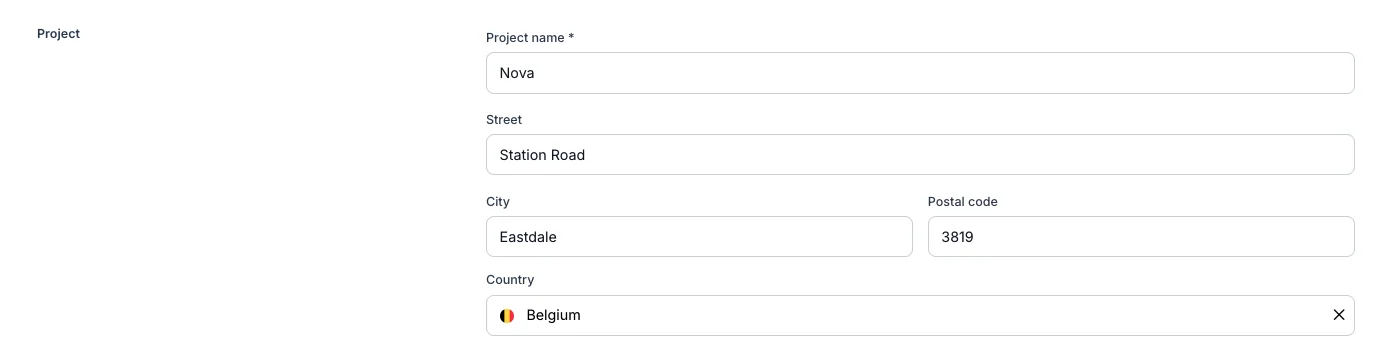
Project details

Found under Settings → General.

Field Description
Project name The name of the customer or site, as it appears throughout the platform.
Address The physical address where the EMS controller is installed.
Voltmasters EMS: project details

Voltmasters EMS: project details

Grid settings

Found under Configuration → Grid & market → Grid settings.

Main meter

Select the energy meter that acts as the main meter (head meter) for this installation. This is the meter that measures the total exchange with the electricity grid. Reports, dashboard figures and many screens that display grid data use this meter as their primary source.

Grid connection type

Configure whether the installation is single-phase or three-phase to match the actual grid connection at the site. This should correspond to what is stated on your connection document from the grid operator. If in doubt, check your connection document or ask your installer.

Access power (consumption) and access power (injection)

The contractually granted maximum power of the grid connection, in kW: what you are allowed to draw from the grid and what you are allowed to inject into it. The EMS never plans beyond these values.

Enter what your contract with the grid operator says, nothing more. If the site draws more than its access capacity for longer than 15 minutes, a peak tariff surcharge from Fluvius may apply.

Where to find your access capacity: on mijnfluvius.be or in your grid connection contract. The injection side is stated in the same contract, and is often the sum of the capacities of the local generation sources.

On a three-phase connection with a main meter that measures per phase, the EMS also keeps each individual phase within its share of these limits, so an unevenly loaded phase is protected even when the total is still under the limit. See per-phase protection under load management.

Desired monthly peak (consumption) and desired monthly peak (injection)

The peak you do not want to exceed this month, in kW. This is where you tighten the connection beyond what the contract allows: the EMS controls against the lower of the access power and the desired monthly peak. It may not be set higher than the access power, and left empty it applies no extra cap.

How low you can set it depends on how much local energy (solar, battery) is available. The lower the peak, the more the EMS has to lean on local generation and storage to stay under it. There is no fixed formula; the value is site-specific and is usually determined together with your installer.

Import safety margin

Add a safety margin is a separate switch, for installations where not all devices follow a setpoint accurately. The margin is subtracted below the desired monthly peak, so a device that overshoots slightly does not push the site over the limit:

Effective EMS limit = the lower of the access power and the desired monthly peak, minus the safety margin

The page shows that result per direction as the effective EMS limit, with the live value alongside it, so you can read straight off what the EMS is actually controlling against.

As a rule of thumb for the margin: 2 to 5 % of the peak for installations with stable power flows and fast control, 5 to 10 % for most installations, and more than 10 % where control is slow, measurements lag, or several sources can peak at once.

Export safety margin

The same margin on the injection side, subtracted below the desired monthly peak for injection. It works exactly like the import margin and is entered separately, because the two directions rarely need the same headroom.

Applying a capacity change now or later

The access power follows the capacity in your contract with the grid operator. When that capacity changes on a date you already know (a new connection contract, an increase after an expansion, a seasonal arrangement), the new value does not have to be entered on the day itself. As soon as you edit a limit, a margin or the connection type, the page offers an effective date:

  • Leave the date empty and the new values apply the moment you save. Any change already scheduled for this project is cancelled.
  • Pick a date at least two days ahead, in the project timezone, and the change is scheduled instead. Until then the current values stay in force and the pending change stays visible on the page, with the values, the effective date and the date it will actually be applied.

The platform applies a scheduled change by itself, but not always on the effective date:

The new values are When they are applied
lower than or equal to the current ones one calendar day before the effective date, so the EMS has time to align before your contract changes
higher than the current ones on any field at 00:00 on the effective date itself, in the project timezone

Both the change and the moment it is applied are recorded in the project activity log, so you can always trace which limits were in force at a given time.

Schedule a capacity increase on the date the new capacity actually becomes contractual, not on the date it was granted. Applying a higher limit too early lets the EMS draw more power than your contract allows, with a peak tariff surcharge as a result.

Reactive power import and export limits

These two fields are not yet available in the platform. The section below describes how they will work once they are released.

In addition to the active-power limits above, you can cap the reactive power the installation is allowed to exchange with the grid. Both fields are optional and are expressed as a percentage (0–100%). The value is passed straight through to the EMS controller, which keeps the installation inside the configured reactive-power band.

These limits follow the Fluvius telecontrole (Netflex) convention, so the values you enter here line up with what a grid operator would request over the telecontrole interface. See How DSO RTU works for the telecontrole side of reactive-power control.

What reactive power is

Active power (kW) does the actual work; reactive power (kVAr) is the power that continuously flows back and forth to magnetise transformers, motors and cables. It performs no net work, but it loads the grid and shifts the voltage at your connection point. Grid operators therefore limit how much reactive power an installation may draw or inject.

What the percentage means

Both fields are a percentage of the installation's reference power: the combined rated power of the flexible assets that can deliver reactive power (the battery inverters and PV inverters). A value of 0 means no reactive-power exchange is allowed in that direction; 100 allows the full reference power to be used for reactive power.

Field Direction Physical meaning
Reactive power import limit Grid → installation (consumption) The maximum inductive reactive power the site may draw. Inductive reactive power is underexcited and lowers the connection-point voltage.
Reactive power export limit Installation → grid (injection) The maximum capacitive reactive power the site may inject. Capacitive reactive power is overexcited and raises the connection-point voltage.

Together the two values define the allowed reactive-power band at the connection point: from the export limit on the capacitive side to the import limit on the inductive side. The EMS distributes the required reactive power across the batteries and PV inverters, within each device's apparent-power headroom, and never exceeds these limits.

Sign convention (Fluvius Netflex)

Fluvius uses the consumer reference frame for both measurements and setpoints:

  • Positive reactive power flows from the grid into the installation → inductive (underexcited) → lowers the grid voltage. This is the import direction.
  • Negative reactive power flows from the installation into the grid → capacitive (overexcited) → raises the grid voltage. This is the export direction.

Example

Suppose the flexible assets add up to a reference power of 100 kVA, the import limit is set to 33 and the export limit to 33:

  • The installation may draw at most 33 kVAr inductive from the grid.
  • The installation may inject at most 33 kVAr capacitive into the grid.
  • The EMS keeps the net reactive power at the connection point inside the band −33% … +33% at all times.

Fluvius recommends keeping reactive-power setpoints around 33% and not higher, because flexible assets are typically only required to deliver ±33% reactive power (Synergrid C10/11). Consult your installer or grid operator for the correct values for your connection.

For the authoritative definition, see the Q-regeling / Reactief vermogen section of the Fluvius Netflex DER technical specification.

Grid connection references

Found on the same Grid settings page, below the grid settings themselves. The section is shown for Belgian projects only, because the data mandate it feeds is offered by Fluvius for Belgian connections.

Your EAN number is the unique identifier for your grid connection point. You can find it on your grid connection contract or on your electricity bill. Add one reference per meter point and pick whether it covers consumption, production or both.

The references have no effect on EMS operation or optimisation. They identify the connection towards the grid operator: a reference is what a data mandate is requested for, which lets the platform retrieve the official metering data and compare it against the measurement taken on site.

Voltmasters EMS: grid connection references

Voltmasters EMS: grid connection references

Strategy

Found under Configuration → Strategy.

Choosing a strategy

The strategy determines the primary objective of the battery and controllable devices.

Strategy Description
Voltmasters Cost Optimisation The EMS buys and sells energy at the most financially favourable times, based on EPEX day-ahead prices and your energy contract. Best suited for dynamic energy contracts.
Self-supply The battery is used primarily to maximise self-consumption of locally generated energy (PV). Grid interaction is minimised.
No control The EMS does not actively control the battery or other devices.

Consult your installer if you are unsure which strategy best suits your installation and energy contract.

Minimum price difference

The minimum margin between the buy and sell price, in €/MWh, that must exist before the EMS will trade energy via the battery. A common starting value is €20/MWh. You can adjust this threshold to make the system more or less active in price-based trading.

Grid power dead zone

A small power band around zero within which the EMS does not make control adjustments. This prevents constant small corrections and unnecessary wear on controllable equipment. A common value is 0.5 kW.

When a grid power target is configured, this band is centred on that target instead of on zero.

Grid power target

The grid power the battery balances towards instead of 0 kW. Leave it at 0 kW to keep the connection balanced to zero, which is the right value for an ordinary installation.

A positive value keeps that much import standing. Use it on sites where an external device curtails solar production to prevent injection: the extra charging shows up as import, which makes that device release more production, which the battery then stores. This repeats until production can no longer follow, and the import settles at this value.

Keep the value small, in the order of a few kW. Whenever production runs without a surplus left to release, the target is simply bought from the grid. See grid power target for the full mechanism and a worked example.

Voltmasters EMS: the grid power target settings

A grid power target of 4 kW, applied only while the installation is generating.

Grid power target only while producing

Determines whether the target applies around the clock or only while the installation is generating.

Setting Behaviour
On (recommended) The target is capped at the current on-site generation, so it drops to 0 kW when nothing is being produced and no import is bought overnight. Generation below the target still builds up, because every step releases more production.
Off The target is held around the clock, so the site keeps importing it at night and whenever there is nothing to release.

Both fields require an EMS controller running version 0.0.323 or newer. On an older controller they stay hidden, because the balancing logic that aims at the target is not present there.

Peak shaving reserve

A percentage of the battery's state of charge (SOC) that is reserved to keep the grid import below its limit. As long as the SOC is above this reserve, the battery is used freely by the active strategy. Below it, discharging for other purposes is blocked and the reserve is refilled with priority, but the battery may still discharge to hold the grid at its import limit, for any load (general consumption as well as DC fast charging).

Set this value if the installation must never exceed its grid import limit (for example a limited transformer or connection capacity), or if part of the battery capacity must always remain available for DC fast charging. See peak shaving reserve for how it works, and consult your installer for the appropriate value for your specific installation.

Battery load balancing strategy

Determines how power is distributed across multiple battery inverters when more than one is present.

Mode Description
Cascade Battery inverters are activated one by one as more power is needed. The activation order rotates regularly to spread wear evenly across all units.
Pro Rata All batteries operate simultaneously. The required power is distributed proportionally based on each battery's remaining usable capacity (kWh), within the maximum charge and discharge rates of each unit.

Selling via battery injection

When this option is enabled, the EMS is permitted to discharge the battery and inject the stored energy into the grid when the injection price is sufficiently favourable.

Enable this when using the Cost Optimisation strategy with a dynamic energy contract, if you want the system to generate revenue by selling stored energy. When disabled, the EMS will not plan or execute injection sales via the battery based on energy prices.

Grid charging for injection

When this option is enabled (in addition to Selling via battery injection), the EMS may also buy energy from the grid during cheap periods purely to sell it back at moments with a high injection price. Purchases are only planned when the injection price beats the purchase price after round-trip losses plus the minimum price difference, so every buy/sell pair is profitable on its own.

Enable this when the spread between cheap hours and injection peaks in your contract is large enough to make pure price arbitrage worthwhile. When disabled, the EMS only sells energy that is already in (or naturally flows into) the battery. See Selling energy to the grid for how the two options work together.

Voltmasters EMS: strategy settings

Voltmasters EMS: strategy settings

Load shedding priorities

The priority list is not yet available in the platform. The description below is the design it will follow.

Below the strategy form you define the load shedding priorities: the priority groups in which the EMS sheds flexible consumption (battery charging, EV charging, controllable loads) when the grid import must be limited, whether by the project's own import limit or by a grid operator setpoint such as Fluvius Fall-Back Flex. Drag devices into groups; group 1 is used first, and within a group the EMS picks the order itself. Devices under Not in the list are never shed. See Fall-Back Flex for how the groups are used during an activation.

Voltmasters EMS: load shedding priority groups

Load shedding priority groups on the Strategy page.

Energy contract

Found under Configuration → Grid & market → Energy contract.

Contract type

Type Description
Dynamic contract Energy prices are settled on the basis of quarter-hour or hourly market prices (EPEX spot). The price moves with the actual market, enabling the EMS to optimise more effectively.
Flexible contract Rates are adjusted periodically (for example monthly or quarterly) but remain fixed within that period.
Fixed contract The price is agreed in advance for the entire duration of the contract and does not change with the market.
Fixed (Spain, time-of-use) A Spanish access tariff (3.0 TD / 6.1 TD / 6.2 TD) with a fixed price per tariff period (P1–P6). Only shown for projects located in Spain.

For a full explanation of each contract type, including the Spanish time-of-use periods and which parameters each type needs, see Energy contracts.

Consumption scaling factor

A multiplier applied to the measured consumption to better approximate your actual billing by your energy supplier. A value of 1 means no correction is applied. If your supplier uses separate day and night tariffs, use the average of both. A common value is 1 or 1.05.

Consumption cost

The cost you pay for energy drawn from the grid, expressed in €/MWh. Find this value in your energy contract or ask your energy supplier.

If you do not know this value, leave the field blank. The EMS will fall back to default values, but this will reduce the accuracy of the cost optimisation calculations.

Distribution cost

The total of all grid costs charged per MWh on your electricity bill, expressed in €/MWh. Find this in your energy contract or on your electricity bill.

Add up all per-MWh charges on your bill: transport, distribution, taxes, and levies. Do not include the monthly or yearly access capacity charge, as this is a fixed charge not calculated per MWh.

If unavailable, leave the field blank and the EMS will use default values.

Injection scaling factor

A multiplier applied to the measured injection, equivalent in purpose to the consumption scaling factor but for energy injected into the grid. Find this in your energy contract or ask your supplier. Defaults apply if left blank.

Injection cost

The net compensation or cost associated with injecting energy into the grid, expressed in €/MWh. This value can be negative during periods of negative market prices. Find this in your energy contract. Defaults apply if left blank.

Voltmasters EMS: energy contract settings

Voltmasters EMS: energy contract settings

Deleting a project

To permanently delete this project, use the Delete project option at the bottom of the Settings → General page.

Deleting a project is permanent and cannot be undone. All associated data, devices, and settings will be removed.

Voltmasters EMS: delete project

Voltmasters EMS: delete project