Control algorithms
Battery schedule
The battery plan shown on the overview dashboard: when to charge, when to discharge and when to stay idle, and how to adjust it manually.
The battery schedule is the plan the EMS makes for the battery per quarter-hour: when to charge, when to discharge and when to stay idle. You see it on the project dashboard, and you can adjust it manually.
How the algorithm builds the plan is described on the Cost optimization page. What happens to stored energy when you sell it is described on Selling energy to the grid.
The plan is produced when both of the following are true:
- the project's control strategy is set to Cost optimization, and
- no external signal is active, that is, no external partner is currently steering the installation.
If an external signal partner is actively steering the battery, that signal takes precedence and the battery schedule does not apply. When the partner is on standby, the battery idles, unless the per-site option to cost-optimize during standby is switched on.
The plan on the dashboard
The plan is shown per quarter-hour on the project dashboard. Each entry has an action (what the battery does) and a goal (why). Every entry moves from planned to in progress to done, so you can see what actually happened and where it deviated from the plan.
On the dashboard you can override individual quarter-hours, read the plan as a list with Show planning as list, and follow the expected state of charge as the Battery SoC prediction in the Installation data chart.
Adjusting manually
You can adjust a period of the plan yourself.
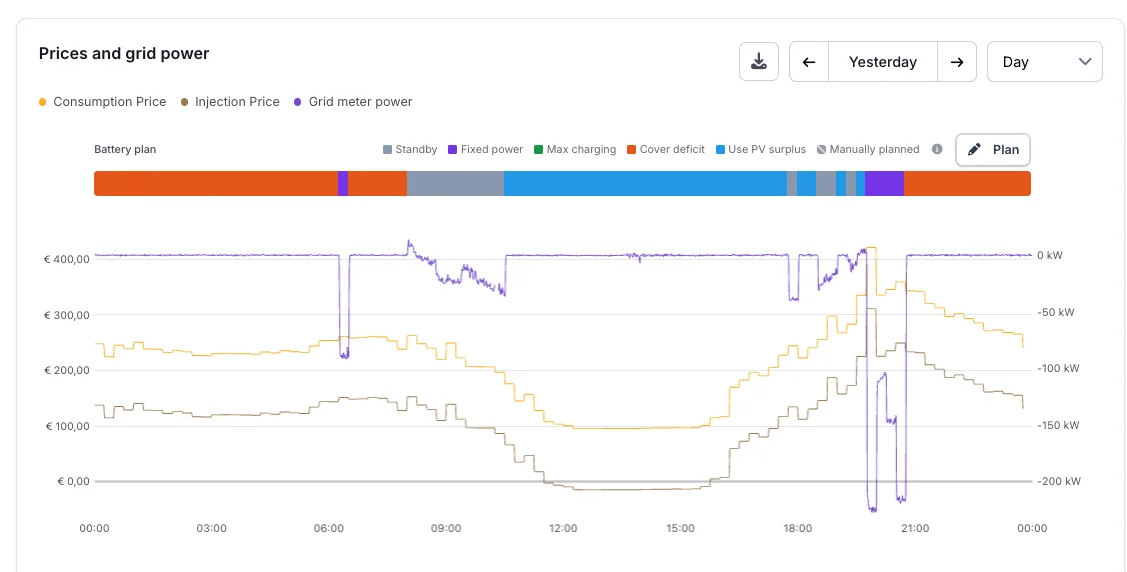
- Click Plan above the bar, or click a future quarter-hour in the bar (drag across several to select a range). The bar shows one colour per action.
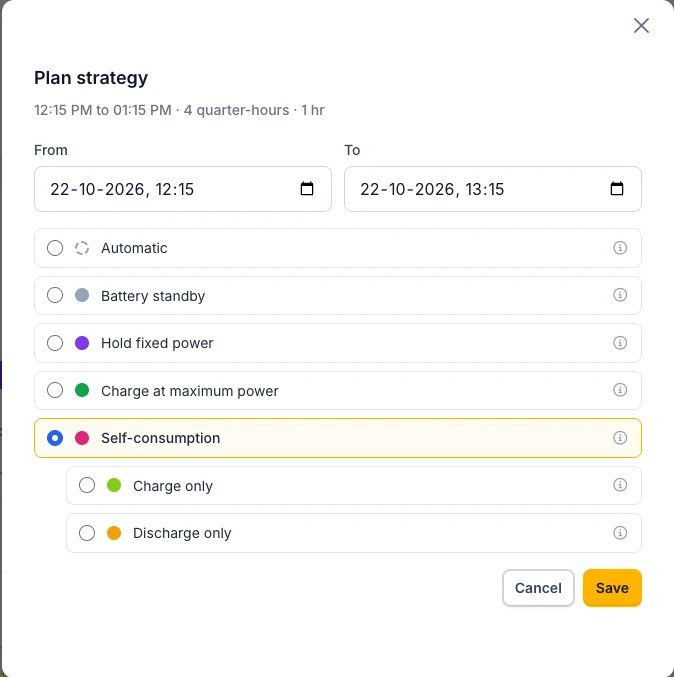
- Choose the period with From and To.
- Choose an action, for example Hold fixed power.
- For Hold fixed power, choose the Direction (Charge or Discharge) and the Power in kW.
- Click Save. The period appears as a hatched Manually planned block in the bar.
- Back to the algorithm: choose Automatic and save.
On EMS controller 0.0.339 or newer, the dialog also offers Self-consumption, which charges the solar surplus and fully covers the deficit, with its one-directional variants Charge only and Discharge only underneath once you select it. These replace Cover production deficit and Store solar surplus in the dialog. The algorithm never uses the self-consumption actions itself.
Actions
The schedule is a sequence of timed entries. Each entry describes a single planned action.
| Action | What the battery does |
|---|---|
Hold fixed powerfollow_scheduled_power |
Charges or discharges at a fixed power, regardless of consumption or solar production. The planner uses it for grid charging and for discharging to inject into the grid; in a manual period it is the power you enter. The grid connection and the battery limits still cap that power. |
Charge at maximum powercharge_at_max_power |
Charges as fast as the grid connection, the current consumption and the battery limits allow. It does not discharge to cover consumption during the period. |
Store solar surpluscompensate_pv_surplus |
Stores the current PV surplus for a later, more expensive moment (no grid charging). If production falls short, it covers consumption only up to the forecasted level, so the stored energy stays reserved for the moment it was meant for. |
Cover production deficitcompensate_production_deficit |
Discharges exactly the shortfall between consumption and local production, so as little as possible is drawn from the grid. If there is a solar surplus after all, the battery charges it. |
Battery standbyidle |
The battery rests: solar production and the grid cover the consumption. A solar surplus is still charged, and the battery only discharges to keep the grid connection within its import limit. |
Self-consumptionself_consumption |
Keeps the grid connection balanced: charges a solar surplus and fully covers any shortfall between consumption and local production. Manual planning only. |
Self-consumption, charge onlyself_consumption_charge_only |
Charges only the solar surplus that would otherwise be exported. It does not discharge to cover consumption, except to keep the grid connection within its import limit. Manual planning only. |
Self-consumption, discharge onlyself_consumption_discharge_only |
Covers the consumption that would otherwise be drawn from the grid and keeps the grid connection within its import limit. It does not charge, so a solar surplus is exported. Manual planning only. |
Goals
| Goal | Meaning |
|---|---|
| Charge for expensive slot | Charge now, while it is cheap, to cover an upcoming expensive period. |
| Charge (negative price) | Charge because the electricity price is negative, so you are paid to consume. |
| Charge for injection | Charge the battery to avoid injecting into the grid. |
| Charge for grid limit | Charge the battery ahead of a grid operator limit, whatever the price. |
| Discharge expensive slot | Discharge during an expensive period to avoid buying from the grid. |
| Discharge before negative | Discharge ahead of a negative-price period, so there is room to charge during it. |
| Discharge for injection | Discharge to inject (sell) into the grid when the injection price is attractive (see selling energy to the grid). |
| Discharge for grid limit | Discharge the battery to keep consumption within a grid operator limit. |
| Bypass PV surplus | Bypass the battery and use the PV surplus directly. |
| No action | Nothing to do for this period. |
For example, an event can be "hold fixed power" with the goal "discharge for injection": the battery follows a planned discharge setpoint in order to inject energy into the grid during an attractive injection price.
Example: evening high prices
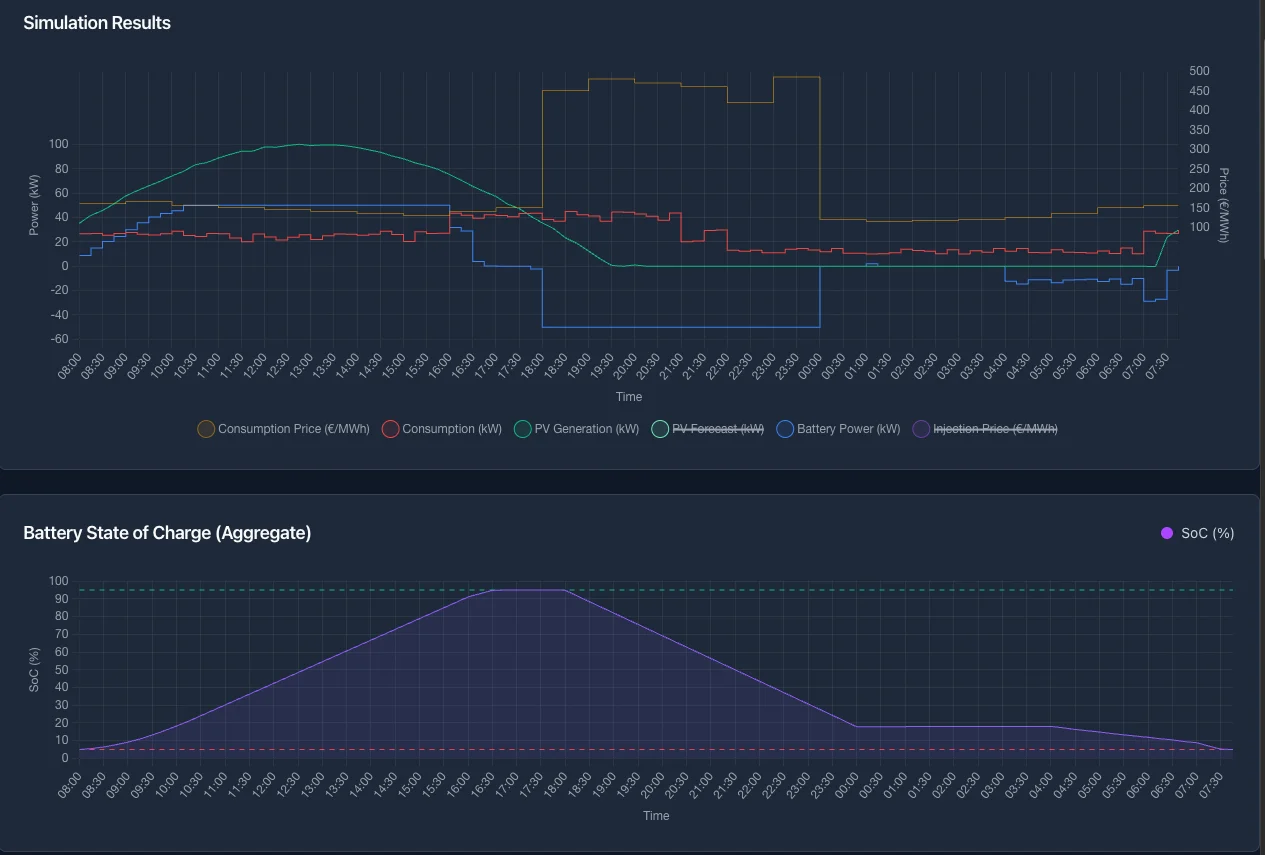
The chart below shows the evening high prices scenario from the simulator. Electricity is cheap during the day and becomes much more expensive in the evening: the consumption price jumps to roughly 450 €/MWh between about 18:00 and 00:00.
What the schedule does:
- Daytime (≈ 08:00–16:30): charging. While prices are low and PV is producing, the battery charges (positive battery power). Most of this is PV surplus being stored; the goal is to charge for the expensive slot later in the day. The state of charge climbs from near-empty to its maximum (≈ 95%).
- Evening peak (≈ 18:00–00:00): discharging. When the consumption price spikes, the battery discharges (negative battery power) to cover the load instead of buying from the grid. This is the discharge during an expensive slot goal, and the state of charge drops steeply.
- Overnight: winding down. Once prices return to normal, the battery is left to settle back towards its minimum state of charge.
By shifting the stored energy from the cheap daytime into the expensive evening, the installation avoids buying at the peak price, exactly what the cost-optimization schedule is designed to do.