Device integrations
Active power control and fallback
Setting the feed-in management mode so curtailment arrives, and configuring the inverter's own fallback for a loss of communication
An SMA inverter decides for itself where it expects its active power limit to come from. That one setting determines whether the EMS can curtail the inverter at all, and whether the inverter protects itself when the EMS falls away.
A wrong setting here is invisible. The inverter accepts every command and then ignores it: no Modbus error, no log line, no event. The only symptom is that curtailment does not take effect.
Set the feed-in management mode
Log in as Installer and in the web interface of the inverter go to Device parameters > System and device control > Inverter > Active power configuration. Set Operating mode of active power setpoint to External setpoint.
In the Dutch interface shown in the screenshots, that is Apparaatparameters > Installatie- en apparaatbesturing > Omvormer > Configur.werk.vermogen, with Bedr.mod. voorinstel. act. vermogen set to Externe instelling werkelijk vermogen.

This is the only setting under which the fallback works. The inverter keeps a separate channel for an external controller, and both the setpoint the EMS writes and the fallback that guards it live on that channel. Choose a direct setpoint mode instead (in watts or in percent) and the EMS can still curtail, but the fallback settings become decoration: the inverter never consults them.
The percentage is relative to the configured maximum
The limit is a percentage of the inverter's configured maximum active power, not of its nameplate rating. On an inverter rated 125 kW but configured to a maximum of 70 kW, 50 % means 35 kW.
That is usually what you want: a deliberate power cap keeps working and the EMS curtails within it. Be aware that changing the maximum active power also changes what every percentage means.
Configure the fallback
The inverter can limit itself once it stops receiving setpoints, for example when the EMS controller loses its connection. This is optional and switched off by default.
There are two channels here, and only one of them carries the EMS setpoint. They look identical: External setting of active power and External setting of active power 2, each with its own fallback mode, fallback values and timeout. Configure the wrong one and nothing happens when communication is lost, because the inverter is watching a channel nobody feeds.
On the Sunny Tripower 125 we measured, the EMS setpoint arrives on channel 2. Verify it on the installation rather than assuming, see below.
Open the fallback settings
Go to Device parameters > System and device control > Plant control and fallback mode. In the Dutch interface: Apparaatparameters > Installatie- en apparaatbesturing > Installatiebesturing en terugvalmodus.
Find out which channel carries the setpoint
Give the two channels a clearly different fallback value, for instance 15 % on one and 40 % on the other, arm both, and then cut the communication. The power the inverter settles on tells you which channel was being fed. Put the other one back on Keep values (Waarden behouden) afterwards.
Configure that channel
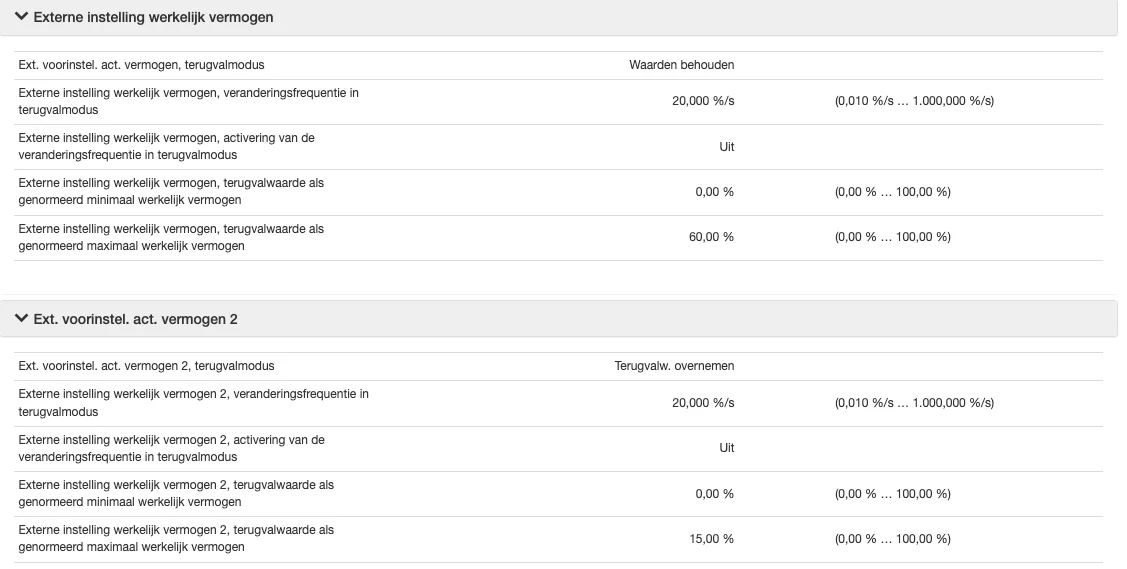
Channel 1 left on "keep values", the fallback configured on channel 2 Set on the channel that carries the setpoint:
Setting Value Fallback mode Apply fallback values ( Terugvalw. overnemen)Fallback value of maximum active power agree with the customer Fallback value of minimum active power 0 % Timeout 30 s or more Leave the other channel on Keep values (Waarden behouden). A fallback armed there fires the moment you switch it on, because nothing feeds it.
Choose the fallback power deliberately. Too low costs production on every brief communication hiccup; too high offers little protection.
Set the timeouts long enough
The EMS refreshes its setpoint roughly every five seconds. Two timers decide how long the inverter waits before the fallback takes over, and both have shipped far too short on units we have seen: 0,3 s and 3 s respectively. Anything under 15 seconds produces false fallbacks on a single missed message.
To find them, switch the parameter list to channel names (the Channel button, then Grouping: Off) and search for
WCtlCom: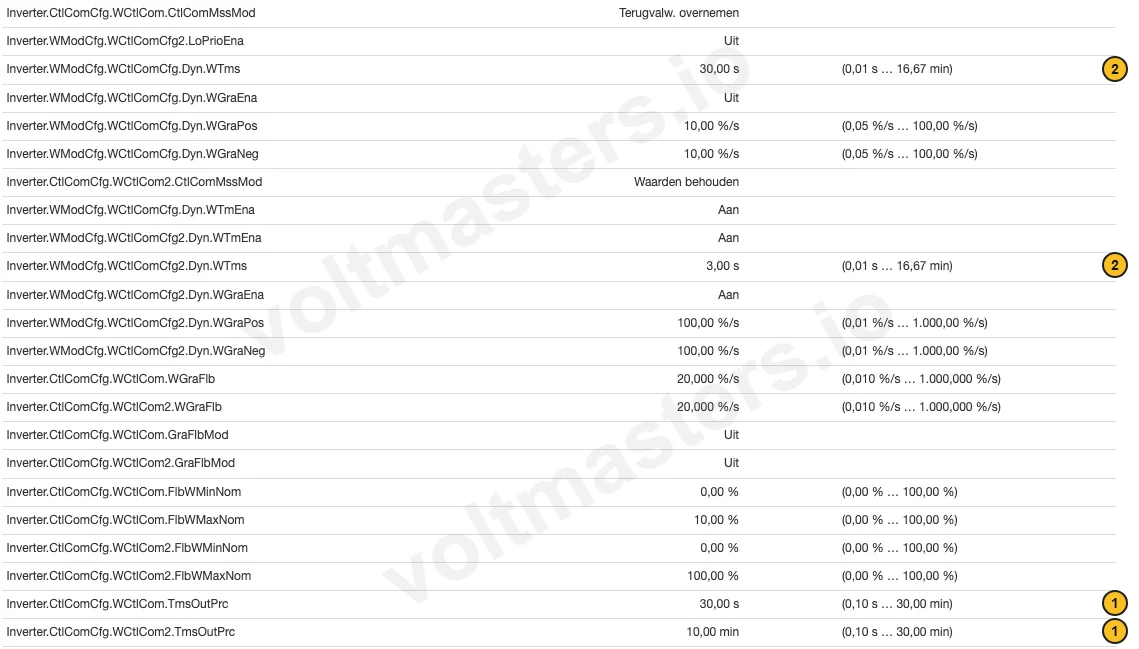
No. Channel Meaning 1 Inverter.CtlComCfg.WCtlCom.TmsOutPrctimeout before the fallback engages 2 Inverter.WModCfg.WCtlComCfg.Dyn.WTmsresponse time for the external setting Every parameter appears twice, once for
WCtlComand once forWCtlCom2, matching the two channels above. Set the timers on the channel that carries your setpoint.Arm the fallback while the EMS is steering
Arm the fallback only while the EMS is actually steering. The inverter tracks how long ago it last saw a setpoint. Switch the fallback on after a longer silence and it engages straight away, and then holds until the fallback mode is switched to Keep values (Waarden behouden) and back. That is a configuration order problem, not a fault.
Verify
Change the inverter's IP address so the EMS can no longer reach it, or set the device to non-controllable in the platform. Either cuts the setpoint at the source. Within the timeout the inverter should drop to the fallback power; undo the change and it should return to normal within about fifteen seconds.
Measured end to end on a Sunny Tripower 125, with the EMS steering and the fallback set to 15 % on channel 2:
| Situation | Power |
|---|---|
| EMS steering normally | 34,9 kW |
| communication cut | drops through 19,0 kW |
| fallback in force | 10,5 kW, held flat |
| communication restored | back to 35,0 kW within ~15 s |
Recovery needs no intervention. Once the EMS starts writing again, the inverter follows within seconds.
This is also the check that tells you the fallback sits on the right channel. Does the power not move at all, then it is configured on the channel the EMS does not feed.
The fallback cannot be set from the platform
Every fallback setting lives on the inverter itself. The fallback value and both timeouts carry SMA's Grid Guard marking, so writing them needs a Grid Guard session opened with the installer's personal code. That code is personal, and it would grant write access to every grid parameter on the device, so the EMS never uses it. The Sunny Tripower 125 therefore has no fallback setpoint field in the platform: configure the fallback in the inverter's own interface, as described above.
What the EMS does contribute is the part only it can do. While either channel has a fallback armed, it refreshes the setpoint every cycle, so the inverter's timeout elapses on a real loss of communication and not because our own write interval happened to be longer.