Device integrations
Huawei Smartlogger 3000
Enable Modbus TCP on the Huawei SmartLogger 3000 so the Voltmasters EMS can read it, including the limited and unlimited link settings.
The SmartLogger 3000 aggregates several Huawei inverters. Our EMS reads it over Modbus TCP, once that is enabled on the logger.
Enable Modbus TCP
To activate Modbus, log in to the web interface as Installer and navigate to:
Settings → Comm. Param → Modbus TCP
Then set Link Setting to Enable (Limited) or Enable (Unlimited).
- Enable (Limited): you must add the specific IP addresses that are allowed to access the system via Modbus. Only these IPs will be permitted.
- Enable (Unlimited): any IP address can access the system via Modbus.
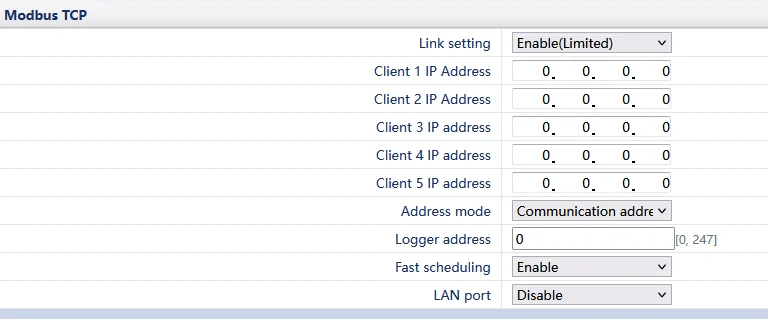
Limited setting view for the Huawei Smartlogger 3000
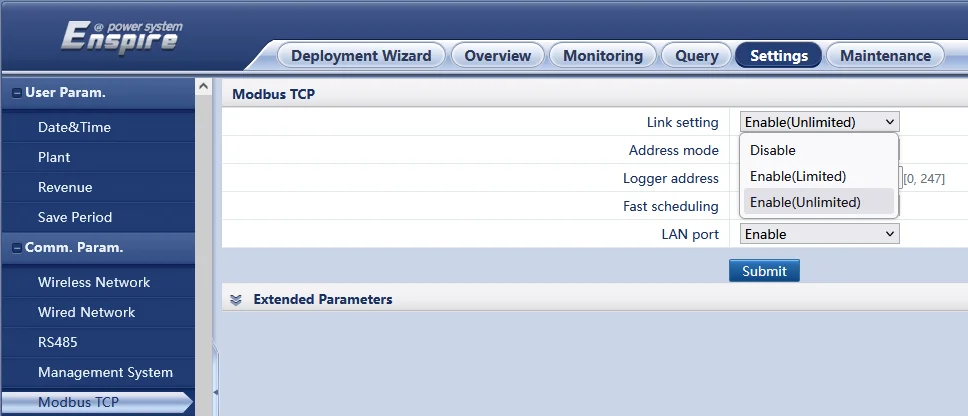
Unlimited setting view for the Huawei Smartlogger 3000