Device integrations
Huawei Sun 2000
Connect a Huawei SUN2000 inverter to the Voltmasters EMS over Modbus TCP or RS485, with curtailment support and the recommended factory reset.
Our EMS monitors and curtails Huawei SUN2000 inverters over Modbus TCP or RS485.
Supported devices
| Model | Connection |
|---|---|
| SUN2000 series | Modbus TCP or RS485, with curtailment |
| SUN5000-150K-MG0, SUN5000-17K-MB0, SUN5000-25K-MB0, SUN5000-8K-MAP0, SUN5000-12K-MAP0 (beta) | Through the generic SunSpec adapter |
| SUN8000-500KTL (beta) | Same adapter as the SUN2000 series |
Factory Reset Recommended: We strongly recommend performing a factory reset on the Huawei inverter before adding it to the Voltmaster Controller. This ensures a clean initial handshake and prevents potential connection conflicts.
Setup
Install the FusionSolar app
Ensure you have the latest version of the FusionSolar App installed on your mobile device.
Establish local connection
Make sure the inverter is powered (AC or DC). Plug the WLAN or Smart Dongle into the USB port at the bottom of the inverter, turn on Wi-Fi on your smartphone and connect to the inverter. Stay within 5 metres.
Configure communication settings
- In the app, go to Settings.
- Navigate to Communication Configuration.
- Select Dongle Parameter Settings.
- Choose Modbus-TCP and set the connection to Enable (unrestricted).
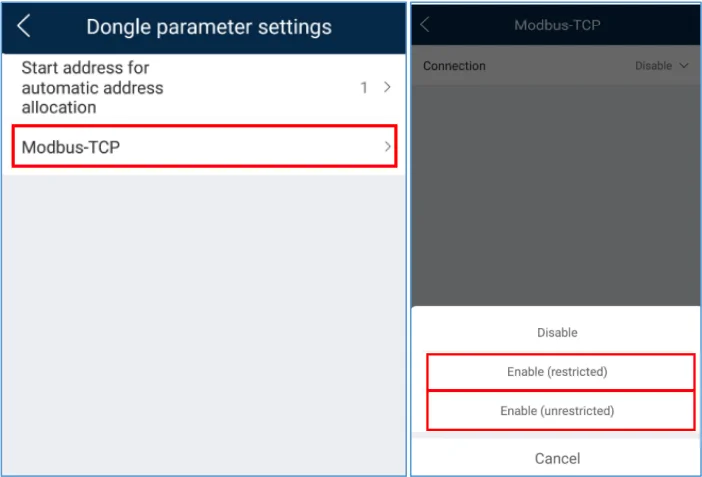
Firmware Requirements: If the Modbus-TCP option is not visible, a firmware update for the inverter is required.
Configure power control and curtailment
To enable active power management via the Voltmaster Controller, follow these steps:
- On the app home page, select Power Adjustment.
- Select Grid-tied Point Control.
- Select Active Power.
- Set the Control Mode to Remote Output Control.