Device integrations
Sunny Boy / Sunny Tripower
Supported devices: Sunny Tripower 3.0-10.0, Sunny Tripower TL-20, Sunny Tripower TL-30, CORE1, CORE2, Sunny Tripower 125, Sunny Tripower X, Sunny Tripower TL-US-10 and Sunny Boy
Our EMS connects directly to SMA Sunny Boy and Sunny Tripower inverters over Modbus TCP for production monitoring and active-power curtailment. Most models integrate through the generic SunSpec adapter; a few families have a dedicated SMA-native adapter.
Supported devices
| Series | Models | Adapter |
|---|---|---|
| Sunny Tripower 3.0 / 4.0 / 5.0 / 6.0 / 8.0 / 10.0 | STP3.0 to STP10.0 | SunSpec |
| Sunny Tripower TL-20 (legacy, beta) | STP 5000TL-20, 6000TL-20, 7000TL-20, 8000TL-20, 9000TL-20, 10000TL-20, 11000TL-20, 12000TL-20 | SMA Sunny Tripower TL-20, chosen automatically |
| Sunny Tripower TL-30 | STP 15000TL-30 (beta), 20000TL-30, 25000TL-30 | SMA Sunny Tripower TL-30, chosen automatically. Available from controller version 0.0.337. |
| Sunny Tripower TL-10 | STP 10000TL-10, 17000TL-10 (beta) | SunSpec |
| Sunny Tripower TL-US-10 (beta) | STP 12000TL-US-10, 15000TL-US-10, 20000TL-US-10, 24000TL-US-10, 30000TL-US-10 | SunSpec |
| Sunny Tripower CORE1 | STP 50-40, STP 50-41 | SMA Modbus profile, chosen automatically from controller version 0.0.339. On an older controller: SunSpec. |
| Sunny Tripower CORE2 | STP 110-60 | SMA Sunny Tripower CORE2, chosen automatically |
| Sunny Tripower 125 (beta) | STP 125-70 | SMA Modbus profile, chosen automatically. Set the Modbus Unit ID of the inverter to 3. |
| Sunny Tripower X | STP 12-50, 15-50, 20-50, 25-50 | SunSpec |
| Sunny Boy and other SMA inverters with SunSpec | SunSpec | |
| Older Sunny Tripower without SunSpec | SMA Modbus profile |
Most models connect through the generic SunSpec adapter. A dedicated SMA adapter talks to SMA’s own register layout and gives extra values, such as the active power per phase and the voltage and current on the DC bus.
Any SMA inverter that exposes the standardised SunSpec Modbus profile can be integrated through the generic SunSpec adapter, even if it is not listed by name above. See SunSpec (Generic). To read several inverters through a single connection, use the SMA Data Manager.
Enable Modbus TCP
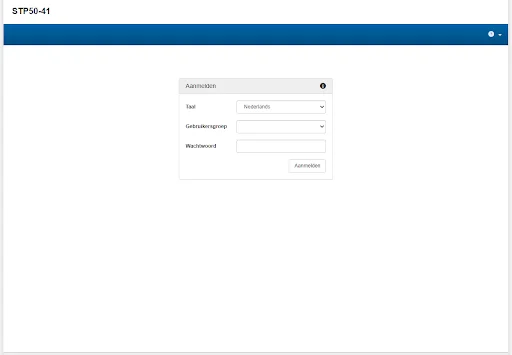
Log in as Installer
Connect your laptop to the same network as the inverter, open its IP address in a browser and log in with the Installer user group.
Open the device parameters
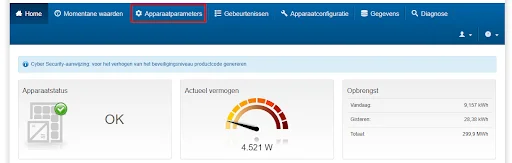
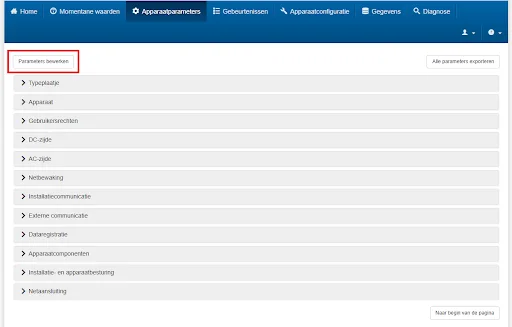
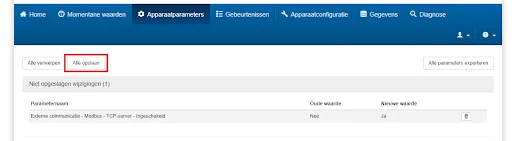
Click Device Parameters (Apparaatparameters in the screenshots) and then Edit Parameters (Parameters bewerken).
Enable the Modbus TCP server
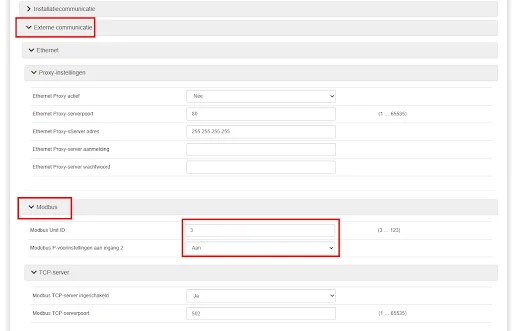
Expand External Communication → Modbus → TCP Server (Externe communicatie), set Enabled (Modbus TCP-server ingeschakeld) to Yes and leave the Port at
502.
Save the settings
Click Save All (Alle opslaan).
Active-power curtailment (with any adapter) requires the inverter's Modbus write access and grid-management mode to be enabled in the SMA Installer settings, and the correct Modbus Unit ID to be configured. Without this, the EMS can read data but cannot send setpoints.
Enable reactive power control
To allow the EMS to send reactive-power setpoints, the inverter's reactive power mode must be set to external control. In the inverter's web interface, go to:
Device parameters > System and device control > Inverter > Reactive power mode
Set both of the following parameters to Q, external setting (instead of Off):
- Reactive power mode in case of active power output
- Reactive power for zero active power
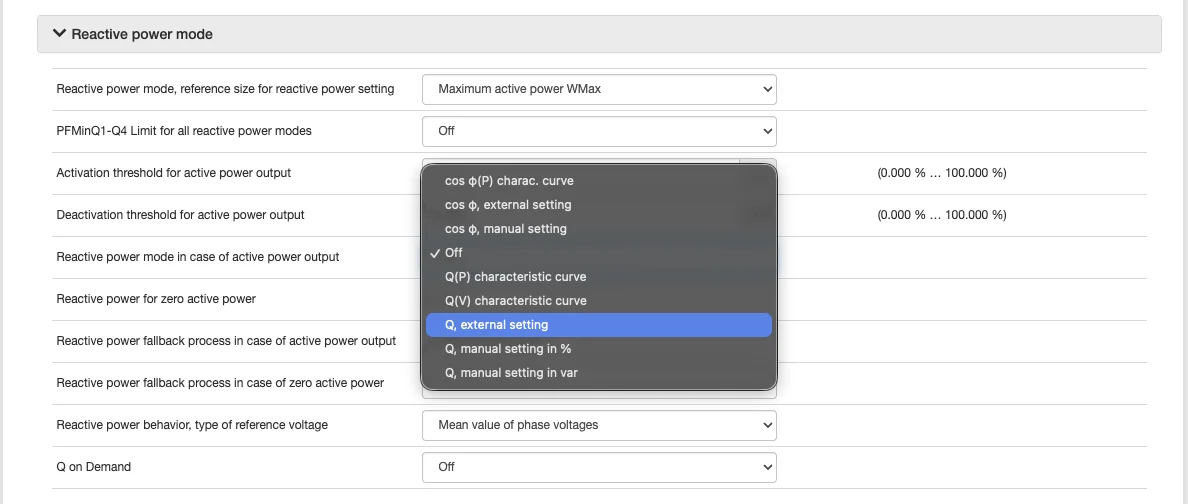
In the Dutch interface: Apparaatparameters > Installatie- en apparaatbesturing > Omvormer > Blindvermogenprocedure: set Procedure blindvermogen bij afgifte act. vermogen and Procedure blindvermogen bij nul act. vermogen both to Q, externe instelling.
Active power control and fallback
Curtailment only arrives if the inverter's feed-in management mode points at the register the EMS writes, and a wrong mode fails silently. The inverter can also limit itself when it stops receiving setpoints. See Active power control and fallback.