Voltmasters Platform
Network check
The network check tells you whether the EMS controller can reach the platform, the measurement database, the time and name servers, the software update sources and remote access.
The network check tells you whether the EMS controller can reach the Voltmasters services it needs: the platform, the measurement database, the time servers, the name servers, the software update sources and remote access. It is under Configuration → EMS controller → Network configuration, next to the network configuration.
The check runs from the controller itself, so the result says what the controller reaches, not what your laptop reaches.
This check says nothing about the connected devices. It only tests the outgoing connections to services on the internet. A green verdict means the controller reaches Voltmasters, not that it reaches your inverter, battery or meter. Test a device with the Test button in the wizard (see Adding and verifying devices).
Running the check
Click Run network check and then open View results. The check only tests connections and changes nothing on the controller or the installation, so you can run it at any time.
Reading the results
The result opens with a one-line verdict. Below it are the groups, each marked OK or Not reachable. A group is only OK when every target in it is reachable.
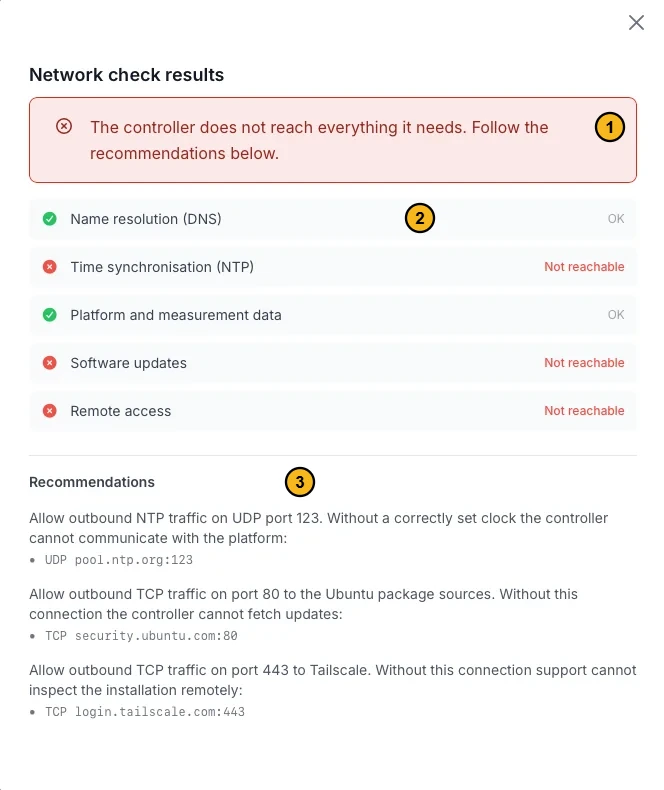
A controller that reaches the platform but not the time servers, the package sources or remote access.
- The verdict: whether the controller reaches everything it needs.
- The groups: OK or Not reachable.
- The recommendations: for each failure the protocol, the port and the address to open. You can pass these on to a network administrator.
The groups
| Group | What it covers |
|---|---|
| Name resolution (DNS) | Resolving the names the controller needs, through the DNS servers it uses itself. Public DNS servers such as 1.1.1.1 are not needed. |
| Time synchronisation (NTP) | Keeping the controller's clock correct. Without a correct clock the controller cannot communicate with the platform. |
| Platform and measurement data | The connection that brings the measurements to the platform. |
| Software updates | Fetching updates for the operating system. |
| Remote access | The connection through which Voltmasters Support can inspect the installation. If UDP does not get through, it falls back to relays over TCP 443: that works, but is slower. |
Extra checks
Under Extra checks you add your own targets to the run: another internet service the installation depends on, or an address on the local network. Each extra check needs a type.
| Type | What you enter | What it tests |
|---|---|---|
| TCP | Host and port | Whether a TCP connection is set up. |
| UDP:DNS | Host and port | Whether a DNS query over UDP gets an answer. |
| UDP:NTP | Host and port | Whether a time server answers over UDP. |
| UDP:STUN | Host and port | Whether a STUN server answers over UDP. |
| DNS | Host | Whether that name resolves. |
| HTTP | Full URL | Whether that URL answers. |
UDP has no connection to set up, so a plain port test says nothing. Only a protocol that really answers proves the traffic gets through. That is why the three UDP types exist.
Each extra check gets its own line under Extra checks in the results, with its latency and the resolved addresses. For HTTP you also see the status code.
Who sees this
The network check is for installers with access to the project. Customers of a project do not see this tab.
Run the network check at commissioning, before you start looking for device faults. A controller behind a strict firewall shows symptoms that look like device faults. The check rules out the internet side. If it passes and the devices still report nothing, look at the connections to the devices themselves. For the ports and domains, see Internet and network.