Device integrations
Mennekes AMTRON
Supported devices: AMTRON 4You, AMTRON 4Business and AMTRON Professional

Our EMS supports the Mennekes AMTRON 4You and AMTRON 4Business AC chargers over Modbus TCP, so their charging power is steered together with the rest of the site. This works for a charger on its own and for a Mennekes charging point network, through the master of that network. The AMTRON Professional, with the Mennekes ECU charge controller, has an integration of its own (see AMTRON Professional below).
Supported devices
| Model | Types | Current type | Connectors |
|---|---|---|---|
| AMTRON 4You | 400 and 500 | AC | 1 |
| AMTRON 4Business | 600 and 700 | AC | 1 |
| AMTRON Professional | ECU charge controller, also AMEDIO Professional and AMTRON Charge Control | AC | 1 |
The integration follows the Mennekes Modbus TCP register list for firmware 1.5.41. The EMS reads the firmware version and the model from the charger and logs them.
The AMTRON 4You and AMTRON 4Business models are available from EMS controller version 0.0.337, as is support for a charging point network. Existing devices with the Amtron model run on the same integration and do not need to be changed.
How the integration works
- Charging power control: the EMS writes a power limit to the charger. The charger turns a value below the minimum power it reports, for example 4.14 kW for 6 A on three phases, into 0, and charging then pauses.
- Pause and resume: a pause sets the limit to 0 without ending the session, so charging resumes in the same session.
- Load balancing: the charger takes part in the site load management, per connector.
- Phases: the EMS uses the number of phases the charger assigns to the session, so the limit of a three-phase session is calculated correctly.
- Session monitoring: charging state, power, current per phase, energy and session duration are read back and shown on the device page and in the EV charging dashboard.
- Incidents: a lost Modbus connection, a faulted connector, charger error codes, a charger that does not apply the EMS limits and charging point network satellites charging at their fallback current are raised as incidents.
Setup
Network
Connect the charger to the same network as the Voltmasters Controller and give it a fixed IP address. If the charger is part of a charging point network, use the IP address of the master.
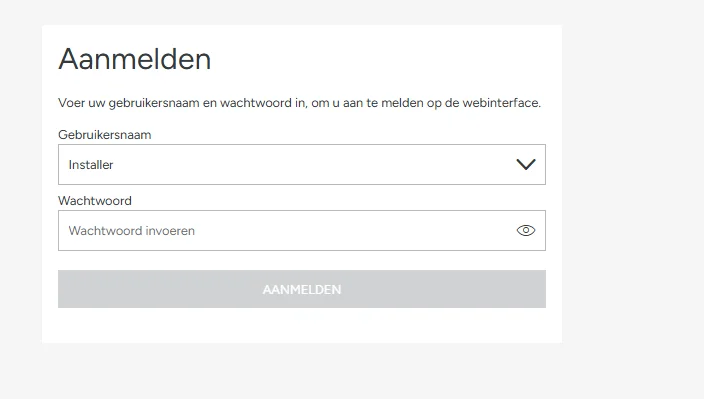
Log in as an installer
Open the charger's web interface and log in with the installer account.
Enable Modbus TCP
- Go to Settings → Networking → External energy management.
- Choose Modbus TCP as the interface and activate the energy management system.
- Make sure Modbus TCP is in read and write mode (in the Mennekes register list: HEMS Read and Write). In read only mode the charger still reports its values, but it does not apply the EMS limits.
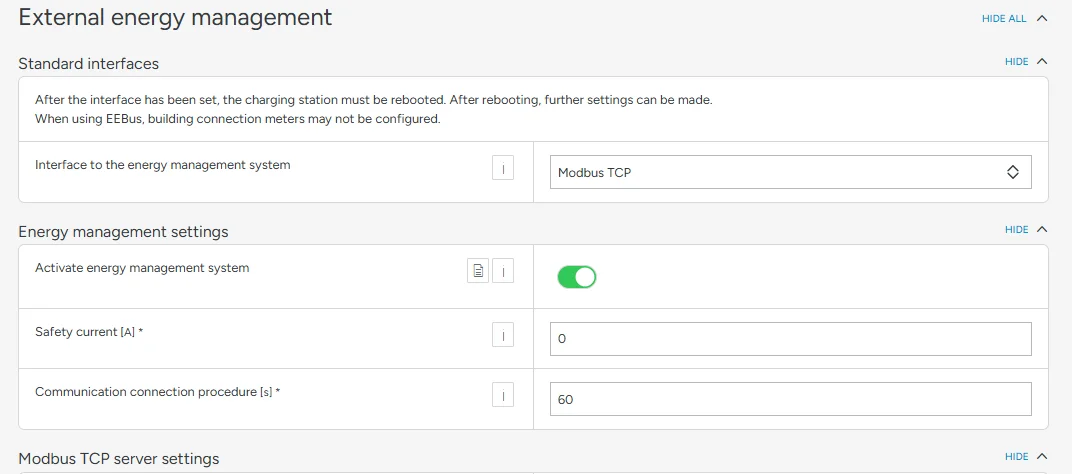
You do not need to set the safety current and the communication timeout yourself: the EMS writes them to the charger (see Fallback on a lost connection below).
Add the charger in the platform
Add a device of type EV charger, with brand Mennekes and model AMTRON 4You or AMTRON 4Business. Fill in the IP address, port
502, and check the prefilled Slave ID1.For a charging point network, add only the master, not the satellites (see Charging point network below).
Verify
Start a charging session and check on the device page that the charging state and power come in, and that the charger follows a lowered limit. If the incident that the charger is not applying the charging power it is given appears, check the Modbus TCP mode from the previous step.
Charging point network
AMTRON chargers can form a charging point network, with one master and one or more satellites. The EMS can only steer such a network through the master: a satellite does not accept limits from an EMS.
- Add only the master. In the platform the master stands for the whole network: its connector shows the consumption of the whole network, calculated from the network current per phase.
- One limit for the whole network. The EMS writes a current limit per phase to the master, the same on all three phases, and stays within the network limit set on the master. The master itself divides that current over the chargers in the network.
- No session data. In the Mennekes registers, session energy and duration only cover the master's own outlet, so the EMS does not show them for a network.
- A satellite as a device. If you add a satellite anyway, the EMS does not steer it and raises an incident. Remove it and add the master.
- Satellites on their fallback current. When a satellite loses the connection to the master, it charges at its fallback current. The EMS raises this as a warning, with the number of satellites. Check the network connection between the satellites and the master.
Fallback on a lost connection
The EMS regularly writes a safety current of 0 A and a communication timeout of 60 seconds to the charger, which works as a heartbeat. When the charger hears nothing from the EMS for 60 seconds, it falls back to 0 A and charging pauses. As soon as the EMS is connected again, it takes over control again.
AMTRON Professional
The AMTRON Professional has the Mennekes ECU charge controller, with a Modbus register map of its own. Choose the model AMTRON Professional for it, and also for other Mennekes chargers with the ECU charge controller, such as the AMEDIO Professional and the AMTRON Charge Control. On the AMTRON 4You or 4Business model the EMS writes its limits to registers the ECU does not have: a charging car then shows as available and the charger does not follow the EMS.
The AMTRON Professional model is available from EMS controller version 0.0.339. Is an AMTRON Professional already added with the model AMTRON 4Business? Once the controller runs 0.0.339 or later, ask Voltmasters to change its model to AMTRON Professional: only administrators can change the model of an existing device.
- Charging current control: the EMS converts the power it allocates into a current per phase, over the phases the car charges on, rounded down and capped at 32 A. Below 6 A the charger pauses the session, and a pause writes 0 A.
- Phases: the EMS follows the number of phases of every session, so a single-phase car is not held to the three-phase minimum.
- Session monitoring: charging state, power, current per phase, session energy and session duration.
- Incidents: a fault of the charger raises a critical incident, a lost backend connection, a firmware update or USB handling a warning. A charger that keeps offering the car more current than its limit for 30 seconds raises the incident that it does not apply the EMS limits.
- Fallback on a lost connection: as on the 4You and 4Business, the EMS writes a safety current of 0 A and a communication timeout of 60 seconds, so the charger pauses when it hears nothing from the EMS for a minute.
Setup: connect the charger to the same network as the Voltmasters Controller, give it a fixed IP address and make sure the Modbus TCP server of the charge controller is enabled. Then add a device of type EV charger, with brand Mennekes and model AMTRON Professional. Fill in the IP address, port 502, and check the prefilled Slave ID 1.