Getting started
Internet and network
Network requirements for the Voltmasters EMS controller: the outbound ports, the domains that must stay reachable, DNS and how to verify it.
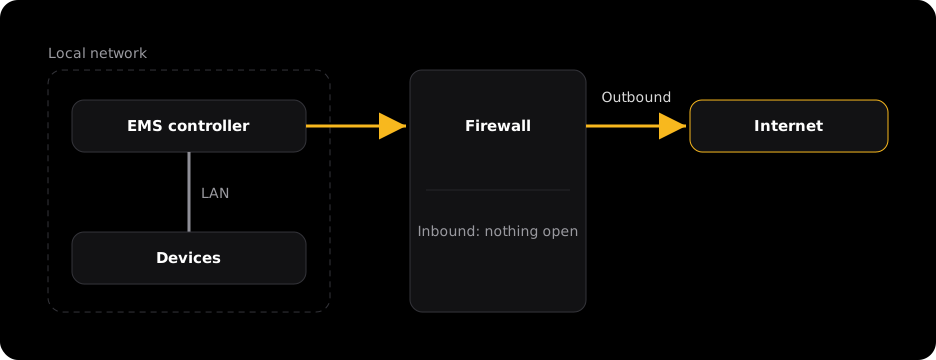
The controller connects to the Voltmasters platform and to your devices on its own. You do not need to open any port from the outside for this, not even for remote support.
Requirements
- Wired network connection (Ethernet) at the location where the controller is installed.
- We prefer DHCP configuration. If you need a static IP, you can set it from the platform under Network configuration.
- Stable internet connection.
- Access to the same local network (LAN) as your energy devices (inverter, battery controller, meter, etc.).
- Functional DNS through the DNS servers the controller uses. The Voltmasters domains must not be blocked by DNS or content filtering (see Domains that must be reachable).
- Accurate clock / NTP time sync allowed (outbound UDP 123). Required, otherwise TLS connections fail.
- No TLS-intercepting (man-in-the-middle) proxy on the controller's traffic.
Outbound ports
Allow the following outbound connections from the controller to the internet:
| Port | Protocol | Destination |
|---|---|---|
| 4505 | TCP | salt.voltmasters.libaro.io |
| 4506 | TCP | salt.voltmasters.libaro.io |
| 8883 | TCP | AWS IoT (*-ats.iot.eu-west-1.amazonaws.com) |
| 2984 | TCP | tmate.voltmasters.libaro.io |
| 443 | TCP | *.voltmasters.be |
| 8086 | TCP | *.timestream-influxdb.eu-west-1.on.aws |
| 80 | TCP | archive.ubuntu.com, security.ubuntu.com |
| 53 | UDP/TCP | the DNS servers the controller uses (no public DNS needed when the site has its own) |
| 123 | UDP | any (NTP) |
| 41641 | UDP | any (Tailscale WireGuard, direct connections) |
| 3478 | UDP | any (Tailscale STUN / NAT traversal) |
If outbound UDP is fully blocked, remote support via Tailscale falls back to relays over TCP 443, which still works but is slower. For a responsive remote-support connection, allow outbound UDP 41641 and 3478. No inbound rules are needed.
Domains that must be reachable
If the site uses DNS filtering, a web/URL filter, or a next-gen firewall (FortiGate/FortiGuard, Cisco Umbrella, Palo Alto, Zscaler, …), explicitly allow these domains.
- salt.voltmasters.libaro.io
- platform.voltmasters.be (production) / voltmasters-beta.libaro.io (dev units)
- tmate.voltmasters.libaro.io
- tempo.voltmasters.libaro.io
- *.amazonaws.com and *.on.aws (AWS IoT, container registry/ECR, InfluxDB)
- archive.ubuntu.com, security.ubuntu.com
- *.tailscale.com
How to verify
Run these checks from a laptop on the same network or VLAN as the controller:
# 1. DNS must return our real server IP, not a filtered/sinkhole address
Resolve-DnsName tmate.voltmasters.libaro.io
Resolve-DnsName salt.voltmasters.libaro.io
# -> both should resolve to a Voltmasters/AWS IP (e.g. 52.17.81.98),
# NOT to an IP owned by your firewall vendor (Fortinet, Cisco, etc.)

# 2. The ports must be reachable
Test-NetConnection salt.voltmasters.libaro.io -Port 4505
Test-NetConnection tmate.voltmasters.libaro.io -Port 2984
# -> TcpTestSucceeded : True
If Resolve-DnsName returns an IP that belongs to your firewall or security vendor, the domain is being sinkholed. Allow-list the domain on the firewall.