Changelog
Changelog
New updates and improvements
Release Notes - 30 October
New in this release: Microgrid, which keeps a site powered during a grid outage with the battery and generators, Fall-Back Flex and the Fluvius day-ahead planning with their own dashboard, load shedding priorities for the whole project, a network scan in the communication step of the add device wizard, a dark theme, and installers who can now change the network configuration of the EMS controller themselves. New hardware: DEIF AGC 150 and AGC 200 generator controllers, Mennekes AMTRON Professional, Autel MaxiCharger AC Single, GoodWe MT and SMT and the Phoenix Contact EMpro CL energy meters.
Microgrid
- Keep a site running during a grid outage: with Microgrid, the controller separates the site from the grid when the grid fails, the battery forms a local grid of its own and, when the battery runs low, a generator takes over. When the grid comes back, the site returns to the grid in a controlled way, released with one click by a responsible person, automatically, or synchronised without an interruption. Microgrid is enabled per project after Voltmasters has validated the installation. Documentation
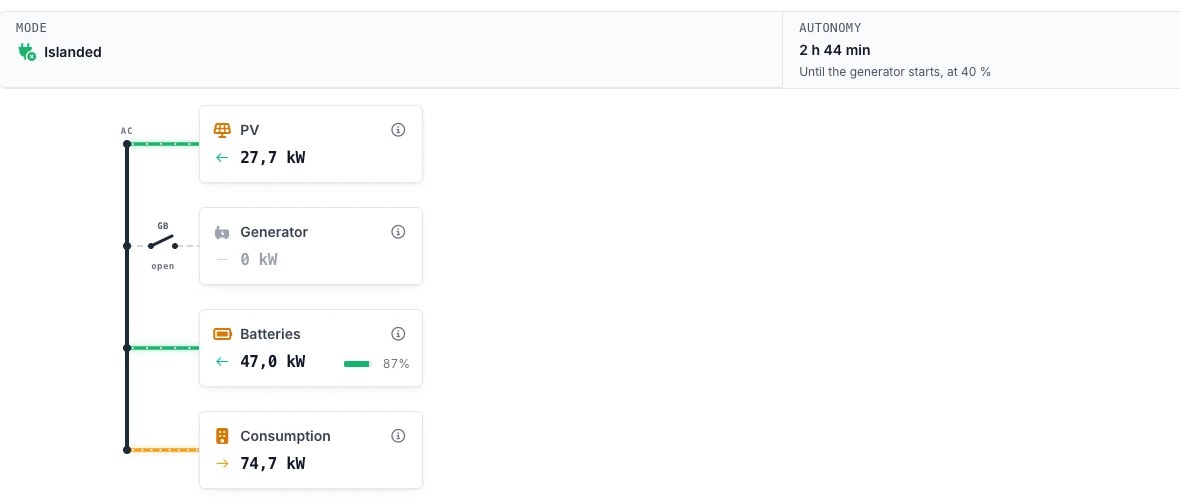
- Microgrid on the energy flow: on the overview dashboard of a microgrid project, the energy flow shows the state of the grid, the grid breaker and the generator breaker, who forms the grid, and the mode, autonomy and last interruption above the diagram. A procedure such as a mode change or a return to the grid is followed step by step, with what the controller is waiting for. The mobile app shows the same status and lets you release the return to the grid. Documentation
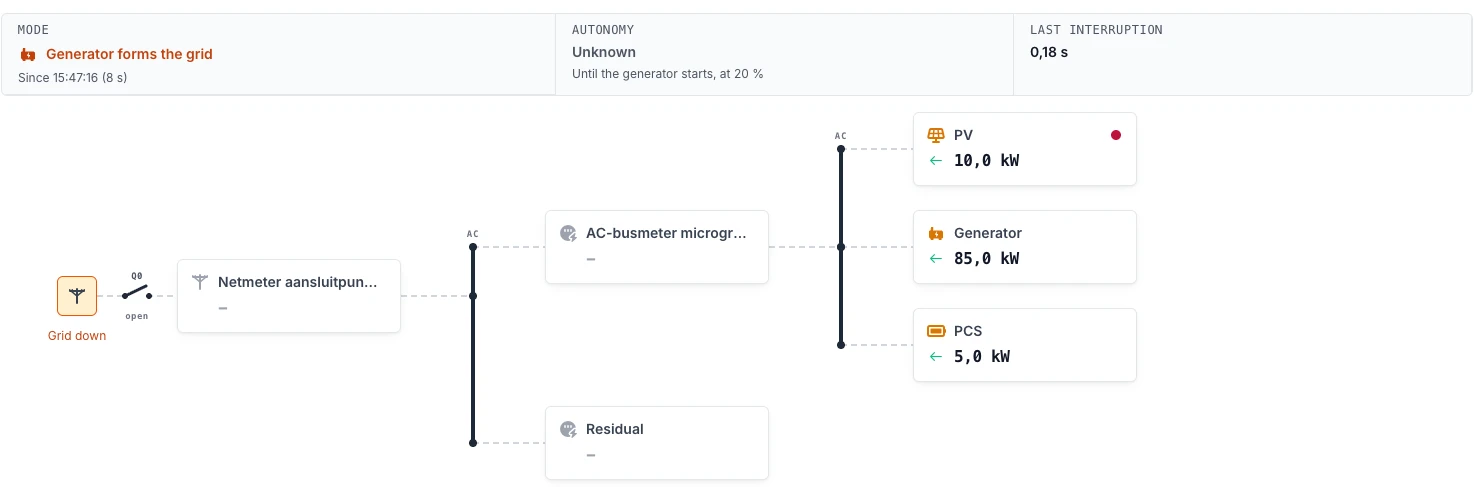

- Generators: generators are a new device type, read through the DEIF AGC 150 and AGC 200 controllers. Their production, fuel level and running state show on the EMS dashboard, in the latest control decisions and on the Algorithm Pro dashboard. A generator can be marked as backup, so it only starts when no other set can carry the site, can take an energy meter on its cable as measurement source, and offers manual overrides to start, stop or set its power. Alarms of the generator controller, such as the starter battery, the switchboard or an engine code, become incidents. Documentation
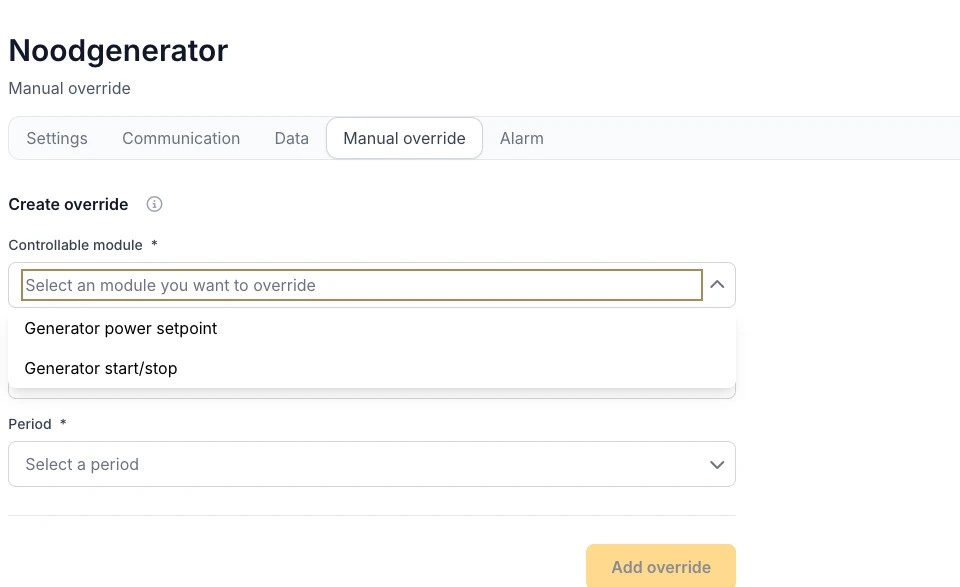
- Microgrid settings: the microgrid settings page holds the IO roles on the IO module (with inverted inputs, the release of the grid breaker and the release of the PV), the island reserve of the battery, the bus meter, the choice of a site without grid connection, a limit on the PV in an island the battery forms (76 % of the forming battery power by default), and the take-over by the batteries of the reactive power of a generator. Documentation
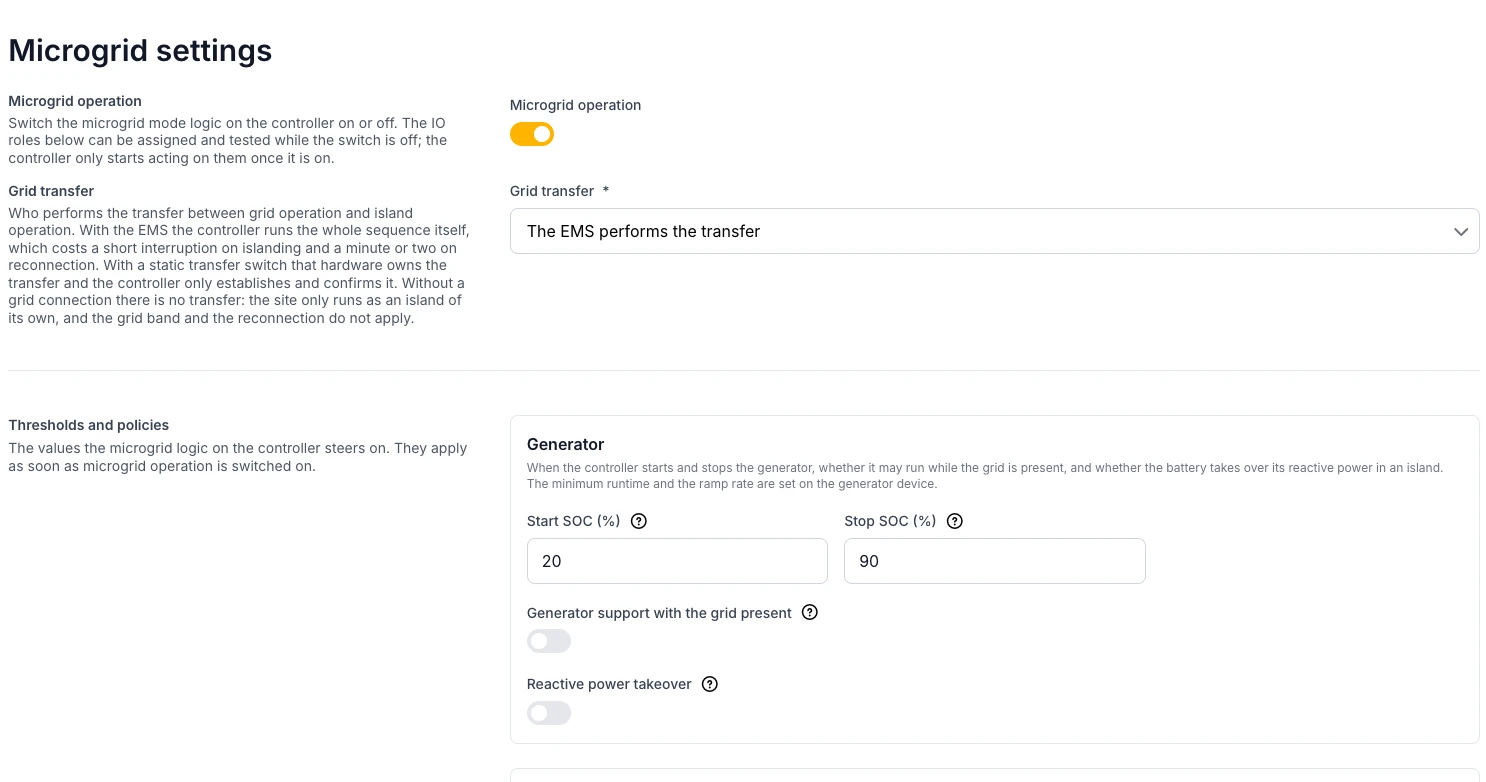
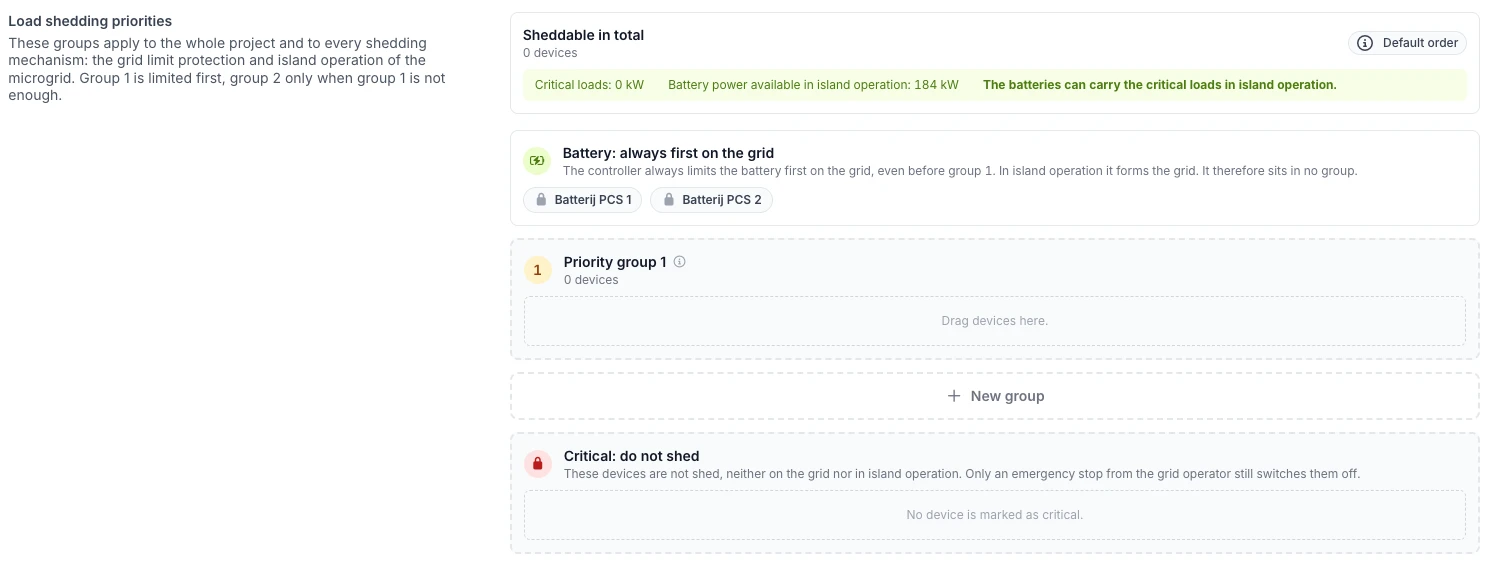
- Load shedding priorities: under Configuration, Strategy, the load shedding priorities set for the whole project which devices are limited first, both for the grid limit protection and in island operation. Devices are dragged between priority groups or moved with a menu, critical loads go in a group of their own, the battery is always limited first and stays out of the groups, and a check shows whether the battery can carry the critical loads in island operation. Available for projects with a microgrid capable controller. Documentation
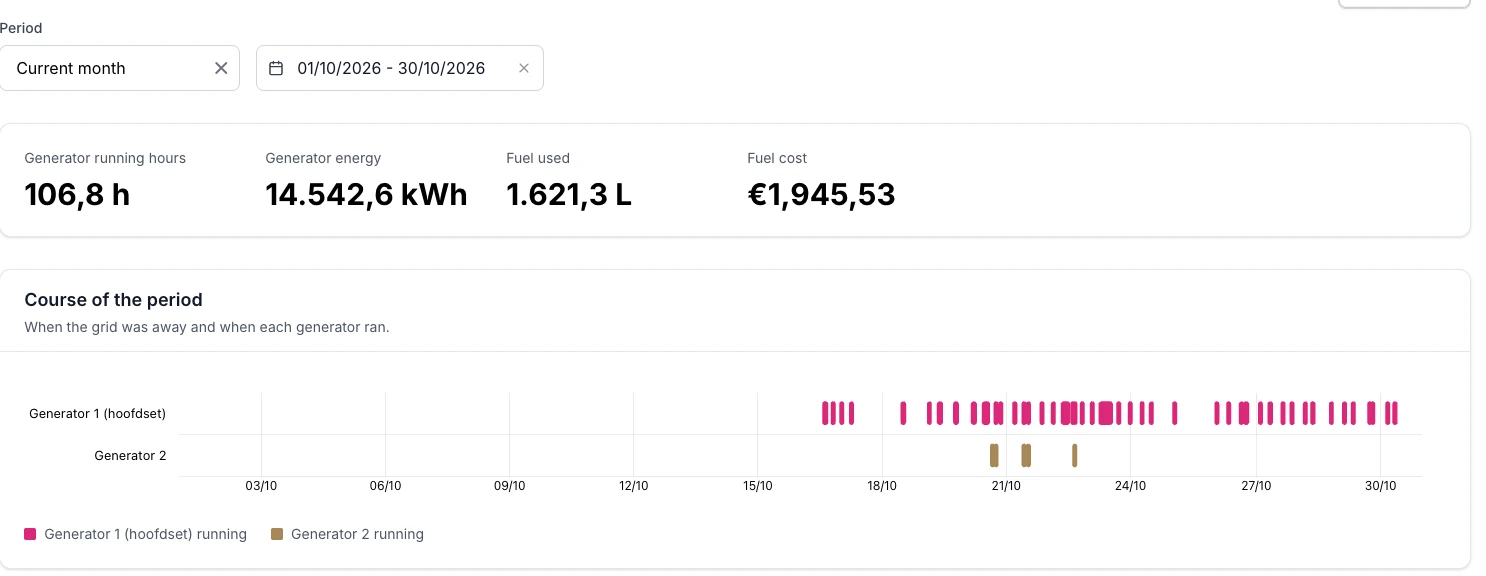
- Microgrid report: a new report under Reports shows the grid availability, the grid outages and returns to the grid, the running hours, energy and fuel cost per generator (from a fuel price per liter), the course of the fuel level and the time per operating mode. The consumption report now counts the generator and the battery in the site consumption. Documentation
- Microgrid incidents: new incident types report, among others, an island overload, a battery inverter that does not rejoin the island, a frequency or voltage reference at its limit during generator support and an under- or overvoltage of the DC supply of a generator controller. Documentation
Fall-Back Flex & Fluvius
- Fall-Back Flex: on a Fluvius Netflex connection, Fall-Back Flex can be enabled in the DSO RTU settings with P_base and P_red. During an activation the controller brings the net consumption below the limit of Fluvius, calling on the battery first and then on the other devices in their shedding order, only as far as needed. The new Fall-Back Flex page follows the limit in force, the net consumption, the compliance and each device live, with the history of the activations. New incident types report a limit that is not met, missing measurements and a failing planning. Needs a controller version with Fall-Back Flex support. Documentation
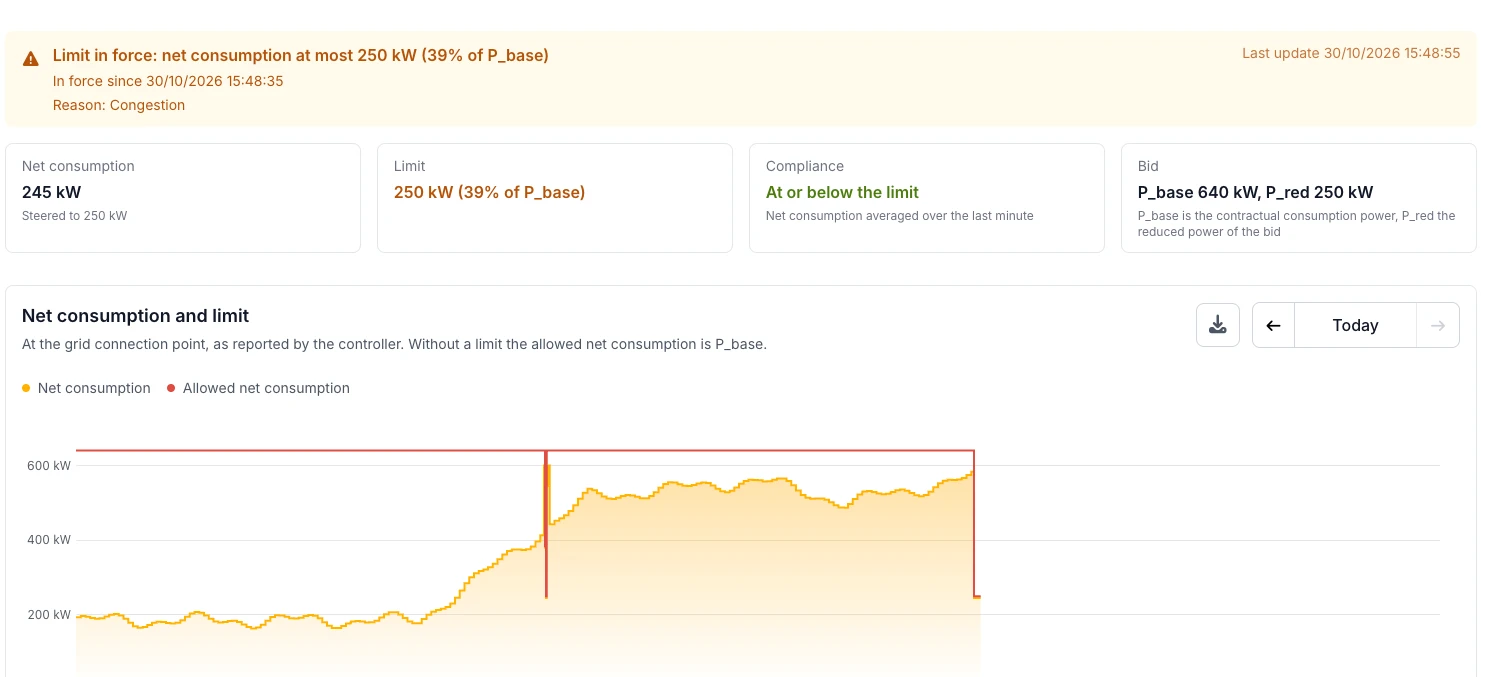
- Day-ahead planning: the day-ahead planning of Fluvius is read with the planning certificate you upload in the DSO RTU settings. The planned limits show on the Fall-Back Flex chart and on the DSO RTU page, and a reminder mail goes out before the certificate expires. Documentation
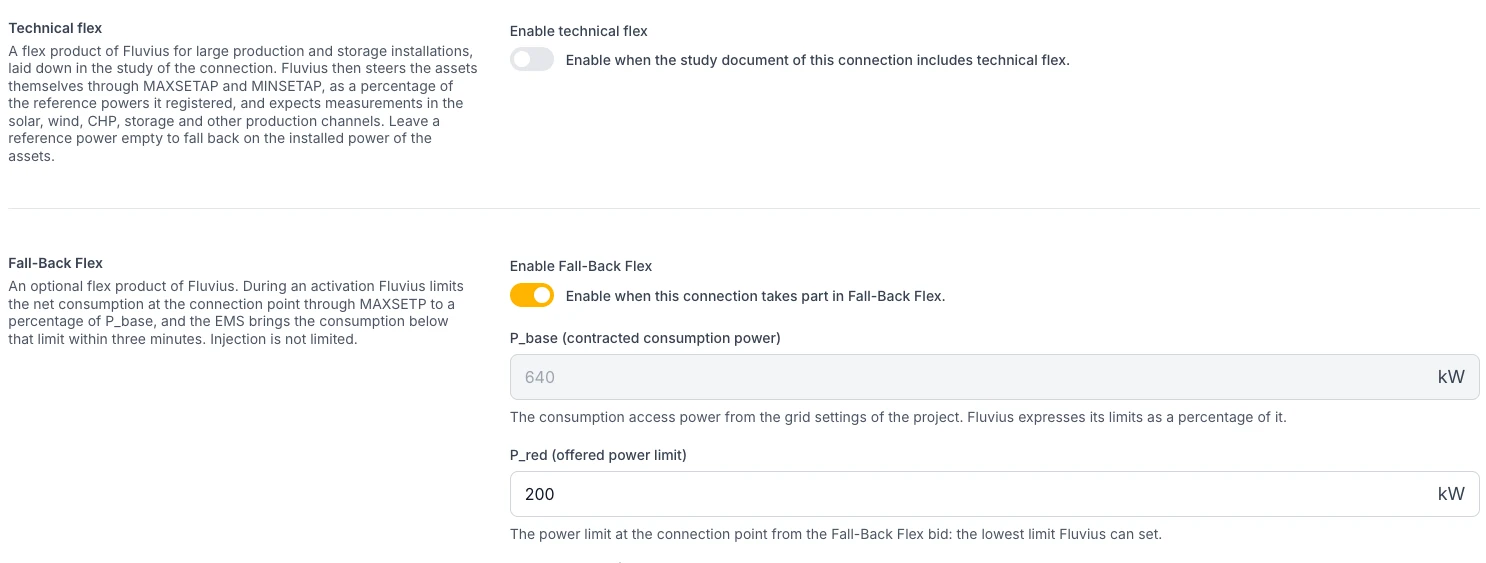
- One switch per flex product: technical flex, Fall-Back Flex and day-ahead planning each have their own Enable switch, with the fields of that product under it. The reference powers of technical flex only show while it is on, and the registered flexible consumption power moved under Fall-Back Flex. Netflex measurement channels are now set per device, and changing a channel no longer makes the page jump to the top. Documentation
Platform
- Dark theme: next to the light theme, the platform now has a dark theme. Choose Light, Dark or Automatic (follows the setting of your device) under Theme on your profile page. Charts, the Pro dashboards and the logo follow the chosen theme. Without a choice, the platform stays light.
EMS dashboard & battery planning
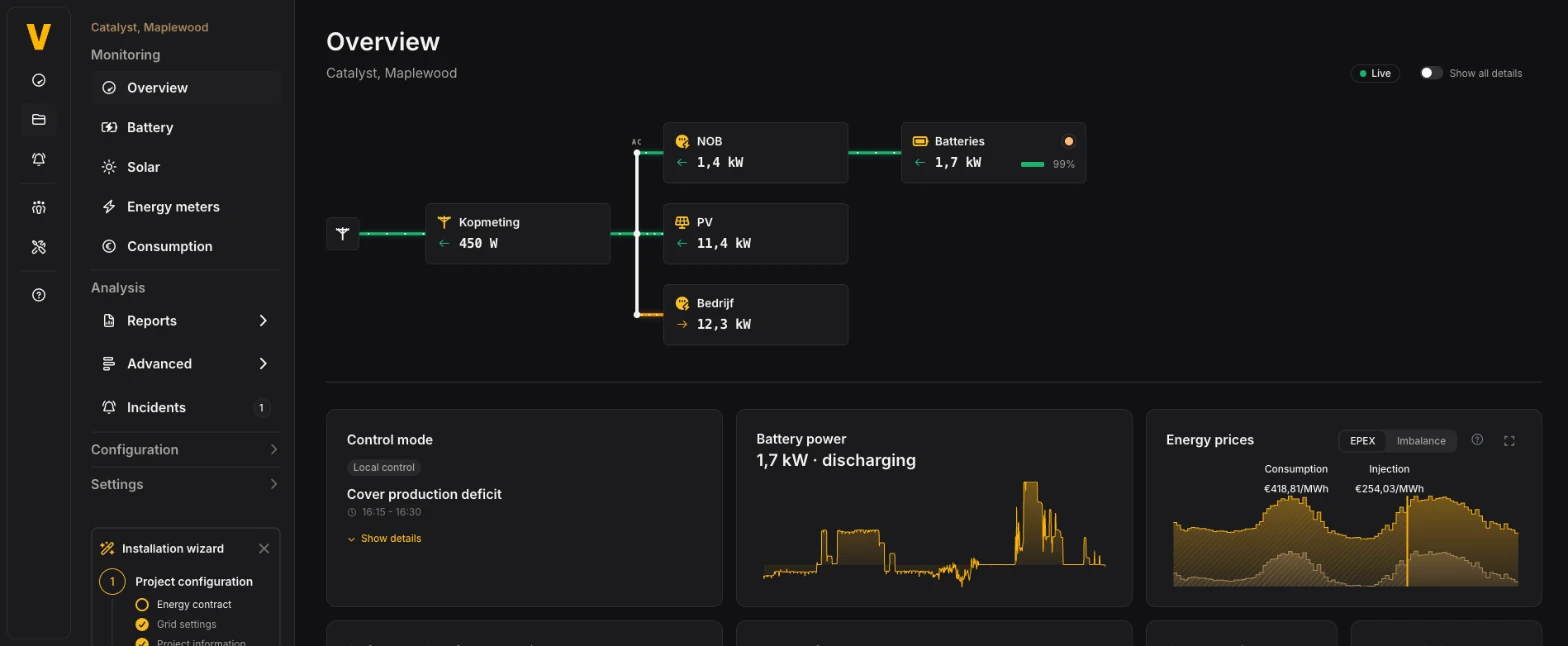
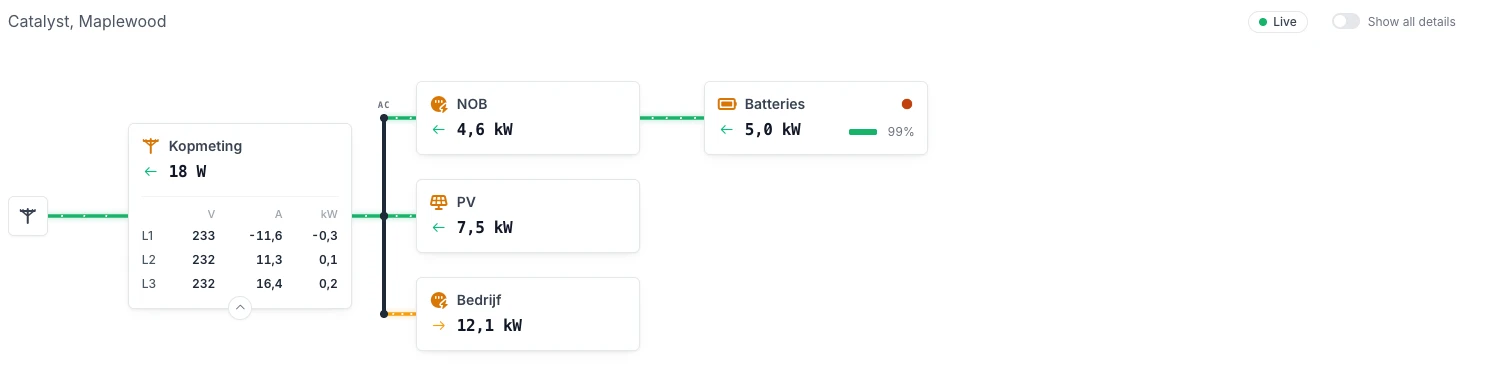
- Flow diagram thoroughly updated: the energy flow on the overview dashboard got a thorough update. Every block has a small arrow that opens its details, and Show all details opens them all at once; the phase table shows its units in a header row. A controllable load carries its device name and shows its estimated consumption from its nominal power while it is on. The source meters of an aggregate meter sit in the details of the aggregate block instead of in blocks of their own. Devices are sorted in number order, so "Charger 2" comes before "Charger 10", and the diagram no longer stays empty on a project without an energy meter. On a microgrid project the same diagram also shows the state of the grid, the breakers and who forms the grid. Documentation
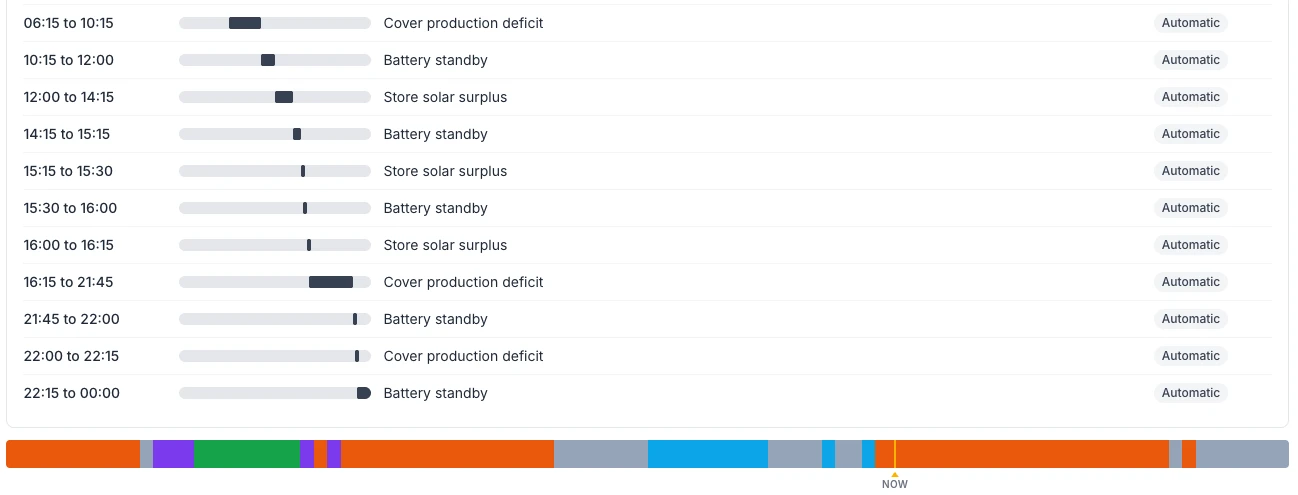
- Battery planning as a list: Show planning as list lists every period of the day with what the battery does and whether that period was planned Automatic or Manual.
Project settings
- Network configuration by installers: project administrators and partner users can now change and save the network configuration of the EMS controller themselves. Documentation
Device Management
- Network scan in the communication step: Scan the network now sits in the Communication step of the add device wizard, above the connection fields, for Modbus TCP connections. It shows a progress bar (on controllers from version 0.0.340), fills in the IP address, port and slave ID of the device you pick, and marks the devices already in the project. The wizard no longer gets stuck after picking a scanned device. Documentation
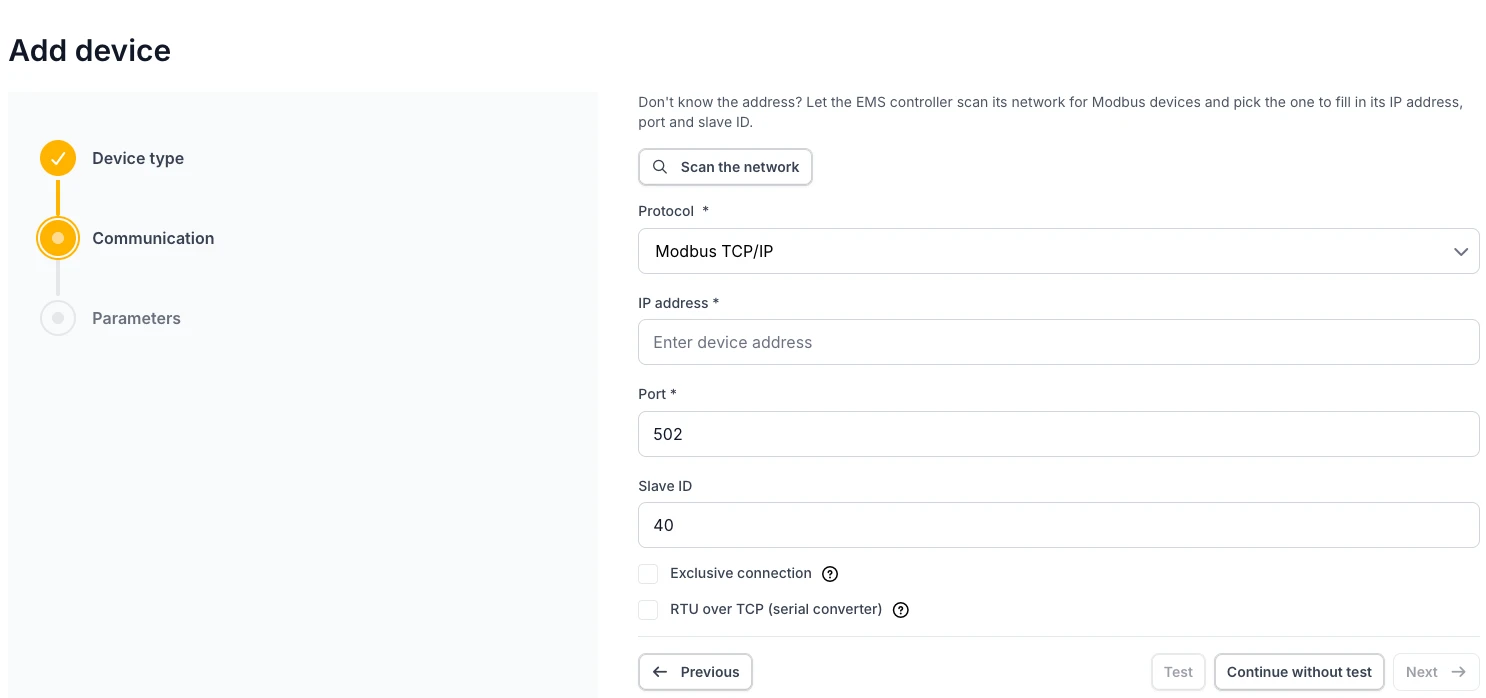
- RTU over TCP: a Modbus TCP connection can be marked as RTU over TCP for a device behind a transparent serial to Ethernet converter. Documentation
Newly supported devices
See the full device integrations overview.
- DEIF AGC 150 and AGC 200: generator controllers for Microgrid, with fuel level and alarms.
- Mennekes AMTRON Professional: AC chargers with the Mennekes ECU charge controller (also AMEDIO Professional and AMTRON Charge Control), on an adapter of their own instead of the one for the 4You and 4Business. Available on controllers from version 0.0.339. Documentation
- Autel MaxiCharger AC Single (A22): AC charger steered on power, with an optional fallback power when communication is lost. Available on controllers from version 0.0.339.
- GoodWe MT and SMT: grid-tied PV inverters with active and reactive power control, also through RTU over TCP. Available on controllers from version 0.0.340.
- Phoenix Contact EMpro CL: the energy meters EEM-XM157, XM355, XM357, XM375 and XM377. Documentation
Release Notes - 22 October
New in this release: the PV & battery simulator, a local interface on the EMS controller for installers on site, alarm signalling to pass a fire alarm on to a fire panel, a maximum phase current per energy meter, the state of charge on the EMS dashboard with its forecast, self-consumption with charge only and discharge only in the battery planning, and automatic validation of projects that have been steering for five days. New hardware: JinkoSolar SunGiga G1, Sunwoda NoahX-L261, Mennekes AMTRON 4You and 4Business and the Kstar DC charger.
PV & battery simulator
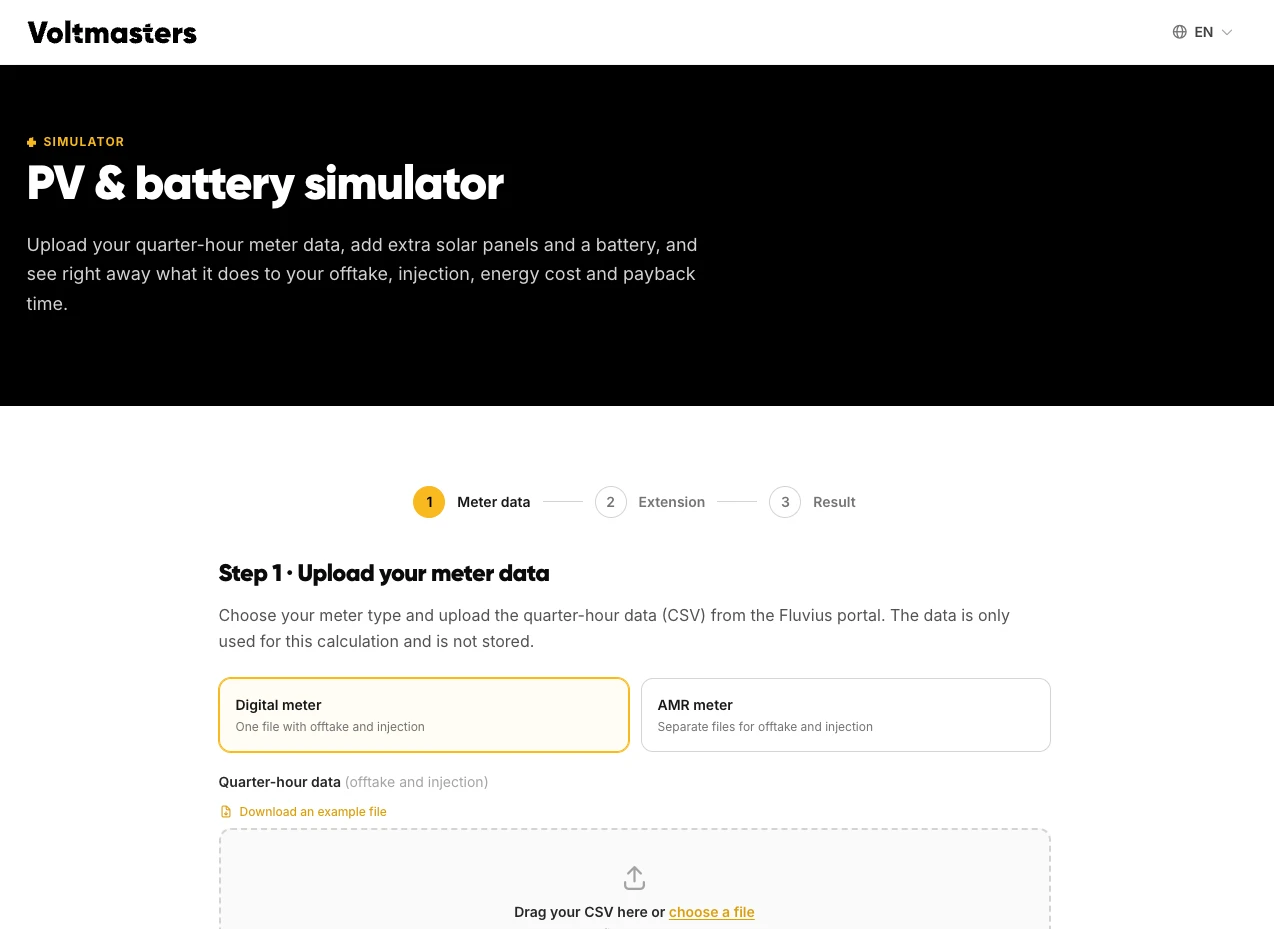
- Simulate a battery before you quote: the new PV & battery simulator takes the quarter-hourly meter data of a site (from the grid operator's portal, a digital meter or an AMR meter) and calculates what extra solar panels and a battery do to the offtake, the injection, the energy cost and the payback time. It uses the day-ahead prices of the past twelve months and the control logic of Voltmasters EMS, compares three scenarios side by side, shows the added value of EMS control, and searches for the PV and battery size that pays off most. The full report arrives by e-mail. No account is needed.
- Open a project in the simulator: on a project with a Fluvius data mandate, Open in simulator in the consumption report opens the simulator with the meter data of the last twelve months, the tariffs of the energy contract, the existing production and the grid connection already filled in. Partners find the simulator on their partner dashboard as well, and their report carries their own branding.
Local interface for installers
- Local interface on the controller: every EMS controller now has a local interface for installers. On site, browse from a laptop on the same network to
http://<address of the controller>:3000and log in with the controller login. Without an address on the site network, connect the laptop to a free USB port of the controller with a USB network adapter instead. You follow the live values of the devices, the decisions of the controller and its logs, also when the controller cannot reach the platform. Available on controllers from version 0.0.339. Documentation
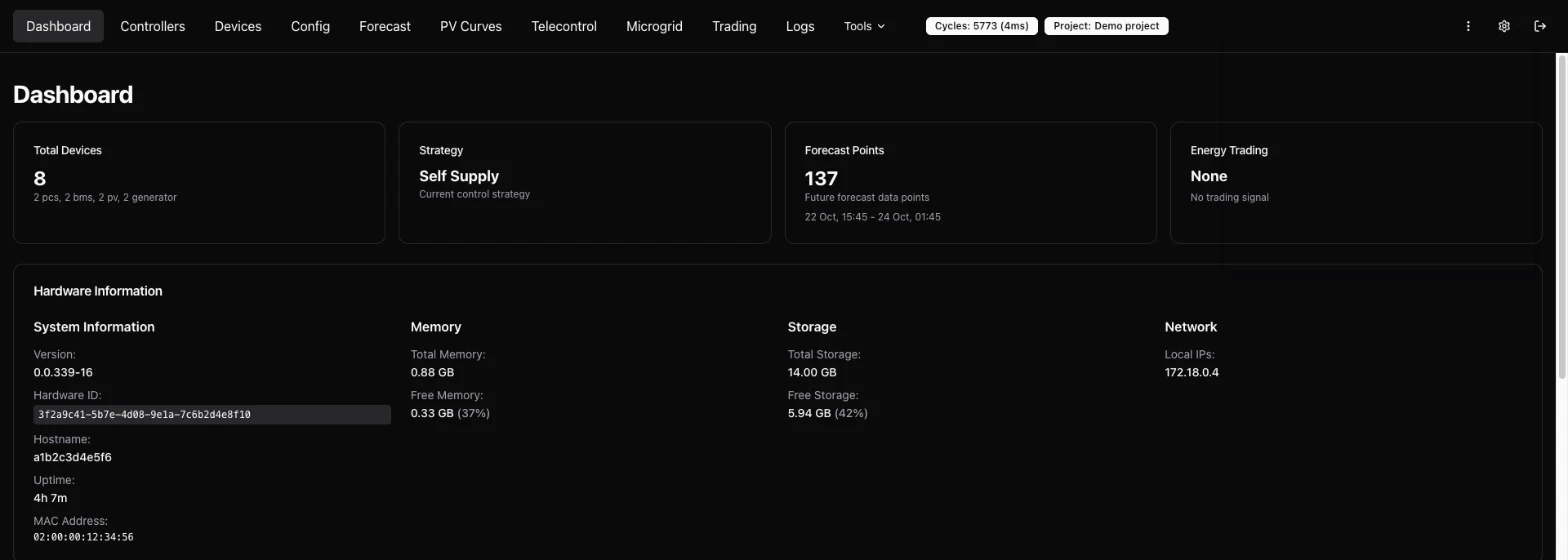
- Where to find the login: project admins and the partner of the project find the username and password in the platform under Configuration, EMS controller, tab Network configuration, in the Controller login block. Every controller has its own login.

- Set the network on site: under Tools, Network Config you set the controller's network on site, for example when it can no longer reach the platform after a change of the site network. Confirm the change within 3 minutes, otherwise the previous settings come back by themselves. The platform takes over the confirmed change.
Device Management
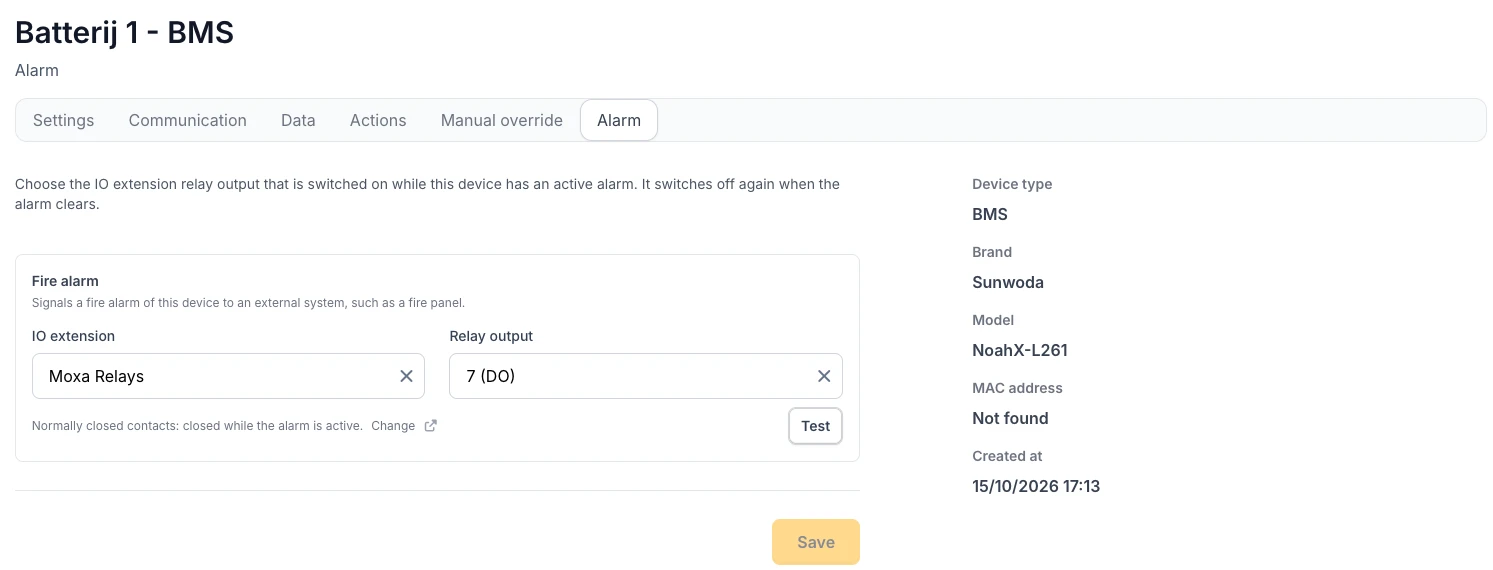
- Alarm signalling: devices have a new Alarm tab to pick the relay output of an IO extension that switches while the device has an active fire alarm, for example to warn a fire panel. The output switches back when the alarm clears. Test lets the controller simulate the alarm for 10 seconds, so you can check the wiring. The IO extension shows which of its outputs are used for alarm signalling. Available on controllers from version 0.0.338. Documentation
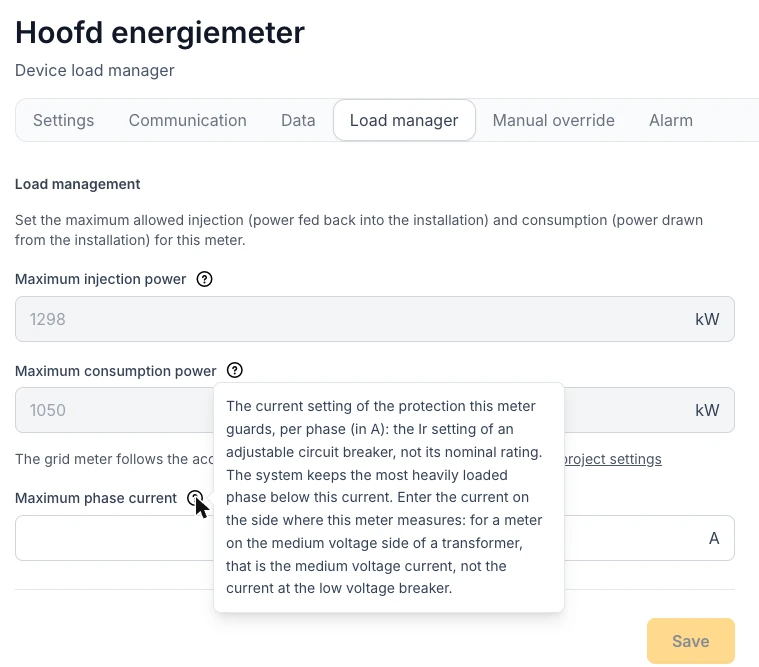
- Maximum phase current: the load manager of an energy meter has a Maximum phase current in A next to its kW limits, also on the grid meter. Enter the setting of the protection the meter guards, such as the Ir setting of an adjustable breaker. The EMS keeps the most heavily loaded phase below it. Three new incidents report a phase current above the maximum, a maximum that symmetric steering cannot meet, and a maximum on a meter that does not measure phase currents. Available on controllers from version 0.0.339. Documentation
Newly supported devices
See the full device integrations overview.
- JinkoSolar SunGiga G1 215 kWh: battery system behind an SCU. Device discovery proposes every cabinet as its own battery inverter with its own battery, so the whole system is added from the first cabinet. A converter that does not run the power mode the EMS set raises an incident. Available on controllers from version 0.0.337.
- Sunwoda NoahX-L261: all-in-one cabinet with a 125 kW battery inverter on a 261 kWh battery. Available on controllers from version 0.0.339.
- Mennekes AMTRON 4You and 4Business: AC chargers, standalone or as the master of a charging point network, which the EMS then steers as a whole. A new incident reports satellites that lost their master and charge at their fallback current. Available on controllers from version 0.0.338. Documentation
- Kstar DC charger: the charger is read for monitoring. Steering its power is not available yet. Available on controllers from version 0.0.339.
Adding and managing devices
- Several Smappee charging stations behind one gateway: each charging station behind a Smappee Genius is added as a device of its own and picked from a charging station list with its name, serial number and model. Stations that already have a device are left out, and the number of connectors follows the station. A new incident reports a station that serves more connectors than its device is configured for. Available on controllers from version 0.0.337. Documentation
- Connector count from the charger: when a charger reports its own number of connectors, the wizard uses it for every brand, so a dual-socket station no longer gets one connector.
- Child devices complete: the wizard waits for the battery values of discovered child devices (capacity and state of charge limits) before you can save, and the battery of an SCU BRES or GRES inverter is now created along with it.
- SMA Sunny Tripower TL-30: the STP 15000TL-30, 20000TL-30 and 25000TL-30 use their own SMA adapter by default, which no longer rewrites the power limit stored in the inverter's flash memory on every cycle. Available on controllers from version 0.0.337. Documentation
- SMA Sunny Tripower CORE1: a lower power limit now takes effect within seconds instead of after about two and a half minutes. Available on controllers from version 0.0.339.
- Billed power: every PV inverter and battery inverter shows its Billed power in kVA in its settings, the power PV control and battery control are billed on. It is set when the device is added, from the rating of the model or the entered rated power. Only administrators can change it.
- Validation after a new device: adding a device the EMS steers to a validated project puts the project back to be validated, and the confirmation says so.
EMS dashboard & battery planning
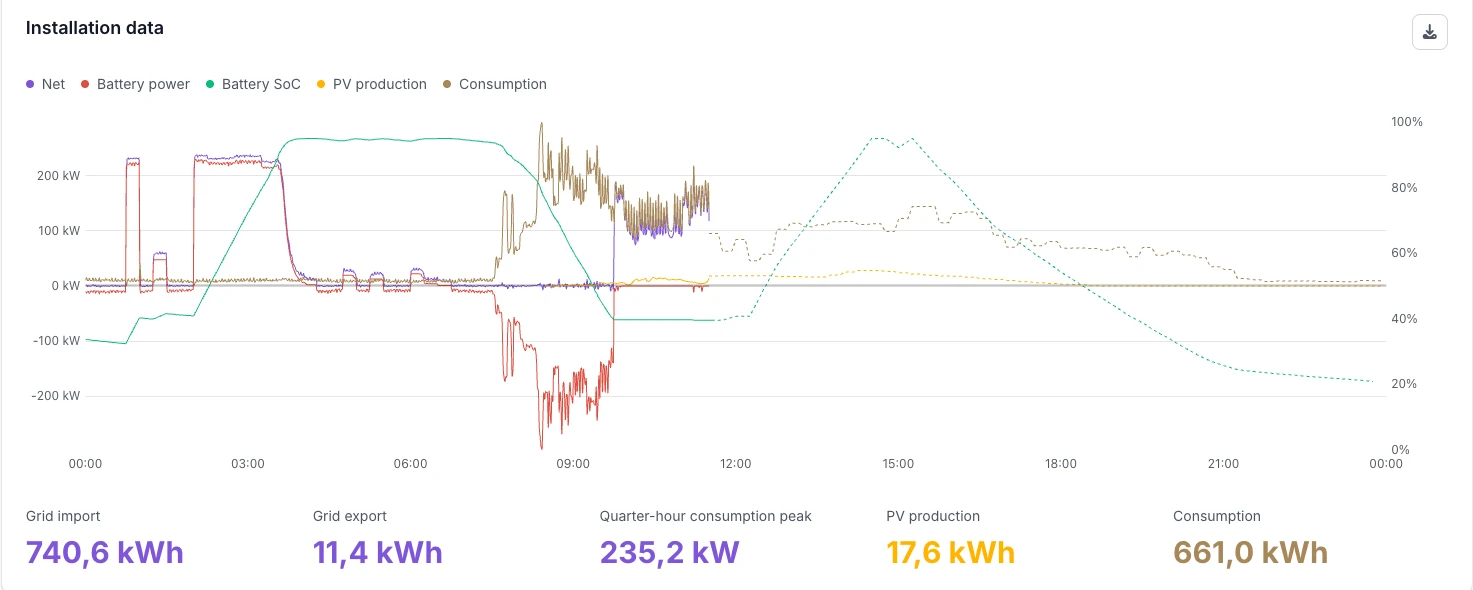
- State of charge on the EMS dashboard: the installation data chart has a Battery SoC series on its own percentage axis, with the measured state of charge and the expected state of charge for the rest of the day as a dotted line. The forecast starts at the last measured point and follows a recalculated plan every five minutes. Documentation
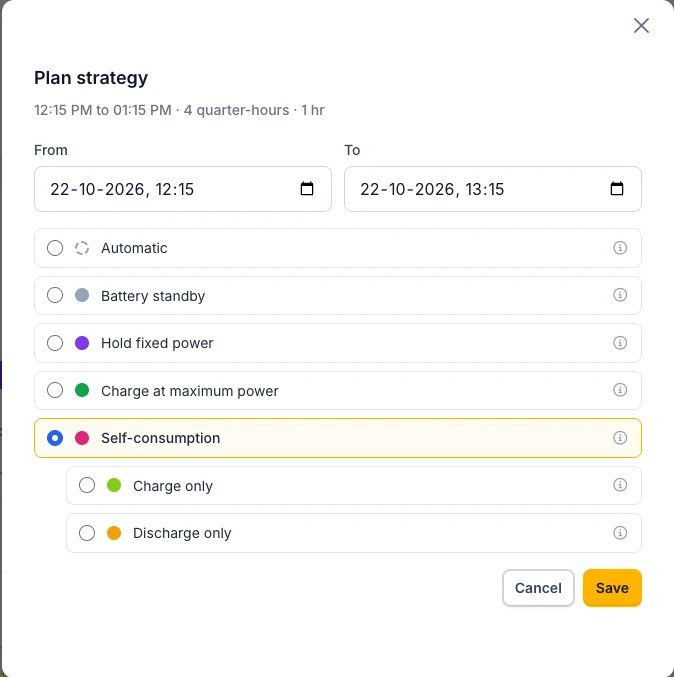
- Self-consumption in the battery planning: the planning modal offers Self-consumption with two sub-options, Charge only (store only the solar surplus that would otherwise go to the grid) and Discharge only (only cover consumption that would otherwise come from the grid, and keep the import limit). Self-consumption has its own colour in the plan lane. Available on controllers from version 0.0.339. Documentation
- Battery support for EV charging during trading: projects with an imbalance trading partner and EV chargers have a new strategy setting, Allow overruling the external battery setpoint to support EV charging. When on, the battery may discharge more than the trading partner asks, so the running charging sessions do not push the site over its import limit. It is off by default: the battery follows the partner and the chargers charge on the grid. Agree on it with the customer. Available on controllers from version 0.0.338. Documentation
Dashboards & reporting
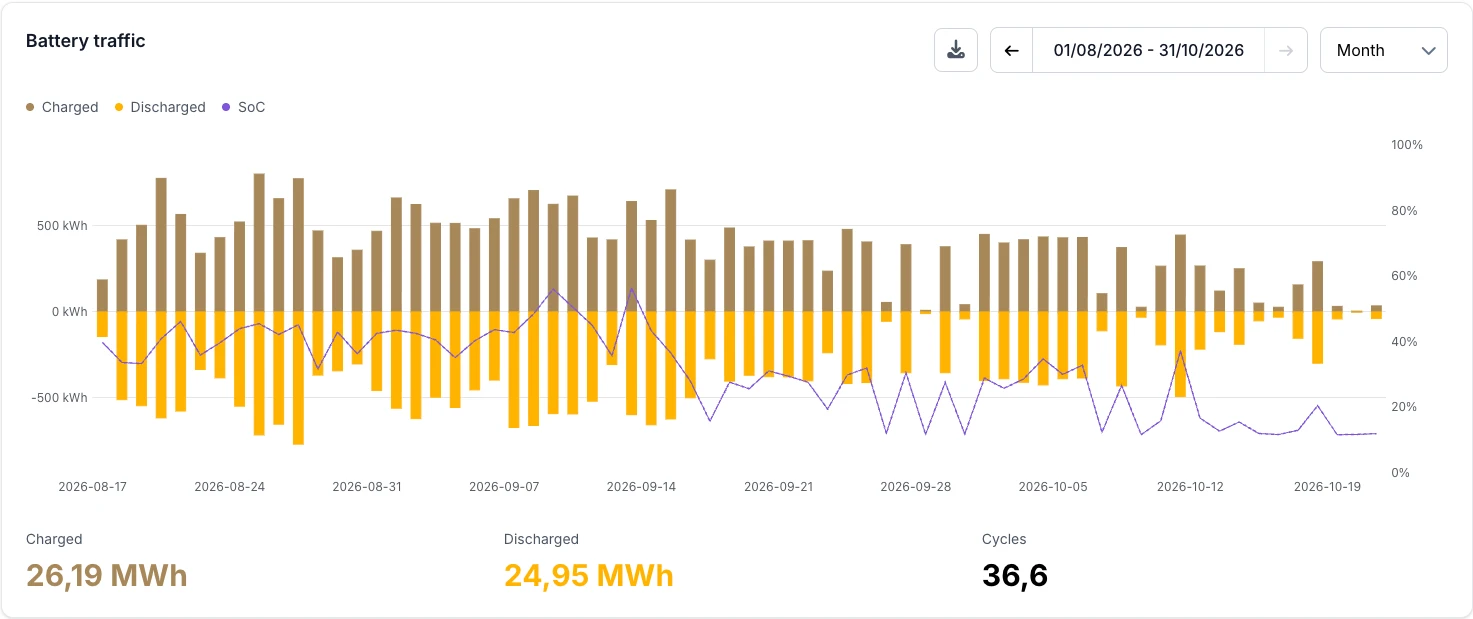
- Battery dashboard over several months: in the month view, the period can span up to twelve months. Charged and discharged energy are drawn as one bar per day, above and below zero, with a thinner state of charge line. Documentation
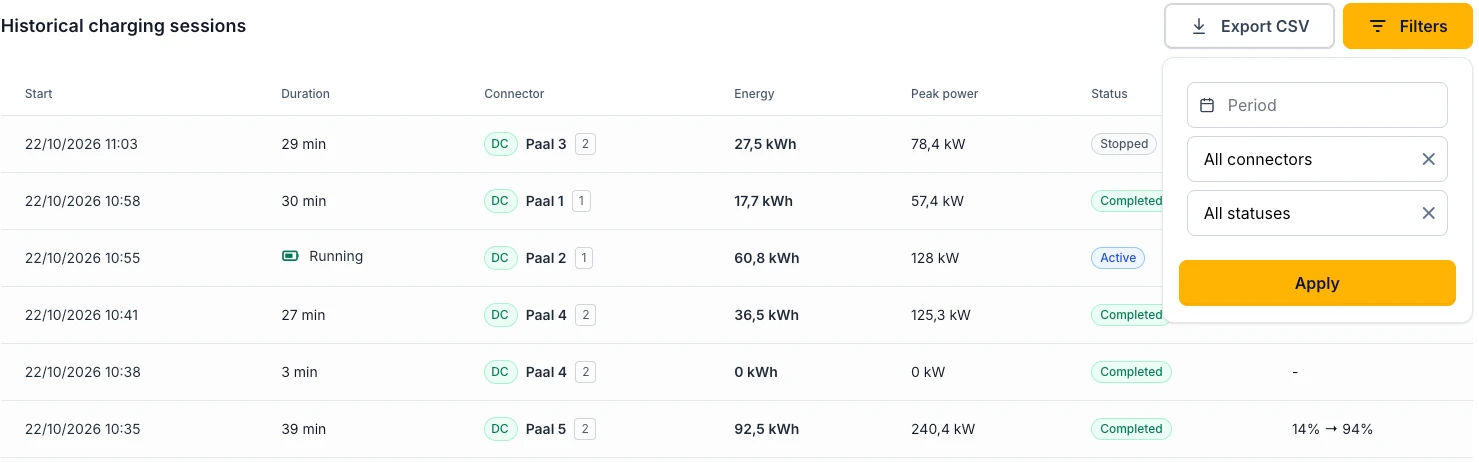
- Charging session history: the filters of the historical charging sessions on the EV charging dashboard have a Period. Documentation
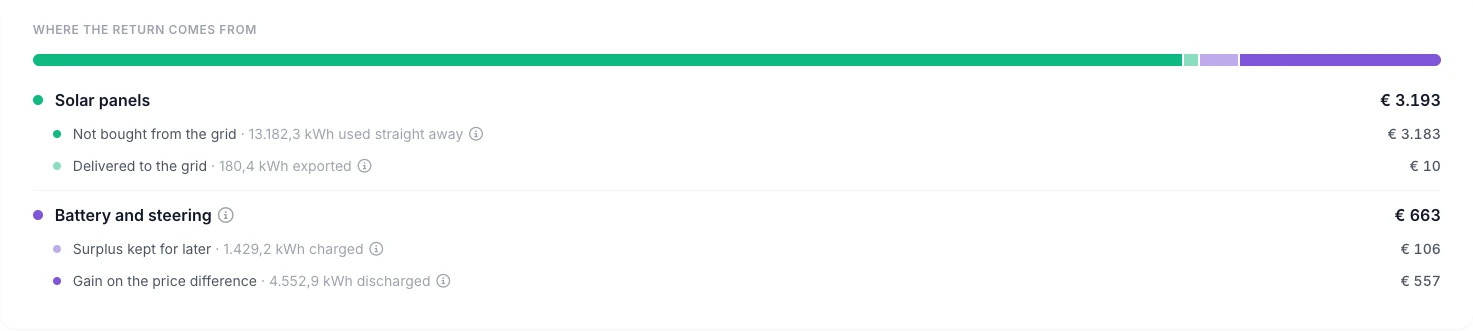
- Savings dashboard says what each post earned: the rows under Where the return comes from are renamed after their result, such as Not bought from the grid, Delivered to the grid and Surplus kept for later, and every volume says where the energy went (used straight away, exported, charged, discharged). Curtailment is no longer a row of its own, because its value is part of the injection. Documentation
- Energy meters Pro dashboard: projects with energy meters have an Energy meters dashboard under Advanced. Documentation
- Solar forecast after extra panels: after a change of the installed capacity, the solar forecast follows the new size right away instead of the production of the last 30 days, and saving a new capacity recalculates the forecast at once.
- Charts: tooltips no longer cover the line you point at, and curtailed solar energy only counts the intervals in which that inverter was actually curtailed.
Project settings & commissioning
- Automatic validation: once the controller has been steering the devices of a project awaiting validation for four days without interruption, the installer gets an e-mail, and a day later the project is marked Ready for validation automatically. The status bar on the EMS dashboard shows the date. If the project cannot be validated yet, Report a reason stops the automatic step until the reason is removed. Documentation
- Fluvius sync status: the grid connection references table shows the Fluvius synchronisation in its own Sync status column, with a tooltip that explains it, and one row per EAN when a synchronisation is retried. Documentation

- Network check: sites that send all DNS traffic through their own servers no longer get a red name resolution verdict and a recommendation to open port 53. Documentation
Incidents & notifications
- Fewer repeated mails: an incident that keeps coming back on the same device is mailed at most once a day and on two days per week. Push notifications are not limited. Documentation
- New incident types: battery held at 0 kW while its unit is out of control, battery unit that keeps dropping out of control, PV inverter steered without a measurement, PV inverter that cannot apply the configured fallback limit, converter not in the operation mode the EMS set, alarm output unreachable, and the phase current, charging point network and Smappee incidents above.
- No false production alarms: an inverter that lost its communication no longer also raises a PV production incident, and small battery setpoints no longer raise false setpoint deviation incidents.
Vic AI assistant
- Smoother answers: answers appear more smoothly while Vic types, and pressing Stop on an answer that is already complete keeps it whole. Vic suggests a support ticket after five of your messages instead of three. Documentation
Release Notes - 29 September
The savings dashboard is now open to every user of a project, with the exchange with the grid, the contract terms behind every amount and a comparison with the previous period. Also new: screenshots and page explanations in Vic, a 5 or 15 minute interval for the measurement export and the Sunwoda OSP200K.
Dashboards & reporting
- Savings dashboard for every user: clients and installers can now open the savings dashboard, under Analysis, Reports, Savings. It shows what the installation returns: the energy cost without an installation against the actual energy cost, split into the solar panels and the battery with the steering, with a card per source. Until now only Voltmasters administrators could see it. Documentation
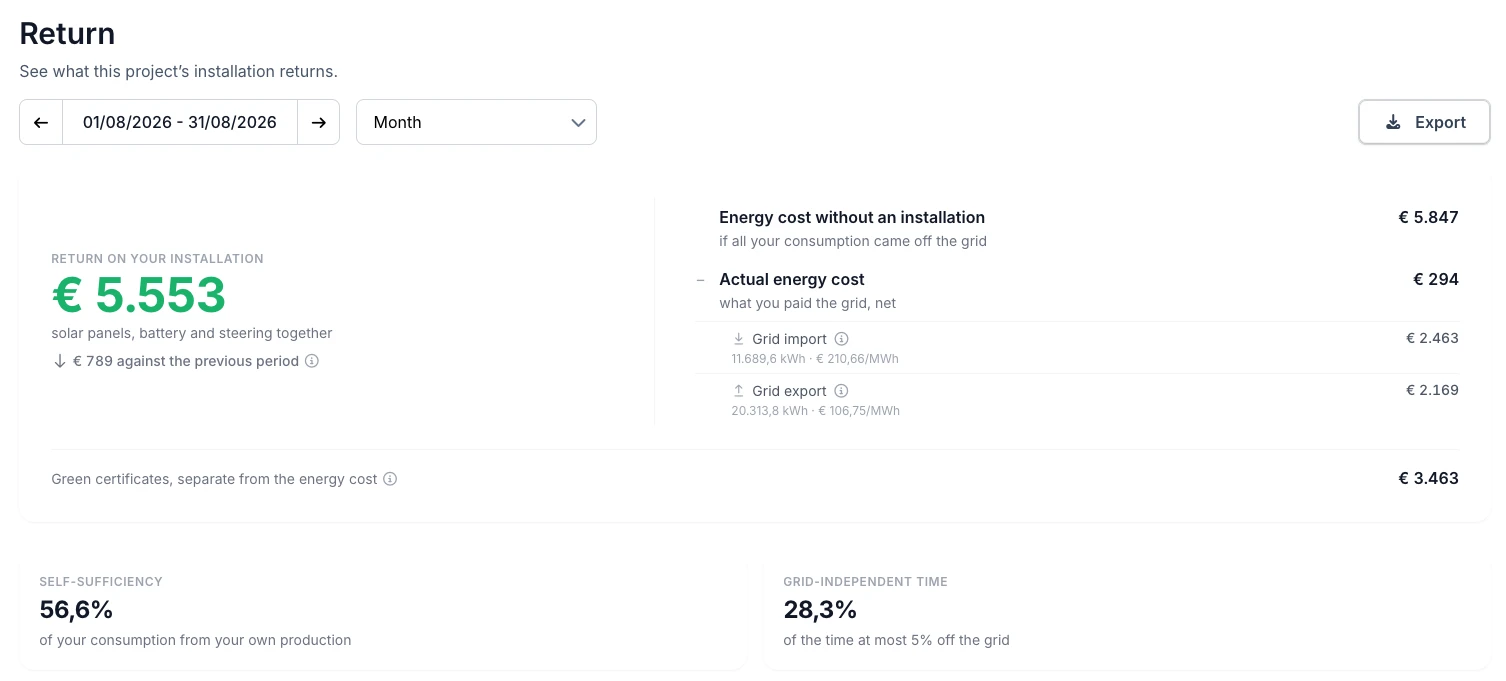
- Grid import and grid export apart: on the savings dashboard, the actual energy cost is split into grid import and grid export, each with its volume and its average price per MWh, the two figures an invoice lists per direction. The export has the same split and adds grid import, grid export and both prices per quarter hour, so the file is enough to check against a settlement of your supplier. What injecting at negative prices cost is only shown on projects whose PV inverters cannot be steered. Documentation
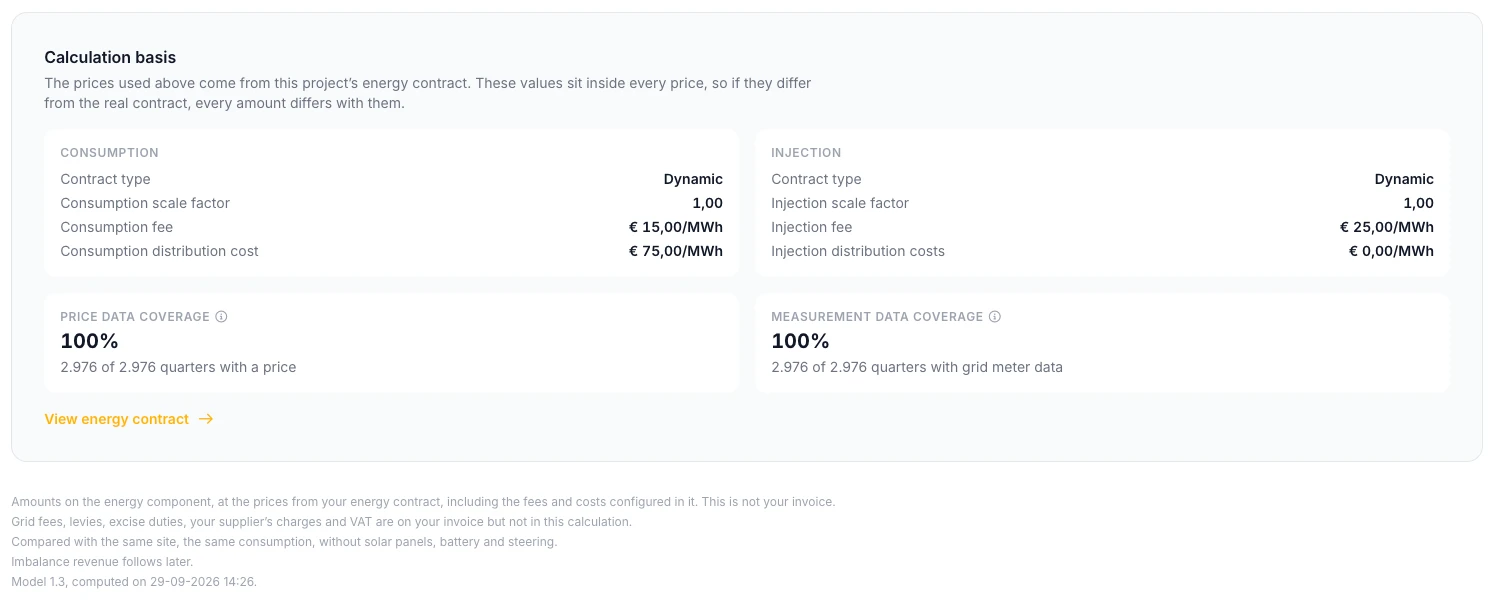
- Calculation basis: a new section at the bottom of the savings dashboard lists, per direction, the contract type and parameters the amounts were computed with, for the contracts that were in force during the period. Fields that fall back on the platform default are marked, and a warning appears when a scale factor other than 1 is set. The price data and measurement data coverage sit in the same section.
- Comparison with the previous period: under the return, the savings dashboard shows the difference with an equally long period right before it. A running month is compared with the same number of days of the month before, a month that has passed with the whole month before.
- Clearer breakdown: the solar injection post is now called Injection from solar and shows which part of the total grid export came straight from the panels. The footnote lists what is not included: grid fees, levies, excise duties, your supplier's charges and VAT.
- Measurement export per 5 or 15 minutes: Export measurements in the consumption report has an Interval choice of 1, 5 or 15 minutes. The 5 and 15 minute files add up the minute readings per interval and add the average import power in kW and the number of minutes with data.
Device Management
- Sunwoda OSP200K: the Sunwoda OSP200K can be added as a battery inverter, with a battery for every battery cluster it reports. Its system, inverter and battery cluster alarms each raise their own incident, and a cabinet emergency stop sends emergency notifications like every other emergency stop. Available on controllers from version 0.0.337.
- Siemens SICHARGE sessions: vehicles that charge one after the other on the same connector are no longer merged into one charging session, and sessions record the state of charge at the start and at the end. Available on controllers from version 0.0.337. Documentation
- Energy meters on one or two phases: a meter that does not report all three phases, such as a single-phase P1 meter, now shows its live values with the phases it has, instead of a dash. Available on controllers from version 0.0.337.
- AlphaESS STORION-LC-TB125 alarms: battery alarms that are warnings in the manufacturer's documentation no longer raise a critical incident, and the nightly low and full charge state of charge alarms no longer raise one at all. A request of the battery to calibrate its state of charge raises its own warning. Available on controllers from version 0.0.337. Documentation
- Elecnova ECO in standby: a setpoint below 0.1 kW, which reaches the cabinet as zero, no longer raises a stuck in standby incident or restarts the cabinet. Available on controllers from version 0.0.337. Documentation
Vic AI assistant
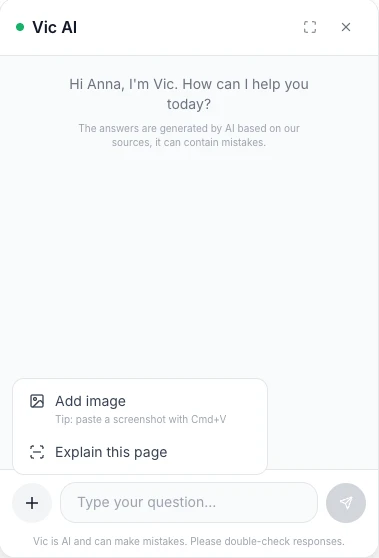
- Screenshots in the chat: the new + button next to the question field has Add image, to add screenshots to a question. You can also drag an image into the chat or paste it. Vic reads what is on it. Available when you are signed in. Documentation
- Explain this page: in the same menu, Vic takes a screenshot of the page you have open and explains what you are looking at and what the most important values mean.
- Screenshots in the support ticket: a support ticket created from the conversation now includes the screenshots you added.
- More project data: Vic can read the state of charge curve of a battery, the power per quarter hour of a device such as a charging curve, the battery plan and the expected state of charge, peaks and energy figures per energy meter, earlier control decisions and live device values, so it answers from the data of your project instead of guessing.
- Checks what you tell it: Vic's instructions were adjusted so it no longer simply goes along with a statement about your installation. It first compares it with the platform data and says so when the data shows otherwise.
- Newer AI model: Vic is being moved to Claude Sonnet 5.5.
Platform
- Demo mode keeps real data safe: in demo mode, the profile, the general project settings and the partner page are read-only, so saving can no longer replace real names, e-mail addresses or addresses with the demo values.
Release Notes - End of September
A large release: day view charts in kW, an energy contract type per direction, a desired monthly peak that follows the real peaks, notifications decided per incident type, Fluvius TCKv4 telecontrol and the registered asset group for Fluvius, and new hardware from Fronius, SolarEdge, Xemex and Schneider.
Dashboards & reporting
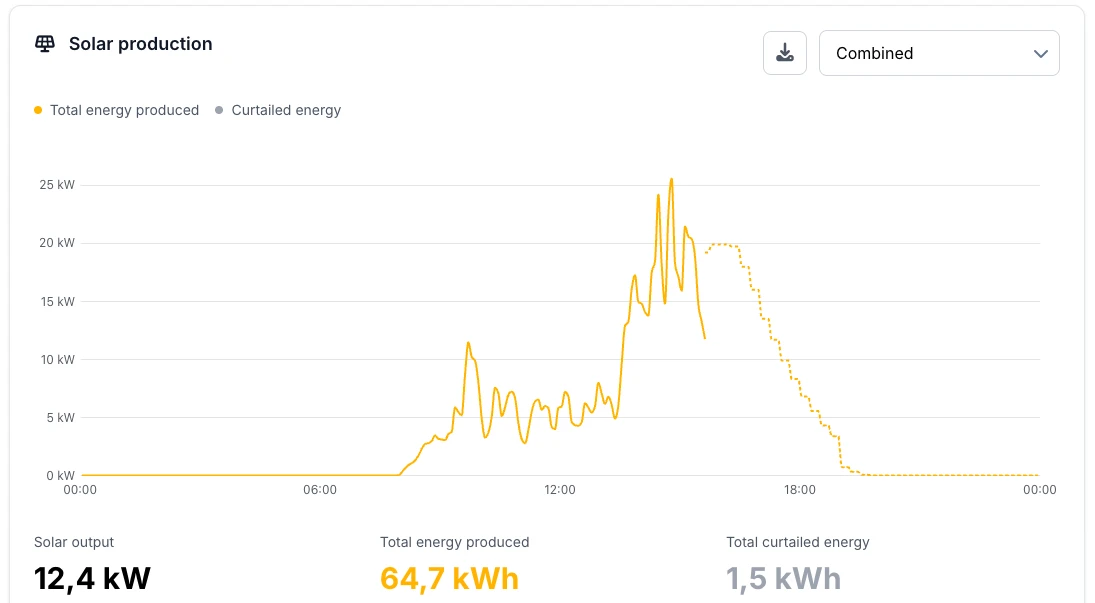
- Day view charts in kW: on the solar, consumption, energy meter and battery dashboards, the day view is now a line chart of the average power in kW instead of 5-minute energy bars. The solar chart shows produced and curtailed power with the forecast as a dotted line, energy meters show import above zero and export below, and the battery keeps its state of charge on its own axis. The week and month views keep their bars. Documentation
- Compact node cards with their incidents: in the energy flow diagram of the EMS dashboard, an open incident is now a coloured dot next to the name of the node, and power and state of charge stay on one line. Hovering the dot lists every open incident on that node, the most severe first. Documentation
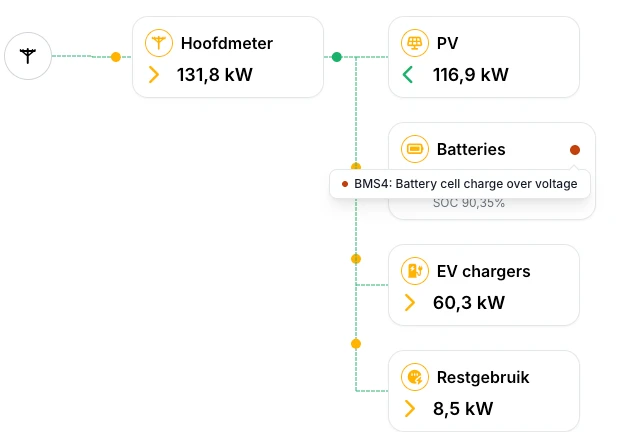
- Straight to the right meter: clicking a submeter in the energy flow diagram opens the energy meter dashboard on that meter, instead of on the main meter.
- Grid operator comparison with late data: the comparison stops at the newest quarter hour Fluvius has published and shows up to when it compared and how much it covers. Quarters that are missing or published late no longer show up as deviations, badges mark a direction that is incomplete or not metered, and the date picker does not go past the last published day. Documentation
EMS dashboard & battery planning
- Battery plan shows what was not planned: quarters the controller could not plan, for example because forecast data was missing, get their own colour, tooltip and legend entry, instead of looking like a deliberate standby. Quarters planned at a fixed power show that power in the tooltip, and manual overrides stay visible, hatched, when you look back at an earlier day. Documentation
- Manual overrides confirm delivery: after saving or stopping a manual override, the confirmation only appears once the command reached the controller. When the controller is offline, a message says the override is stored but not in effect yet. Available on controllers from version 0.0.331.
- Temperature-aware consumption forecast: the consumption forecast can take the expected outdoor temperature into account. Voltmasters switches this on per project.
Project settings & commissioning
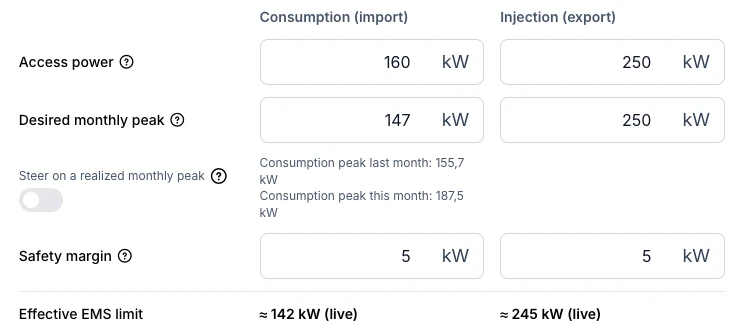
- Energy contract type per direction: the energy contract form has a separate consumption and injection section, each with its own contract type, so mixed contracts such as a fixed consumption price with a dynamic injection price are possible. A new No injection remuneration type is for contracts where injection is not paid. Existing contracts get the same type on both sides. Documentation
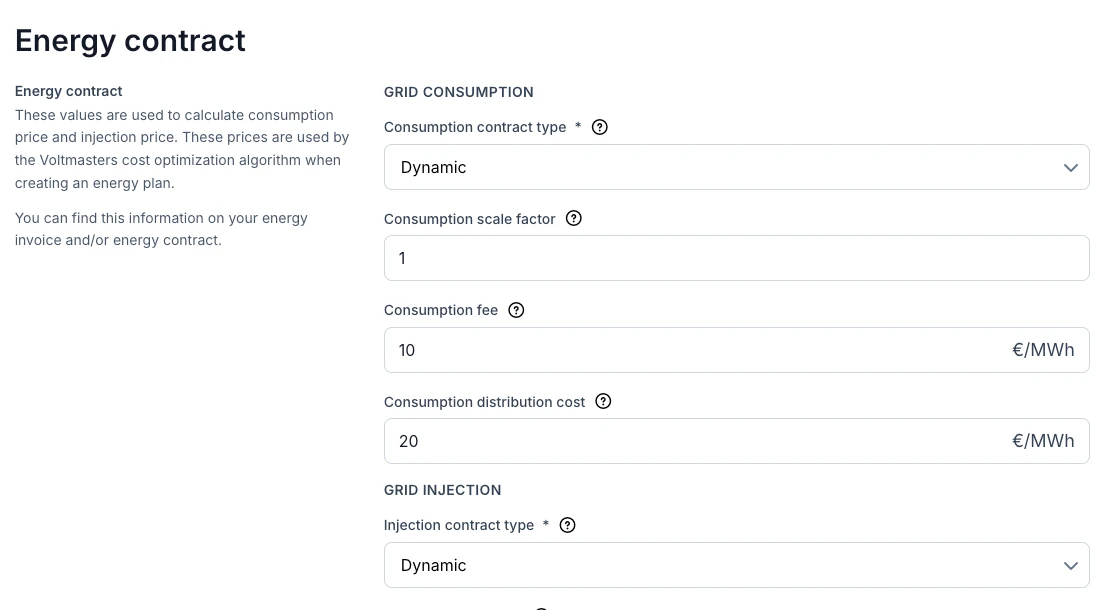
- Measured peaks next to the desired monthly peak: the desired monthly import peak now shows the peak of the site's own consumption for last month and this month underneath it, so you can base the value on real measurements. A new optional setting lets the import limit follow this month's realized peak once the site has already gone above the desired peak, so the battery and load shedding no longer work for a cap that no longer saves capacity tariff. Documentation
- Imbalance trading configuration can be edited: the configuration of every trading provider except Elion can be changed with an Edit configuration button. The wizard opens prefilled, and certificates and keys are listed by file name and upload date with a button to replace them. For BEE and Engie, every PV inverter the EMS does not steer can be linked to its Companion asset ID, and its production is then reported as well. Documentation
- Changelog filter: devices with the same name, such as automatically named battery modules or a replaced device, form one option in the device filter of the changelog, with a second line saying how many devices it covers. Documentation
Telecontrol & grid operators
- Fluvius TCKv4: sites with the older Fluvius telecontrol cabinet version 4 can select TCKv4 as their DSO RTU provider. The settings only ask for the installed power, and the RTU network address is set automatically. Available on controllers from version 0.0.335. Documentation
- Registered asset group and asset reference powers: for Fluvius Netflex and EME eCON+, the telecontrol settings have a new Asset reference powers section for the consumption and production reference power the grid operator registered; the asset setpoints are percentages of these values, and 0 is a valid value. The device table now asks whether each device belongs to the asset group registered with the grid operator, only those devices are steered and counted for the asset setpoints, and a warning incident is raised when a registered device cannot be steered. Documentation
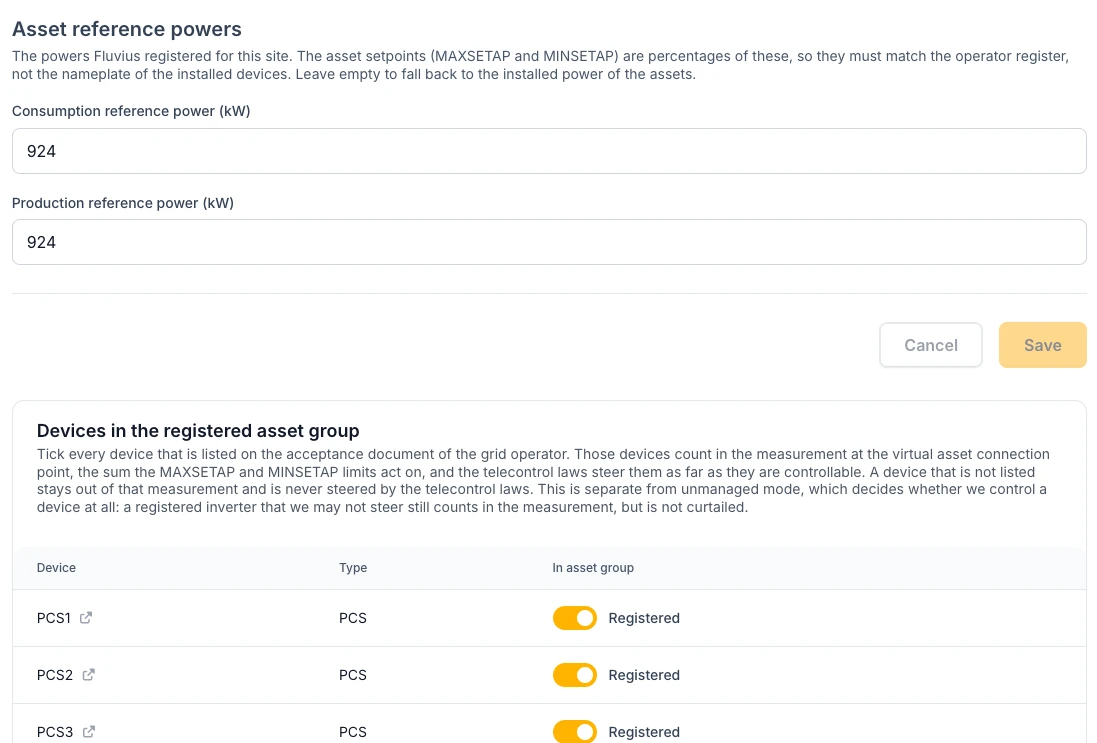
- Reactive operating point: the grid settings have a new Reactive operating point section for sites above 400 kVA, following the Fluvius grid study: an inductive share of 5 % or 10 % of the injected power, and optionally the supply voltage for the second operating point. The EMS controller applies it from an upcoming controller release.
Incidents & notifications
- Notifications decided per incident type: every incident is still registered, but a set of incident types now only sends a mail or push according to its own rule. A grid access power exceedance or an injection above the contract only notifies on a new monthly record, judged on the quarter-hour energy against the contract limit. A controller notifies after one hour offline, a Modbus connection loss after 60 minutes and grouped per connection, access control and fire alarms immediately (a fire alarm is never cleared automatically), a breaker trip immediately with its recovery, and a solar installation after eight forecast hours far below its forecast. Projects that are not validated yet do not notify. Pushes for incidents that were already resolved, double pushes and lost mails are gone. Documentation
- New incident types: incidents that used to show as "Other" now have their own name and can be filtered and muted: reactive setpoint unreachable, invalid reactive band, reactive power setpoint not followed, registered telecontrol device not controllable, inverter alarm, parameter mismatch, charger over-temperature, charger load management refused, connector in unknown status, and grid meter unreachable over Modbus.
Device Management
Newly supported devices
See the full device integrations overview.
- Fronius GEN24 Plus and Symo Hybrid: Fronius can be added as a hybrid battery inverter, with twelve GEN24 Plus models and the Symo Hybrid 3.0, 4.0 and 5.0. Device discovery proposes the battery and the PV strings as linked child devices. The EMS steers charging, discharging, curtailment and reactive power, and hands control back to the inverter when it stops steering. Available on controllers from version 0.0.336. Documentation
- SolarEdge three-phase inverters: SolarEdge is its own PV brand, with the SE5K to SE120K models, and can now be curtailed. Inverters that were set up as a generic SunSpec device ignored the setpoint and have to be switched to the SolarEdge brand. Available on controllers from version 0.0.336.
- Xemex Smart Connect: the Smart Connect P1/A1 and Smart Connect TIC read a utility meter and pass it on over Modbus TCP. Current and voltage transformer ratios can be set for meters behind instrument transformers. Available on controllers from version 0.0.335.
- Schneider StarCharge Fast: the StarCharge Fast 60, 180 and 320 DC chargers, with two connectors each, load balancing per station or per connector, and a fallback power when the connection to the EMS is lost. The station ships on a secured port and has to be switched to port 502 in its web interface. Available on controllers from version 0.0.335.
- Schneider Charge Pro: single-connector AC charger with a maximum charging current and a fallback current for when the connection to the EMS is lost. Pausing suspends the session instead of ending it. Available on controllers from version 0.0.334.
- Etrel Mono: the single-connector model next to the Duo. The wizard uses the number of connectors the charger reports, so a single-connector station no longer gets a second connector. Available on controllers from version 0.0.331. Documentation
- SMA Sunny Tripower 125 (beta): the STP 125-70 is selectable as a beta model. The fallback power limit is not offered for it, because it can only be set on the inverter itself. Available on controllers from version 0.0.332. Documentation
- Smappee Genius Flex charging station: the charging station has a serial number field, to pick the right station on a gateway that serves several, and a rated power that caps all its outlets together. Its connectors are discovered automatically. Available on controllers from version 0.0.335. Documentation
Adding and managing devices
- Named child devices in the wizard: every child device in the add-device wizard has a name field. For Smappee loads it is prefilled with the name given in Smappee, and discovering again never overwrites a name you typed. Child devices also show a readable model label. Documentation
- Alpitronic HYC50 to HYC400: the load balancing mode can also be set to Charger only, a limit for the whole station. Documentation
- Solis hybrid inverter: the Allow self-consumption mode setting (No, Yes, Automatic) is available under the advanced settings. Automatic only lets the inverter regulate on its own when it has its own grid meter. The inverter may only charge from the grid while the EMS asks it to, and an inverter that does not follow the EMS raises an incident. Documentation
- AlphaESS STORION-LC-TB125: discovery also offers a PV meter under the grid meter. Use it when the PV inverters behind the battery system are added on their own as well, so their production is no longer counted twice. The PV energy counter is correct again, and a warning appears when the battery asks for a state of charge calibration. Documentation
Trading & external signals
- Charge-only and discharge-only self-consumption: Trevion can ask the battery to only absorb injection or to only cover consumption. The same choice is available to partners on the Voltmasters integration API, and the battery keeps protecting the import limit under a charge-only signal. Documentation
- Trevion reporting: the device numbering no longer shifts when a device drops out, and every battery reports its own state of charge instead of the average. Documentation
- Yuso 2026-V1: support for the 2026 version of the Yuso interface, opt-in per asset. Schedules keep running through a communication loss, and the limits reported to Yuso include telecontrol curtailment. Documentation
Vic AI assistant
- More live data: Vic can look up energy prices, the state of charge history of a battery and EV charging sessions, and uses fresher production figures. Documentation
- Current documentation in your language: Vic reads the documentation on voltmasters.io, including the Dutch and French pages, refreshed every night, and searches it in the language you chat in. Sources link to voltmasters.io.
API
- Quarter-hour intervals: new endpoints return quarter-hour data for PV (per inverter), battery (charge, discharge and state of charge), site consumption, and hourly forecast and measured outdoor temperature, up to 31 days per call. Documentation
- Validated imbalance prices: the imbalance price API uses the validated prices from Elia, and the 23:45 quarter is no longer missing.
Reliability & control quality
Improvements to the control and reliability of these integrations:
- Battery systems: Elecnova ECO, Posevault, RisenStorage V2, SCU BRES, Poweroad ABMS and Huawei SmartLogger.
- PV inverters: SMA (curtailment and reactive power), Sungrow and single-phase SunSpec inverters.
- EV chargers: Siemens SICHARGE, io-charger and ABB Terra AC.
- Energy meters: the Fluvius AMR and P1 meters.
- Connections: a Modbus TCP device that stops answering is reconnected automatically.
- Dashboard: an EMS dashboard left open no longer crashes the browser tab.
Release Notes - End of August
The release of Vic AI, the assistant inside the platform, plus EMS controller network configuration managed from the platform, Smappee and Posevault hardware support, imbalance against day-ahead prices in one chart, and connection alarms for every trading provider.
Vic AI assistant
- Vic AI: the platform has an AI assistant. Vic answers questions about the platform and the energy topics around it, reads your own projects, devices, incidents and project configuration live, and links you straight to the screen where you can act. Answers come with the documentation pages they are based on, as clickable sources. Ask in Dutch, French or English and Vic answers in the same language. Vic only reads, it never changes a setting. Documentation
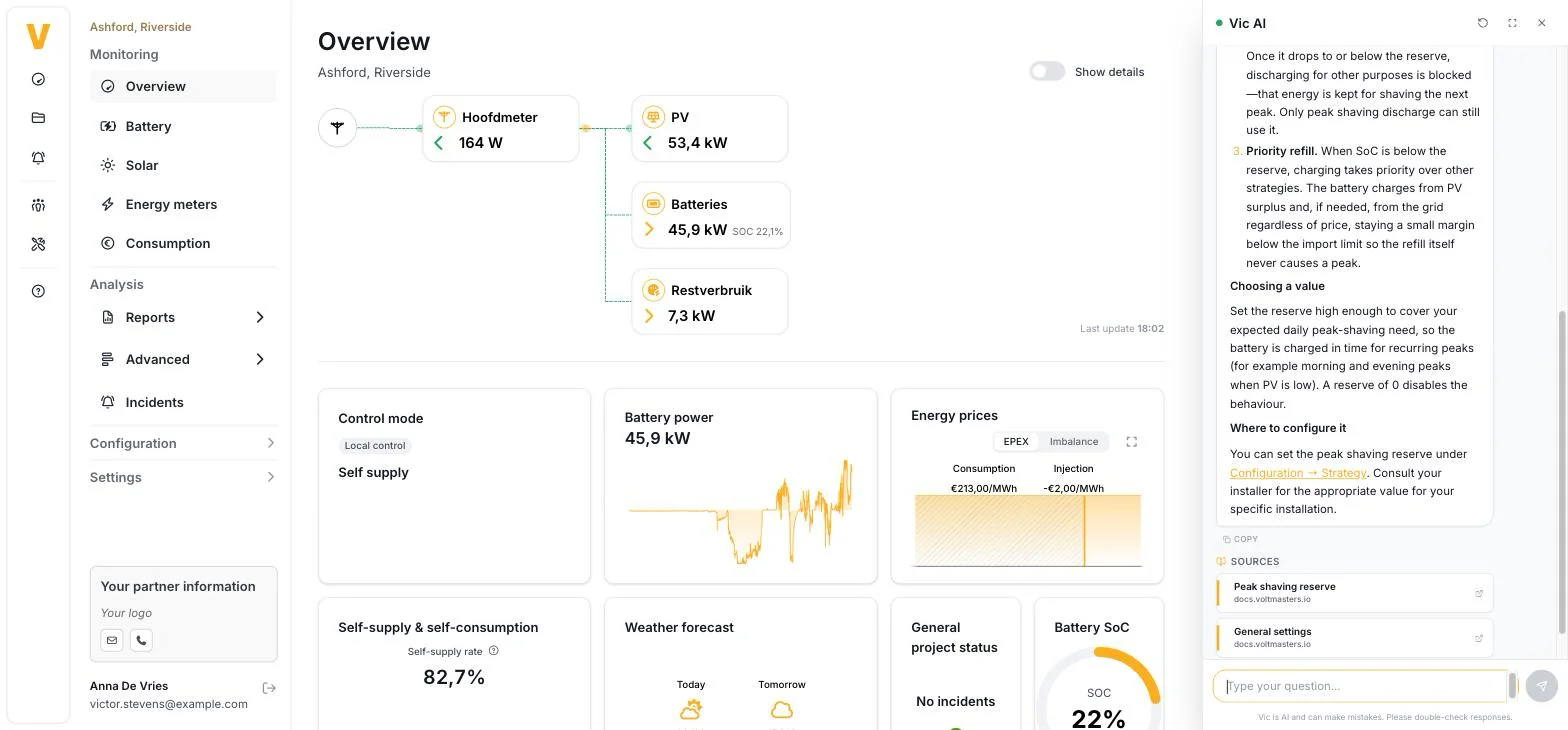
- Support ticket from the chat: when Vic cannot solve a question, a button appears under the answer to open a support ticket. The ticket carries an AI summary of the conversation, the full question-and-answer history and the project you had open, so a Voltmasters engineer picks it up with the context already in place. The ticket is only created by your click, never by Vic itself. The confirmation names the email address the ticket was filed under.
- Vic in the mobile app: the assistant is available in the mobile app as well. It knows which app screens exist and links to them, and sends you to the browser for a task that only exists in the web portal, such as device parameters or imbalance trading.
Device Management
-
Smappee Genius Flex: the Genius Flex gateway is supported as an EV charger and as an energy meter, over the MQTT interface the gateway serves on the installation network. One platform device covers one connector, and the metering loads behind a gateway are found through device discovery. Documentation
-
Smappee BESS: the Smappee storage system can be added as a power conversion system, with its battery as a linked child device, so one device covers the installation whatever the number of containers behind the gateway. Documentation
-
Posevault BESS: the Posevault storage system is supported as a power conversion system with a linked battery management system. The battery capacity has to be filled in, because the device reports its power rating instead of its pack size. Documentation
-
MQTT connections: a device reached over an MQTT broker asks for the address, the user name and the password.
-
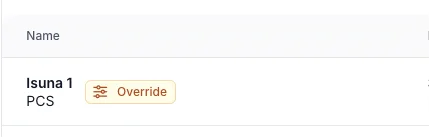
Manual override visible in the device list: devices with a manual override running or still planned carry an Override badge in the device overview.
Project settings & commissioning
-
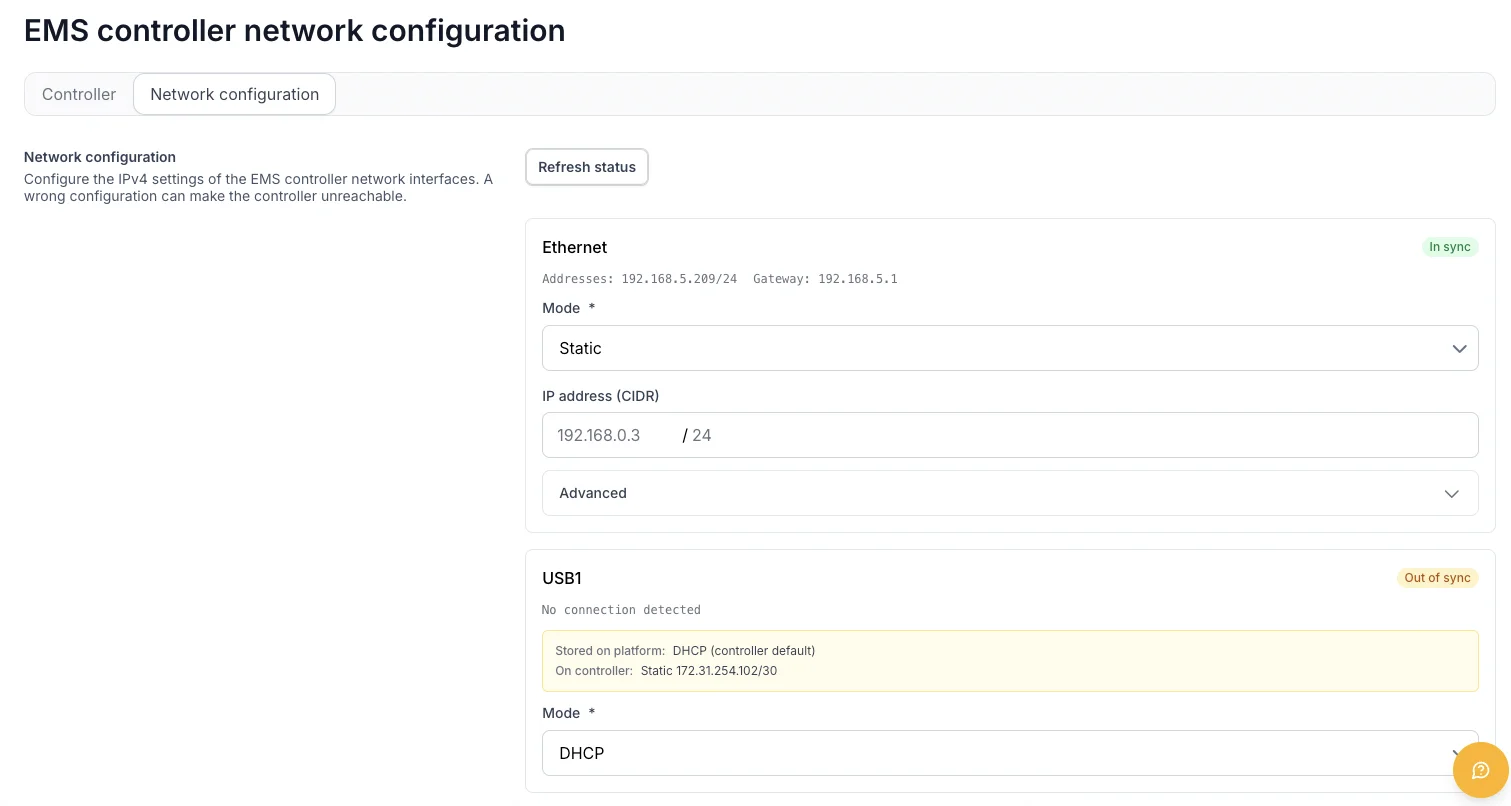
Network configuration of the EMS controller from the platform: the network settings of the controller are managed in the project settings and pushed to the controller. Gateway and DNS sit under an advanced section, with DNS servers as one comma-separated field. The confirmation screen lists every interface that will be taken over, including the ones you just added, and the controller raises an incident and rolls back if the applied configuration turns out to be unreachable.
-
Fluvius Netflex RTU: choosing Netflex as the telecontrol provider provisions the RTU network addresses automatically.
Dashboards & reporting
-
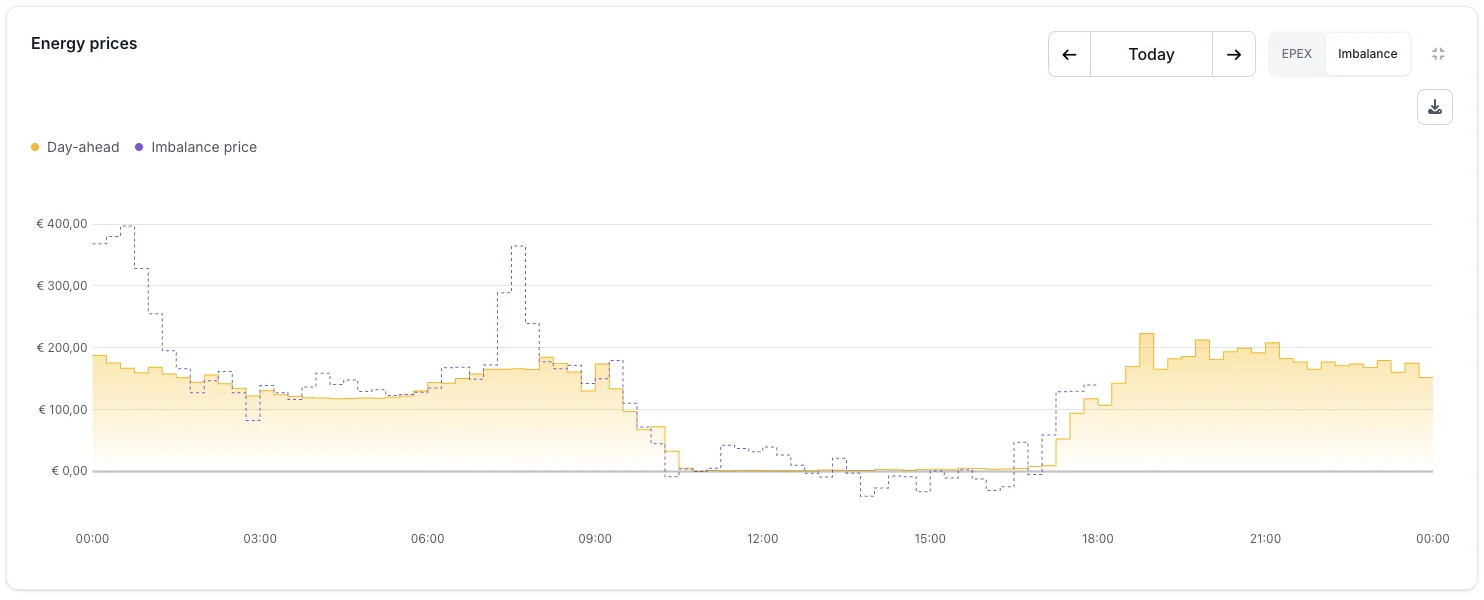
Imbalance against day-ahead: the imbalance tab of the energy prices block draws both market signals in one chart, the day-ahead price as a filled line and the imbalance price as a dotted line, both in EUR/MWh on the same axis so the two can be read against each other.
Reliability & control quality
- Frax EMS: the reactive setpoint reaches the inverter, and the system no longer reports every battery alarm when it has no alarm data. Documentation
- Dyness DH series: the integrated MPPT no longer switches on and off under a grid export limit. Documentation
- Hite: reactive power steering was added to the combiner box and single cabinet inverters. Documentation
- EV charging sessions: a finished session stops counting time, and the number of phases no longer outlives the session that reported it. Documentation
Release Notes - Late August
A large release: historical EV charging sessions, ORES telecontrol for Wallonia, a grid power target, energy cost per meter, Grid limiting per phase, a home-screen widget for the mobile app, a network check, and a long list of new hardware and control fixes.
EV charging
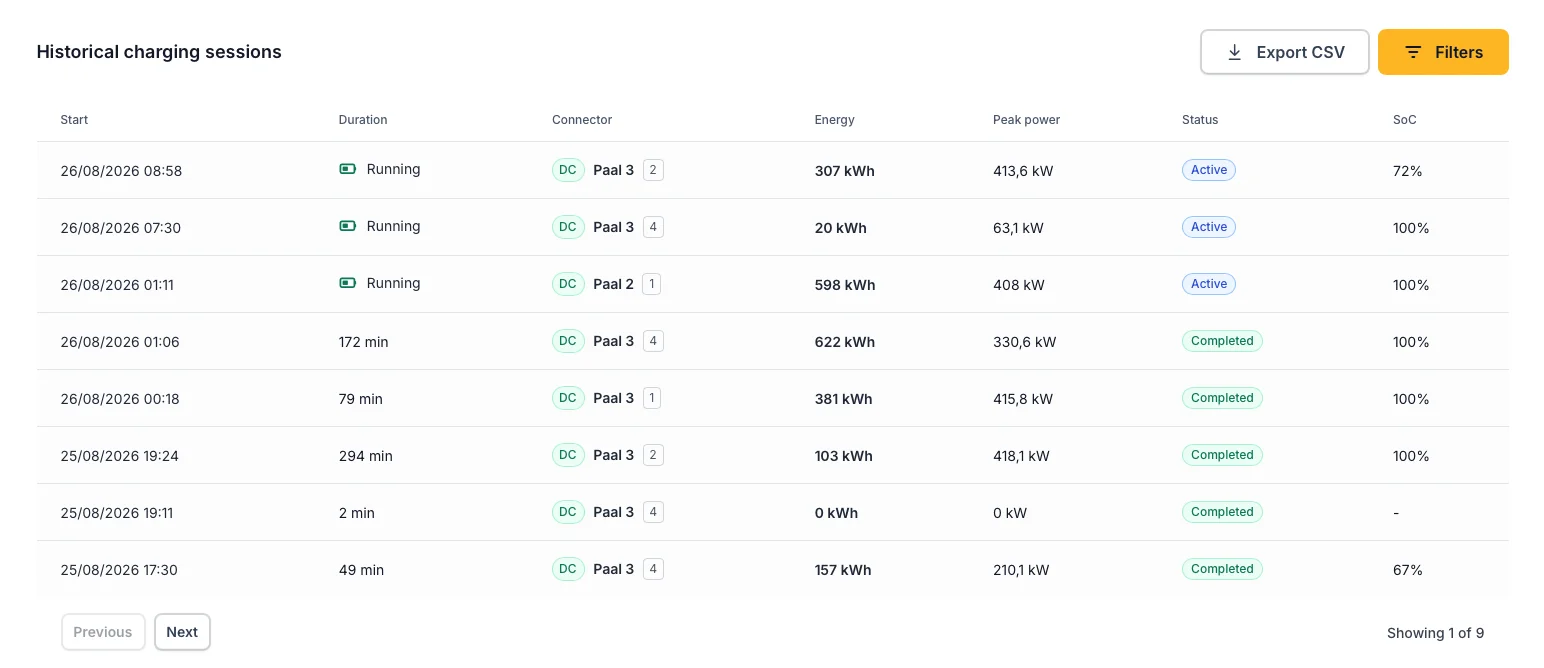
- Historical charging sessions: the EV dashboard has a new Historical charging sessions table. Every session the charger reports is kept: start and end, charge point and connector, duration, energy delivered, peak power, status, and the vehicle state of charge at start and end when the charger reports it. You can filter per connector and per status and export the selection as CSV. History starts on 20 August 2026 and only for EMS controllers that report sessions; for anything older the quarter-hour aggregation remains available. Documentation
- Charging decisions per connector: the latest control decision block on the EMS dashboard now also shows the setpoint the controller decided for each individual EV connector, instead of only the charge point as a whole.
- Site-level chargers: charging sites that are steered as one whole (Alpitronic HYC1000, ABB Terra Gateway Pro) no longer show a connectors tab, because there is nothing to configure per connector on them.
- EV charging on trading sites: the power boost reserve and the draw of chargers that are not managed by the EMS are now taken into account on sites that trade.
Device Management
Newly supported devices
You can now connect, monitor and control more hardware directly from Voltmasters. See the full device integrations overview.
- Alfen NG9: AC EV charger, up to 32 A per phase. Available on controllers from version 0.0.287. Documentation
- Alpitronic Hypercharger: the HYC50, HYC150, HYC200, HYC300 and HYC400 DC chargers (from controller 0.0.287), plus the HYC1000 cabinet, which is steered at station level with a single site budget and comes with its own load management alarm (from controller 0.0.329). Documentation
- ABB Terra Gateway Pro: a site controller in front of a group of ABB DC chargers. The EMS steers the site as a whole through the gateway. You configure the unit IDs of the chargers behind it, the grid topology of the site, and the charging current the gateway falls back to when it loses the EMS. New alarms report a charger behind the gateway that is offline, faulted or unreachable, and a site that fell back to its own budget. Available on controllers from version 0.0.320. Documentation
- Generic PLC energy meter: for installations where the meter is read by a PLC that republishes the measurements on Modbus TCP. Any meter can be brought into the platform this way. Available on controllers from version 0.0.320. Documentation
- PV on the Solis hybrid inverter: the solar field of a Solis hybrid battery inverter now appears automatically as a separate PV device with its own production, next to the battery. It comes with a set of new alarms for this inverter family, covering remote control, AC coupling, generator start and stop, and firmware mismatches. Available on controllers from version 0.0.328. Documentation
- Growatt grid-tied inverters (beta): the MIC-TL-X, MIN-TL-X, MOD-KTL3-X, MID-KTL3-X, MAC-KTL3-X and MAX-KTL3 series are selectable as beta models. Documentation
- AlphaESS: the STORION battery system now requires controller version 0.0.320 or later.
Adding and managing devices
- Deleted devices, and restoring them: the device overview has a new filter with a Deleted status. A deleted device can be restored from there, together with the references that were removed with it. The platform tells you when a restore is not possible, for example when the parent device no longer exists.
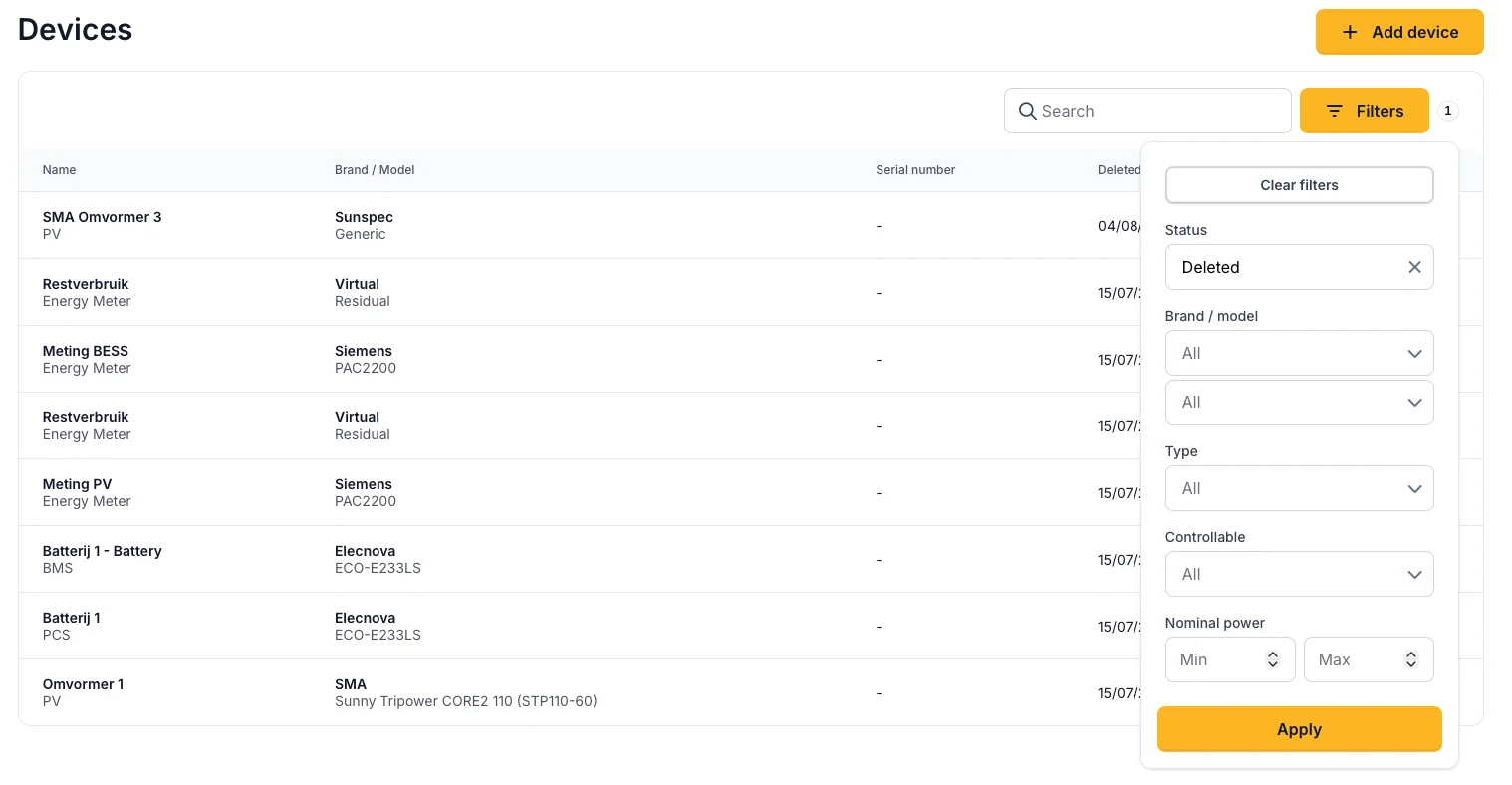
- Richer device filters: the device overview can now be filtered on status, brand or model, type, whether the device is controllable, and a minimum and maximum nominal power.
- IP address column: the device list has a new optional IP address column, next to the MAC address column.
- MAC address lookup: the controller is now asked directly for the MAC address of a device, including for child devices and for devices that were already in the fleet.
Telecontrol & grid operators
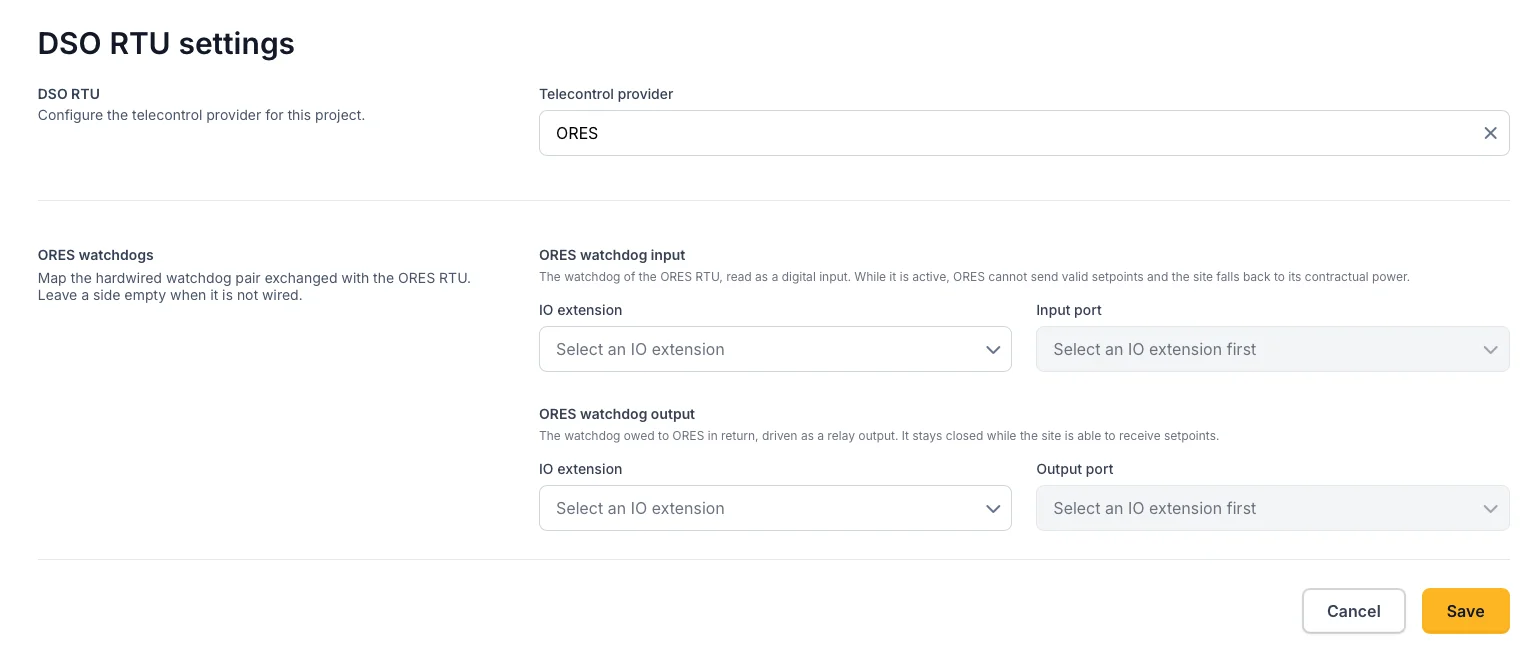
- ORES telecontrol (Wallonia): ORES can now be selected as a DSO RTU provider. The grid operator's RTU polls the EMS over Modbus RTU, sends an active and a reactive power setpoint per steered asset, and reads back the measurements of that asset and of the grid connection point. Documentation
- ORES watchdogs: the telecontrol settings gained an ORES watchdogs section where you map the hardwired watchdog pair exchanged with the ORES RTU: the watchdog read as a digital input, and the watchdog driven back as a relay output. While the input is active, ORES cannot send valid setpoints and the site falls back to its contractual power.
- Grid operator comparison: the "Fluvius comparison" page is now called Grid operator comparison, because it compares the local grid meter with the official quarter-hour values of whichever operator applies.
EMS dashboard & battery planning
-
Grid power target: a project can now be balanced towards a small standing import instead of towards 0 kW. This is meant for sites where an external device curtails solar production to prevent injection: the extra import makes that device release production, which the battery then stores. A second setting keeps the target capped at the current on-site generation, so nothing is bought overnight. On an ordinary installation the right value stays 0 kW. Available on controllers from version 0.0.323. Documentation

-
Strategy shown in the control mode block: on self-supply sites the control mode block now names the strategy that is actually configured, instead of only the control mode.
-
Live data after a background tab: devices no longer appear offline after the browser tab has been in the background, the energy flow diagram reconnects on its own, and the live connection is recovered without having to switch tabs first.
Dashboards & reporting
-
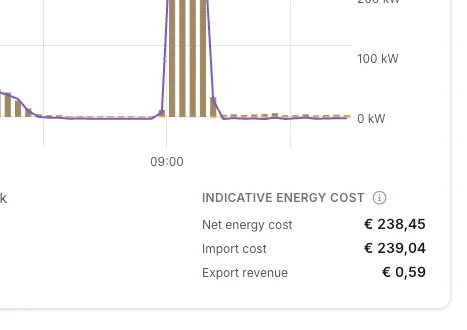
Energy cost per meter: every meter on the energy meter dashboard now shows what its grid import cost, what its export earned, and the net of the two, valued at the project's contract prices for the selected period. The disclaimer behind the title's tooltip says exactly what the amounts cover: the volumetric part of the contract only, no capacity tariff or fixed charges, no imbalance, and an indication rather than a settlement. Documentation
-
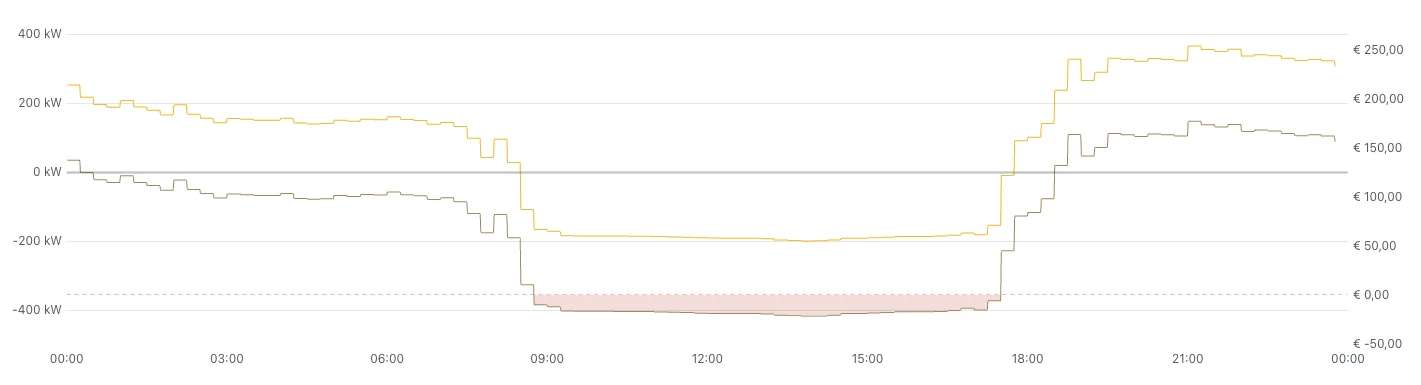
Negative prices in the price graph: the energy price graph now colours the area below zero separately, so negative prices are visible at a glance.
Mobile app
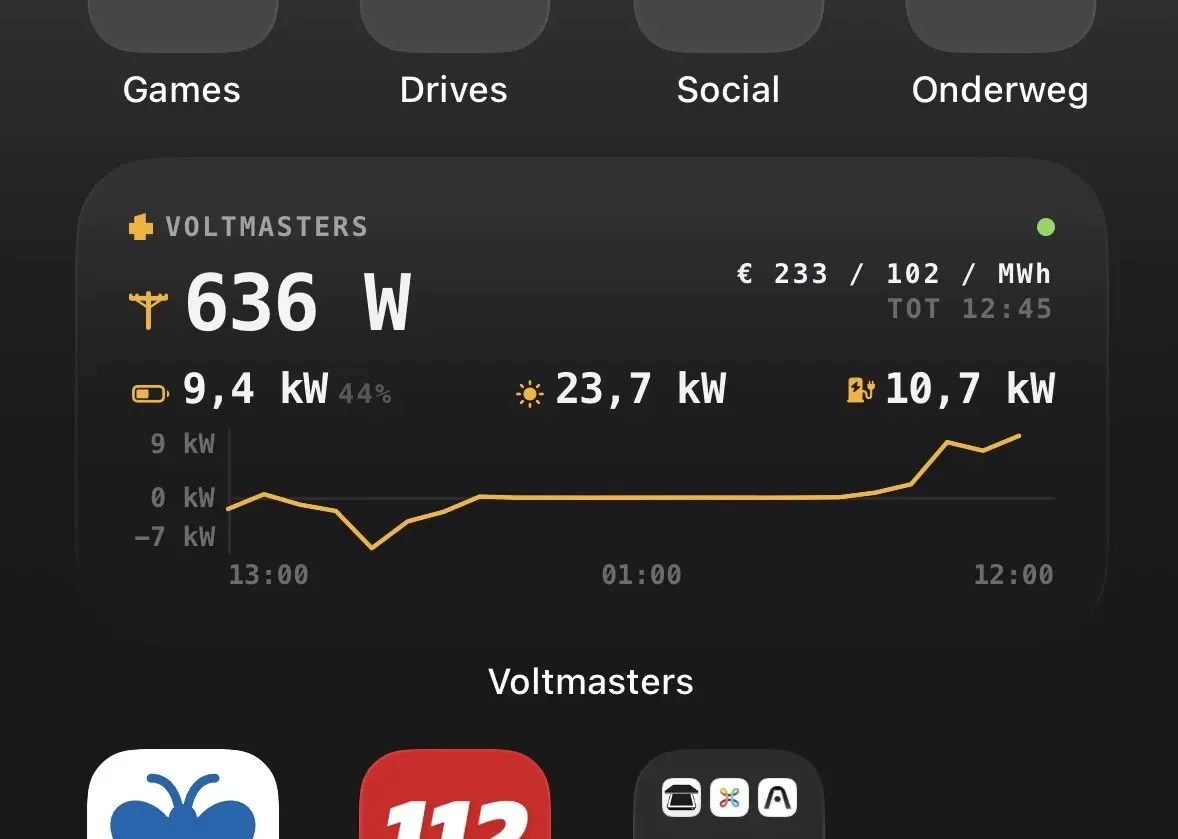
- Home-screen widget: the app can show a widget on the phone's home screen with the state of charge, grid power, and PV, wind and EV power. A reading is left out entirely when the site does not have that hardware, so the widget always matches the installation. The values come from the same source as the graphs in the app, so the widget cannot disagree with what you see after tapping through, and it includes a small grid sparkline over the past hours.
Incidents & Notifications
- Who muted an alarm: the incident list shows a Muted by column, so it is visible who silenced an alarm type.
Project settings & commissioning
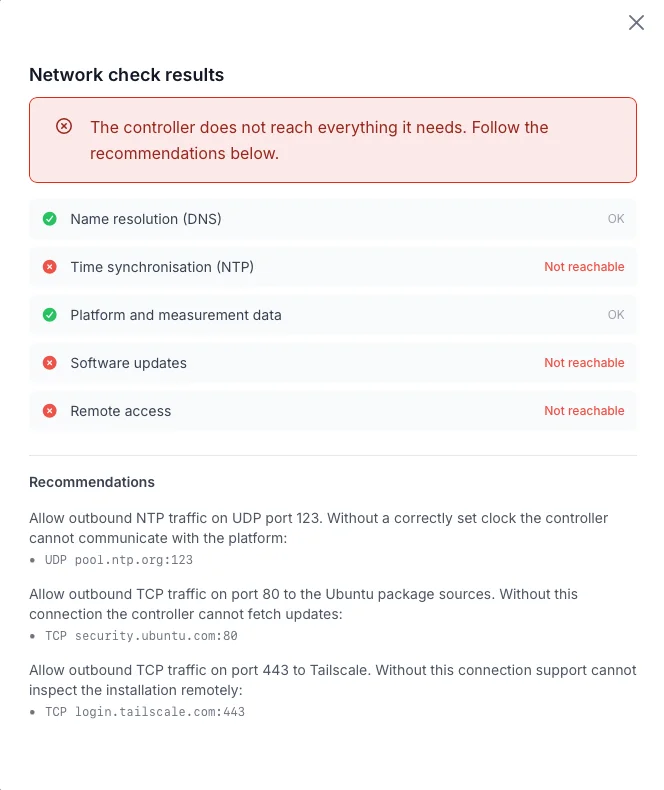
- Network check: A check of what the EMS controller can reach, grouped per purpose: name resolution, time synchronisation, platform and measurement data, software updates, and remote access. Each group that fails comes with a concrete recommendation naming the port and the addresses to open, and the verdict says in one line whether action is needed. The results distinguish TCP from UDP, and the page waits for the answer instead of showing a stale one.
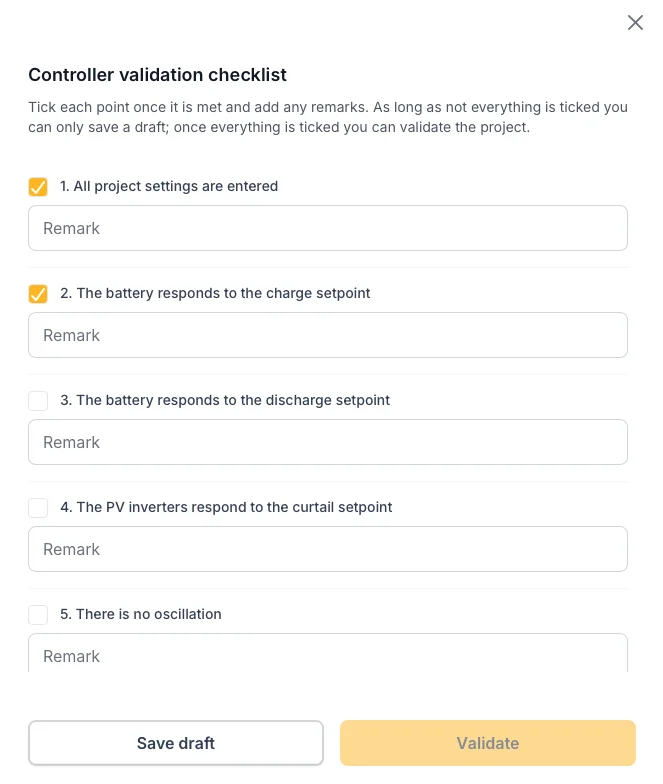
- Commissioning checklist: we expanded the internal validation procedure. These are the validation checks our engineers are analysing when you mark your project as 'ready for validation'.
- Energy cost settings for clients: clients can now reach the net settings and grid meter settings of the projects they may edit. Before, this was only for installers.
Public API
- Charging sessions endpoint: the EV charging sessions of a project can be read over the API, newest first and paginated, filtered on a time window, on a single charge point and on session status.
- Quarter-hour EV energy endpoint: the energy charged per charge point can be read per clock-aligned quarter of an hour, over a window of up to 31 days per call, reaching back as far as the charge point has been reporting.
Reliability & control quality
- Dyness DH series: Adapter optimization. Documentation
- SAJ CHS2: Adapter optimization. Documentation
- Elecnova ECO: the start sequence follows a strict state machine with a power-off dwell, so the inverter no longer flaps between standby and running, and a "powered off" alarm no longer fires while a start is in progress. Documentation
- Sinexcel DC charger: a stale idle setpoint no longer latches the charger at plug-in, the charger can start a session again, and no power limits are left latched after the adapter stops. Documentation
- Grid limiting: the limit is now calculated per phase against the worst phase instead of against the average, so an unbalanced installation stays within its connection.
Release Notes - Mid August
A small release: two new energy meters, PV production on the integrated MPPT of the Dyness DH series, explained battery strategies in the planning modal, and a set of device and alarm fixes.
Device Management
Newly supported devices
You can now connect, monitor and control more hardware directly from Voltmasters. See the full device integrations overview.
- Acrel ADL400: three-phase DIN-rail energy meter, usable as grid meter or submeter. Available on controllers from version 0.0.315. Documentation
- Schneider PowerLogic PM5000: energy meter covering the whole PM51xx to PM56xx family. Available on controllers from version 0.0.317. Documentation
- PV on the Dyness DH100F and DH200F: the solar field on the battery's integrated MPPT now appears automatically as a separate PV device under the battery system, with its own production and yield. Documentation
Device fixes
- Dyness DH series: the status of the battery is now shown with readable labels, the MPPT yield is divided over the connected strings in proportion to their capacity, string readings stay visible while the MPPT is idle, and a reversed string current no longer shows up as an impossible amount of solar production. Detection of the integrated MPPT also works when the installation is read out at night.
- SAJ CHS2: the grid meter and battery values are read from the correct registers, a healthy meter is no longer reported as faulty right after start-up, and no meter values are shown while the meter is not on the bus. Documentation
- GoodWe SEC3000C: the solar capacity is no longer fixed on a value measured while the inverter was still ramping up. Documentation
- Huawei SmartLogger: on plant level the battery is now also controlled when the site has a shortage instead of a surplus. Documentation
- Battery readings: an implausible state-of-charge reading no longer discards the rest of the battery data for that cycle; the last known charge level is kept instead.
EMS dashboard & battery planning
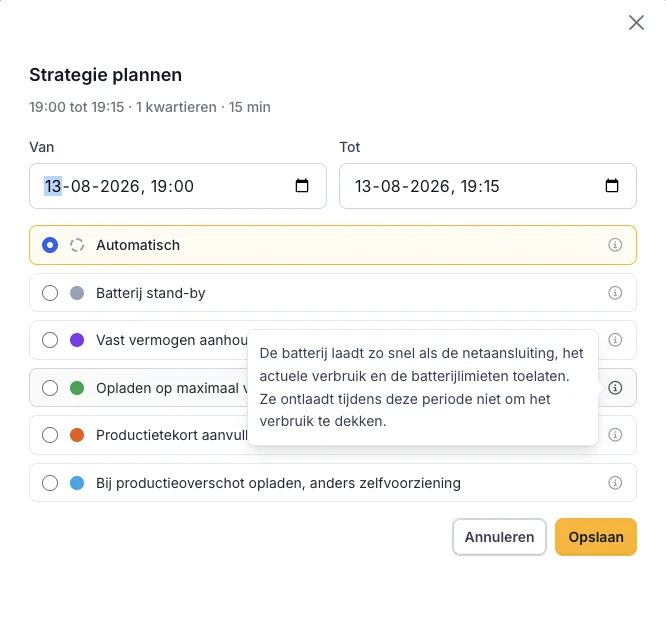
- Strategies explained: every strategy in the battery planning modal now has an info icon that describes what the controller actually does during such a block. The "Automatic" hint moved into the same tooltip, so all options are explained the same way.
Incidents & Notifications
- No more emergency alerts from test incidents: incident types that are still being field-tested no longer trigger emergency notifications. They are still recorded and remain visible to administrators.
- Calmer oscillation damping: fewer false detections, one report per episode instead of a report per occurrence, no reports when nothing was actually damped, and damping is only released once the installation really stops oscillating.
Reliability & control quality
- Silent devices detected faster: the controller monitors on its own whether every device keeps delivering fresh data and reports a device that falls silent.
Release Notes - Early August
This release adds a charge-level projection to the battery plan, battery planning in the mobile app, more supported hardware, an automatically detected MAC address when adding devices, oscillation damping for battery control, and a broad set of interface, incident and reliability improvements.
EMS dashboard & battery planning
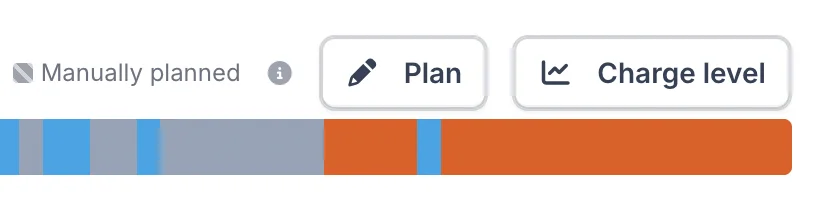
- Charge-level projection: next to the "Plan" button of the battery plan there is now a Charge level button. It asks the controller for its projected state of charge and shows the curve in a modal, together with the covered time range and the minimum/maximum charge band of the battery. Available on controllers from version 0.0.314.
Device Management
Newly supported devices
You can now connect, monitor and control more hardware directly from Voltmasters. See the full device integrations overview.
- AlphaESS STORION-LC-TB125: battery system (PCS and BMS), including the grid meter and PV inverter that sit behind it and are read out through the battery system. Documentation
- Hoymiles HoyUltra 2: battery system (PCS). Documentation
- Schneider EVlink Pro AC: AC EV charger, with a new connector fault incident type that reports a faulty charging connector. Documentation
Adding and managing devices
- MAC address read automatically: when the Add Device wizard probes a device, the EMS controller now reports the MAC address it reads off the network.
- MAC address column: the device list has a new optional MAC address column. The address is refreshed automatically when a device's connection settings change.
- Slave ID prefilled: when adding a device, the Modbus slave ID is prefilled with the value most commonly used by comparable devices.
- Clearer device overviews: both device lists are now ordered by project, then type, then name, and the cross-project overview shows the project column by default.
Mobile app
- Battery planning on mobile: the quarter-hour battery plan can now be read and adjusted from the mobile app, just like on the web dashboard.
- Two days of energy prices: the price graph can now show today and tomorrow instead of a single day.
- Notifications follow the incident: a push notification is dismissed automatically once the incident it announced is resolved.
Incidents & Notifications
- Recurring incidents recognised correctly: a repeated incident is now matched on the controller's own key instead of on its message text, so a reworded message no longer leaves the previous occurrence open and unrelated incidents no longer close each other.
- Readable incident lists: descriptions are truncated to one line in the list, and the full description appears immediately on hover.
- Cleaner inbox: notifications for incidents that were removed by the retention cleanup are now removed as well, so resolved items no longer reappear as unread.
Reliability & control quality
- Oscillation damping: the controller detects power oscillations and damps them, and raises an incident when it does. Telecontrol emergency stops always take priority: they bypass the damping and hold windows completely, so a grid-operator stop is never delayed.
- Isuna battery systems: several control fixes: the EMS setpoint is followed while charging, PV curtailment works when part of the strings are already off, battery power is reported without PV conversion losses, and no control state survives a restart.
- PV communication-loss fallback: the fallback power limit for SunSpec PV inverters is armed more reliably and released correctly when the adapter stops.
Interface & navigation
- Faster-feeling pages: charts and cards now show a skeleton in the shape of the content while data loads, and the loading overlay disappears as soon as the chart appears.
- Overview rows open the project: clicking anywhere on a row in the project overview opens that project's dashboard.
- Automatic reload after an update: when a new version is deployed while you have a page open, the page reloads itself once instead of showing an error.
Accounts
- Smoother invitations: a user who registers through a project invitation is signed in right away, and the terms and conditions are only requested after the invitation has been accepted.
Release Notes - Late July
This release introduces a fully reworked battery planning view with per-quarter overrides, day-ahead prices for 22 European bidding zones, Portuguese as application language, RTU event history for telecontrol, remote battery restart, and a broad set of chart, reporting and reliability improvements.
Languages
- Portuguese is now available as an application language.
- Invitations in the recipient's language: when inviting users or partners you can now pick the language of the invitation. The invitation emails also got a refreshed, responsive design.
EMS dashboard & battery planning
- Reworked battery planning: the battery action plan is now shown per quarter-hour on the dashboard, with the past rendered as a solid read-only band and clearer, translated reasons in the tooltips. The installation graphs were merged into a single view.
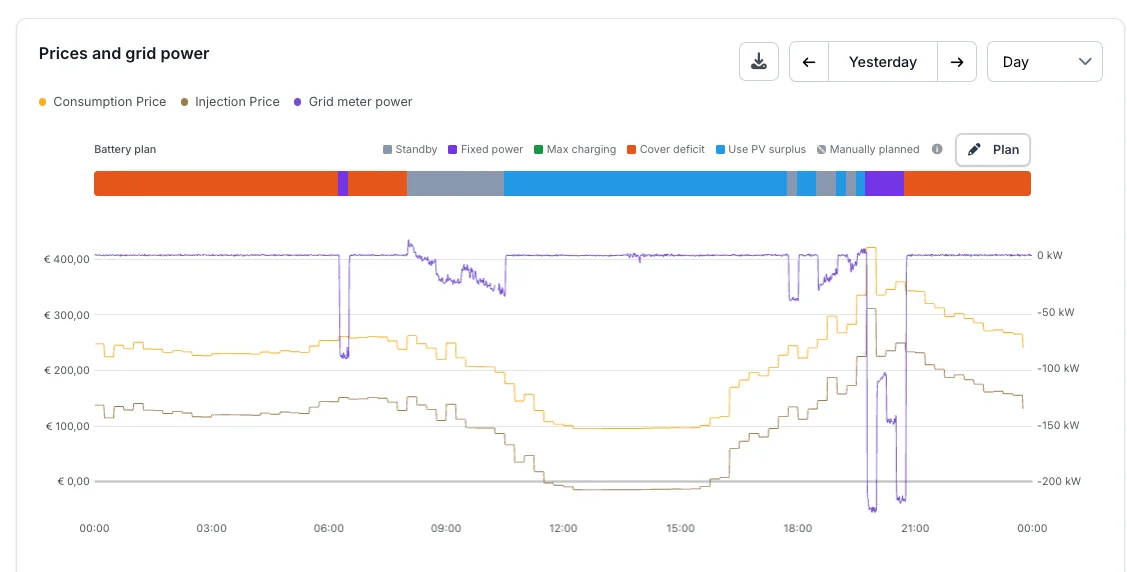
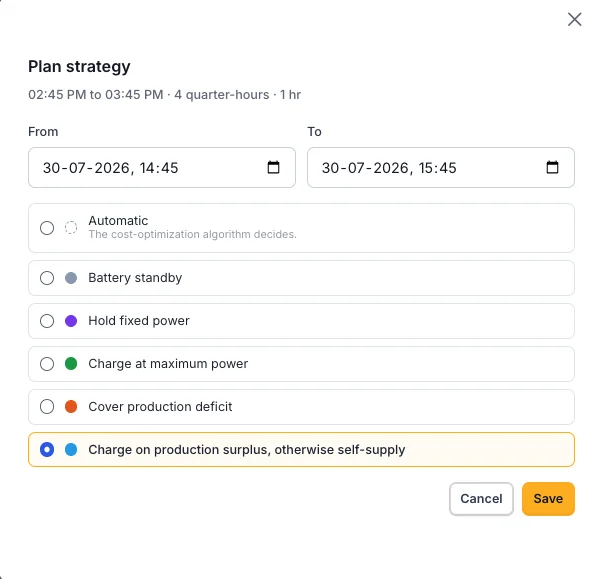
- Per-quarter strategy overrides: on cost-optimization projects you can now override the planned battery behaviour per quarter-hour directly from the plan, including a power input for "follow scheduled power".
- Manual reactive-power override for battery systems (PCS).
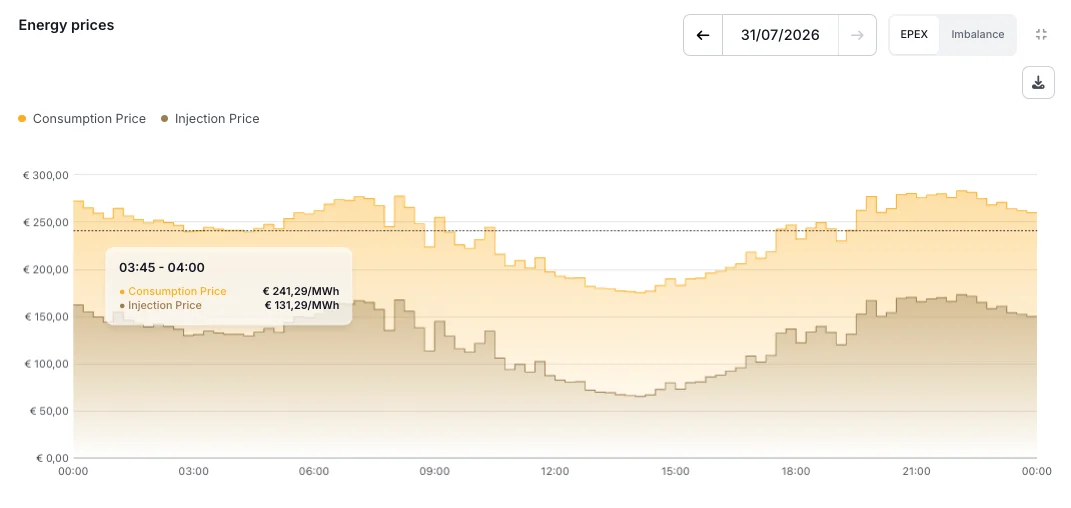
- Energy-price block: a predicted price range is now visualised in the graph, imbalance prices are only shown for countries that actually have them, and imbalance prices are displayed on market time.
- The battery and PV trading state now reflects the controller's actual steering intent.
Device Management
Newly supported devices
You can now connect, monitor and control more hardware directly from Voltmasters. See the full device integrations overview.
- Huawei LUNA2000-215 Smart String ESS: battery system (PCS). Documentation
- Solis hybrid inverter: battery PCS. Documentation
- Sinexcel PWS1-1725KTL-H: battery PCS. Documentation
- Pylontech LEMS: BMS support (previously listed as Pylontech M5). Documentation
- Risen Storage V2: per-stack BMS devices are now available under the PCS. Documentation
Device features
- Remote battery restart: supported battery systems can now be restarted from the Actions page on the device detail.
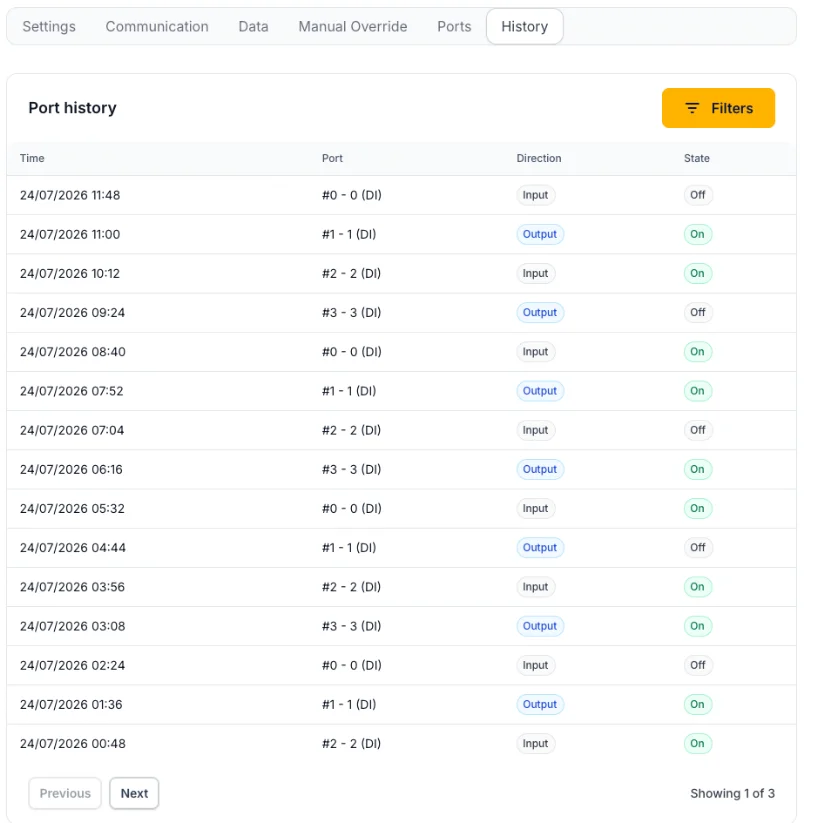
- IO port event history: the device ports page has a new History tab showing port on/off events with filters, pagination and exact timestamps.
- Configurable communication-loss fallback: the fallback power limit applied when communication with a PV inverter or EV charger is lost can now be configured per device.
- Add Device wizard: parameters now reload automatically when you pick a different adapter for custom devices.
- Clearer audit trail: device parameter and model changes are logged more completely, the activity log can be filtered by user and device, and search also matches deleted device parameters.
- Devices that are used as a proxy target are now protected against accidental deletion.
- Controllable load devices now have their own icons.
Telecontrol (DSO RTU)
- RTU event history: the telecontrol page now shows the history of RTU constraint events, including reason codes and date filtering in your own timezone.
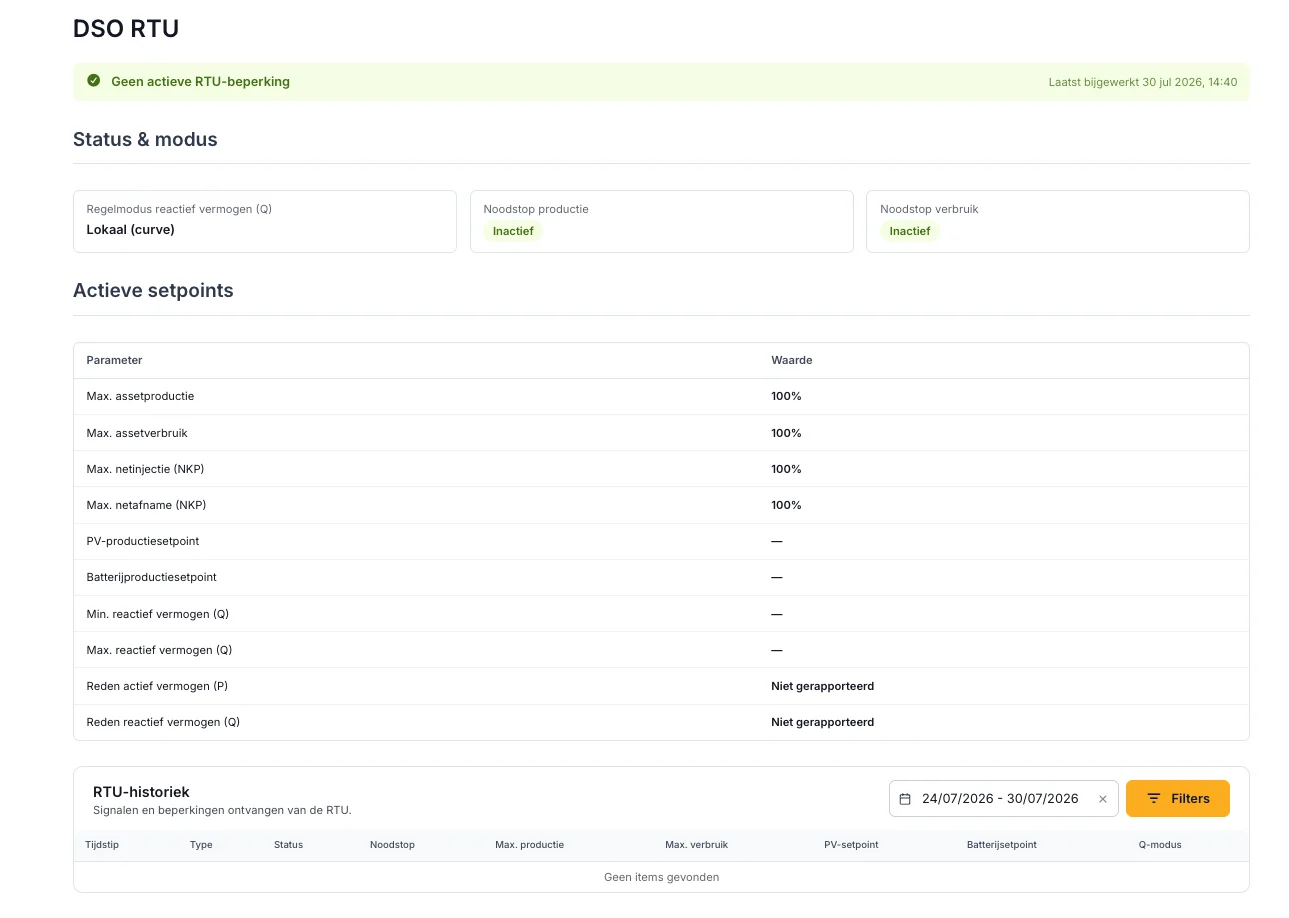
- Per-device-type production setpoints are now shown in the telecontrol state.
Energy prices
- Day-ahead prices for 22 bidding zones: coverage was expanded with Denmark, Sweden, Norway, Ukraine and more; Italy was split into its seven bidding zones; and missing prices for Luxembourg and Italy were fixed. One year of historical prices was backfilled.
- Gridual imbalance trading is now available in production, including a dedicated energy-trading Pro dashboard.
- Yuso imbalance trading: battery and PV can now be controlled simultaneously, with separate PV and battery connections.
Charts & Reporting
- CSV export on every chart: all dashboard charts now have an export button to download the underlying data.
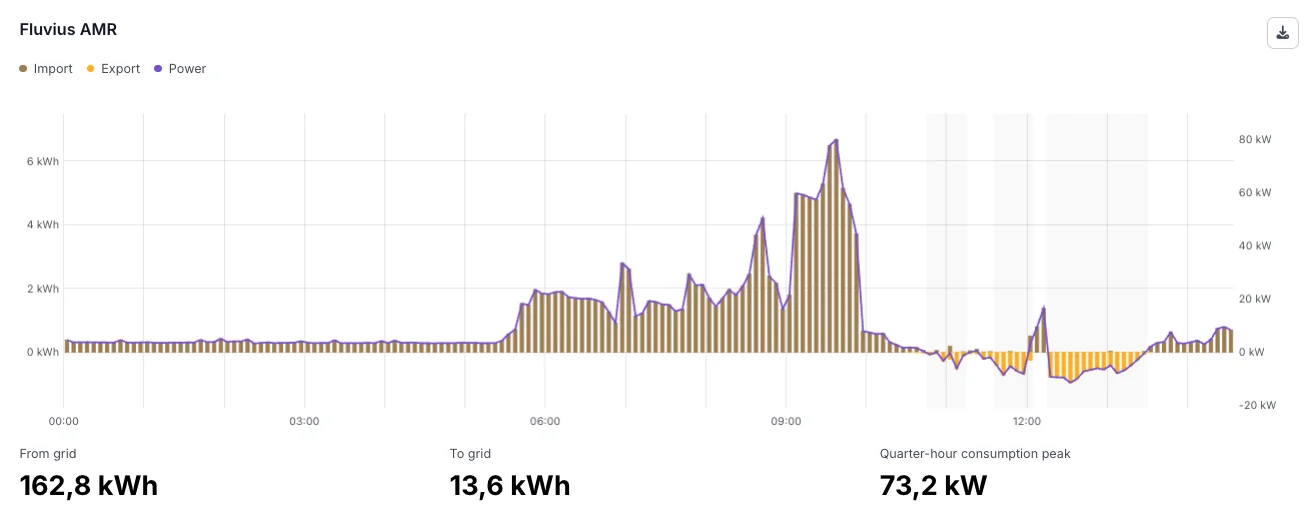
- Chart readability: power axes keep a sensible minimum range so small variations no longer look dramatic, small battery energy values scale correctly, and the cursor and tooltips of stepped price series were improved.
- Timezone-correct date filters: report and dashboard date filters now interpret the chosen dates in the right timezone, so viewers in a different timezone no longer see the previous calendar day.
- Fluvius comparison now includes consumption and production graphs.
- Energy-meter dashboard: smarter default grid-meter selection and meter icons that match the measurement type.
- Menu: the reports (including the new Savings dashboard) were regrouped under a Reports menu section.
Reliability & control quality
- More accurate PV forecasts: forecast calibration against measured production was improved, curtailed periods are handled correctly, and forecast diagnostics were added.
- Clearer grid-limit incidents: grid-limit warnings now use a limit-proportional margin, a warning severity, and an actionable message.
- Fixed a PV curtailment deadlock and export-limit oscillations that could cause PV output to swing between zero and full capacity.
- Stability fixes for the SMA Sunny Tripower, Solis hybrid, Elecnova and Huawei Luna device integrations.
- Controller network configuration: host network interfaces can now be managed remotely.
Incidents & Notifications
- Incident emails only for critical incidents: like push notifications, incident emails are now limited to critical incidents to reduce noise.
Release Notes - Mid-July
This release adds new languages (Spanish, French and German), wind turbine support, a Spanish time-of-use energy contract, more supported hardware, smarter peak-shaving and sub-meter load management, and a broad batch of dashboard, device-settings and reliability improvements.
Languages
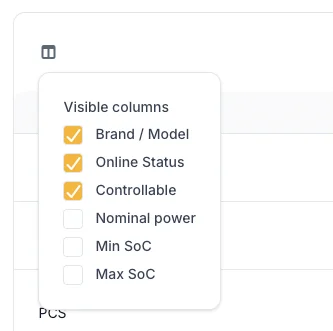
- Spanish, French and German are now available as application languages, alongside the existing ones, both in the web platform and the mobile app. You can switch language in your profile, and the interface (including energy-price and device copy) is fully translated.
Device Management
Newly supported devices
You can now connect, monitor and control more hardware directly from Voltmasters. See the full device integrations overview.
- C-Battery Cbat-IQ: battery system (PCS), including multi-bank support. Documentation
- Elecnova ECO-E233LS: added PCS and BMS model support. Documentation
- EME eCON+ energy meter: energy metering support, including proxy/sub-meter handling behind the eCON+. Documentation
- Solar irradiance meters (Soluzione Solare, IMT Technology): measure on-site solar irradiance and derive a PV power curve from it for more accurate solar output. Documentation
- Victron EasySolar-II (beta): battery inverter (PCS). Documentation
- Sungrow SG125CX-P2 (beta): PV inverter. Documentation
Device settings
- Cleaner device tables: updated default visible columns and removed the firmware-version column for a clearer overview.
Wind
- Wind turbine support: wind turbines can now be added as a device type, with turbine parameters (hub height, rotor diameter, cut-in/cut-out speed, power curve). The platform produces wind-output forecasts from weather data, calibrated against measured production, and includes wind generation in the battery scheduling and grid-limit calculations. Documentation
Energy Management
Contracts & pricing
- Spanish time-of-use energy contract (P1-P6): a new fixed contract type that applies the Spanish CNMC 3.0TD/6.1TD tariff periods per quarter-hour (season, hour and weekend/holiday, Madrid time). Only offered for Spanish projects. Documentation
Battery & load control
-
Peak-shaving reserve: the former "power boost reserve" (only used for DC fast charging) is now a general peak-shaving reserve that keeps grid import under its limit for any load. It is applied consistently across self-supply and cost-optimization. Documentation

-
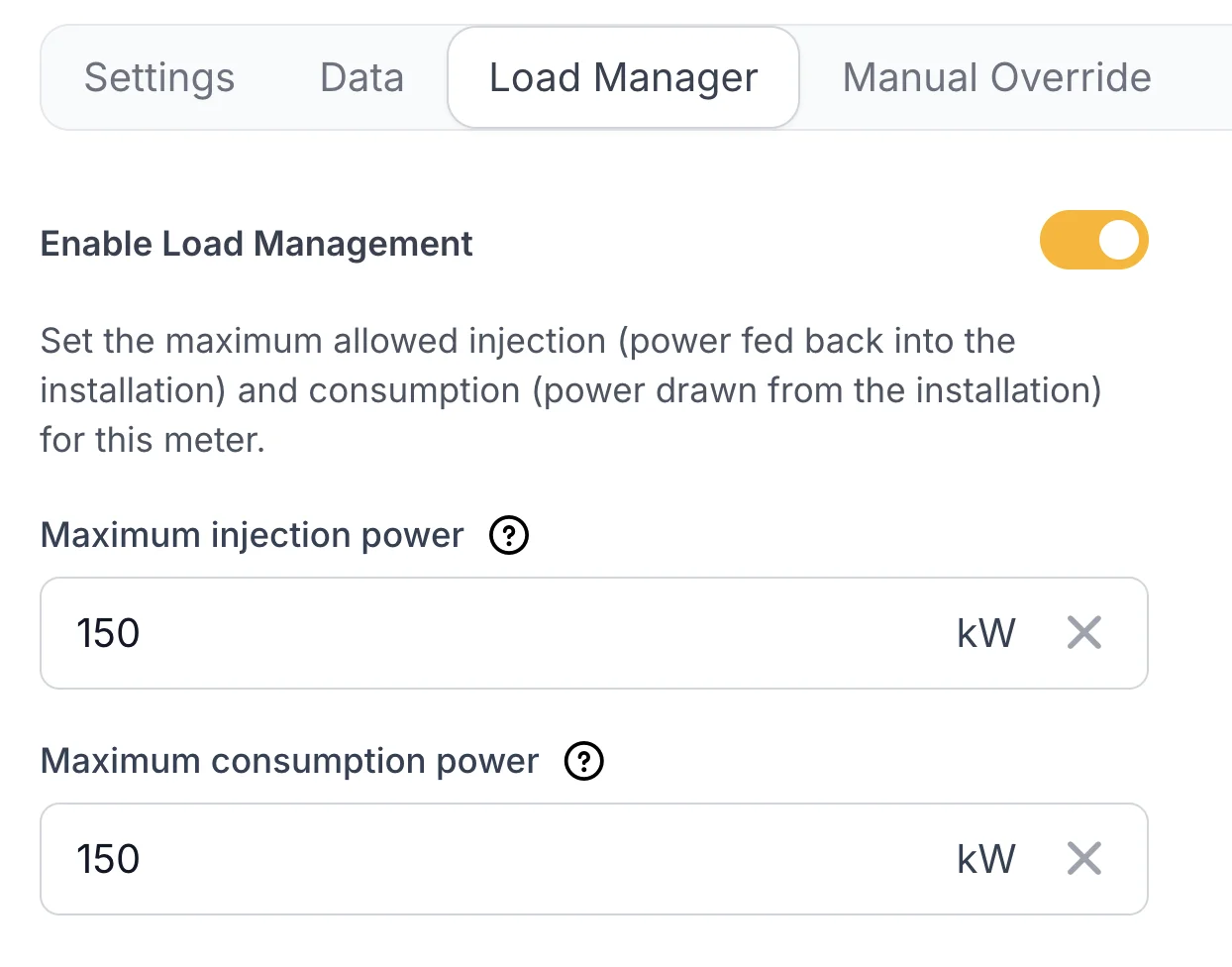
Sub-meter load management: load management now enforces limits across the full metering hierarchy. When a (sub-)meter approaches its limit, the platform first discharges the battery and curtails EV charging before shedding controllable loads, keeping each meter within its limit.
EMS dashboard
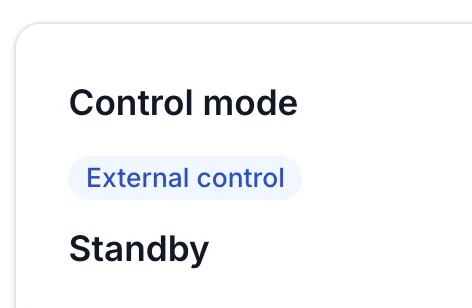
- Clearer control-mode block: added labels for injection and PV-bypass schedule reasons, PV standby / full-production / curtailment states, overrule direction, and a "disabled" / "external control" status.
- Energy-price block: price blocks can now be expanded, EPEX prices are shown in the same block, and the chart is bound to a single day for easier reading. Documentation
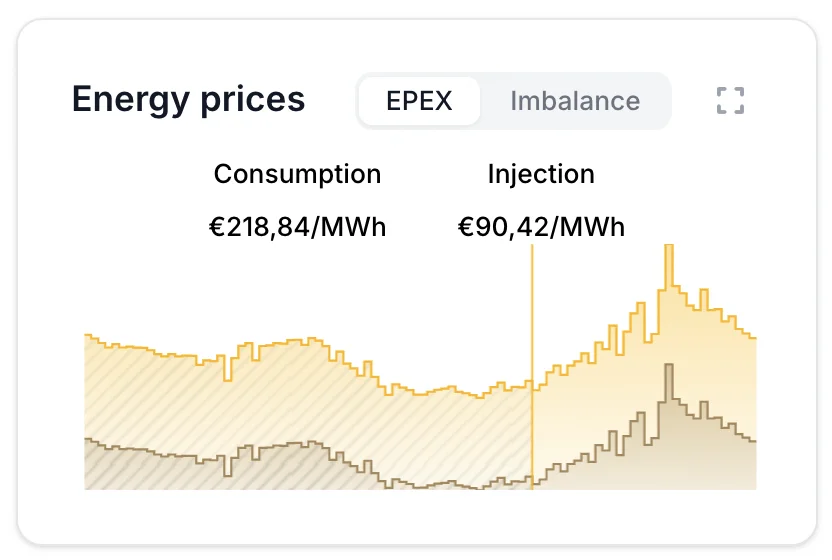
- Removed the standalone imbalance-price display and graph from the dashboard and trading pages.
Reliability & control quality
- More accurate battery scheduling: injection and grid-charge planning were refined so reserved energy is no longer spent too early and cheap-window arbitrage is dispatched correctly.
- Better Victron control: DC-coupled MPPT curtailment and VE.Bus battery control are more stable on single-, two- and three-phase systems.
Metering & Reporting (Fluvius)
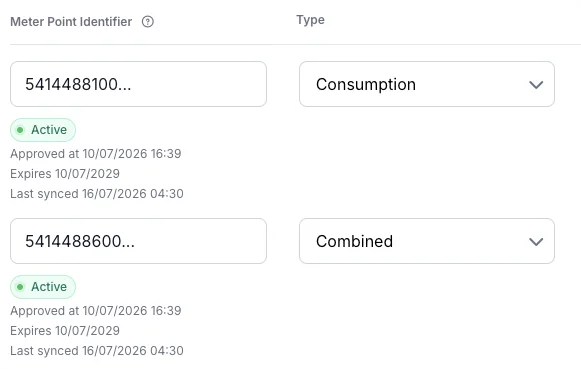
- Fluvius comparison: reworked the comparison view with clearer date-range and mandate selection, better anomaly detection, and terminology updated from "controller" to "local measurement" for clarity. Documentation
Pro Dashboards
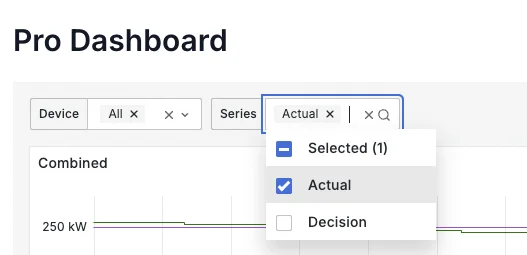
- Clearer Pro dashboards: graph legends now show device names instead of technical identifiers, and the Algorithm and EV-charging dashboards have filters at the top so you can select the devices and series you want to see.
API
- Forecast: You can now fetch all forecast data via API.
Incidents & Notifications
- Only critical incidents are pushed: mobile push notifications are now limited to critical incidents to reduce noise.
- Fewer false alarms: the stale-heartbeat threshold was increased from 15 to 30 minutes, and missing consumption predictions now self-heal before an incident is raised.
Mobile app
- The project dashboard now shows the controller software version and wind turbine data.
- Spanish language was added.
Telecontrol (DSO RTU)
- EME eCON+ as telecontrol provider: the eCON+ can now be used as a telecontrol provider over Modbus. Documentation
Projects & reporting
- Country filter on projects: the project overview can now be filtered by country.
- Detailed consumption export: missing minutes are now added as empty rows so every interval is present in the export.
Release Notes - July
Building on the mid-June releases, this update brings a large wave of new hardware support, optimized energy trading, new imbalance-trading partner, expanded DSO RTU (telecontrol) monitoring, and a broad set of dashboard, planning and reliability improvements.
Device Management
Newly supported devices
You can now connect, monitor and control more hardware directly from Voltmasters. See the full device integrations overview.
- GoodWe SEC3000C: hybrid battery inverter (PCS). Documentation
- Huawei SmartLogger Hybrid: battery PCS that groups SUN2000 inverters and grid meters behind a single SmartLogger, now also supporting multiple grid meters on one SmartLogger. Documentation
- Risen Storage V2 and EcoSourcen EMS V2: battery systems. Documentation
- Sinexcel DC Charger: DC fast charger for electric vehicles. Documentation
- SMA Sunny Tripower TL-30 and additional STP models (STP 8000TL / 9000TL / 10000TL / 17000TL): PV inverters. Documentation
- SAJ CHS2: its grid meter is now resolved automatically under the hybrid inverter.
Improved commissioning
- Huawei SmartLogger discovery is faster and more reliable: it reads device identification to map inverters and grid meters, rejects stale entries, and shows live progress during commissioning.
Energy Management
Battery scheduling
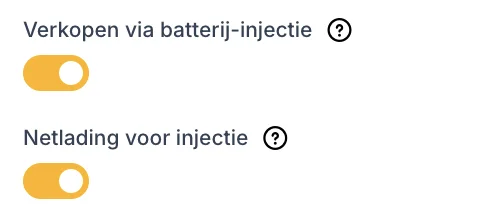
- Grid charge for injection: a new strategy option that lets the battery buy cheap grid energy specifically to resell it at injection-price peaks (used together with injection sales). Documentation
- More accurate injection planning: several fixes so the schedule dispatches injection sales correctly at price peaks. Documentation
- The battery now rests during idle slots: during an idle schedule slot the battery no longer self-supplies the whole site to zero grid. It only "boosts", discharging just enough to keep the site within the grid import limit, and leaves the economic self-supply to the planned slots. Documentation
EV charging
- Smoother EV & battery coordination: EV power budget now ramps smoothly. Documentation
Solar (PV)
-
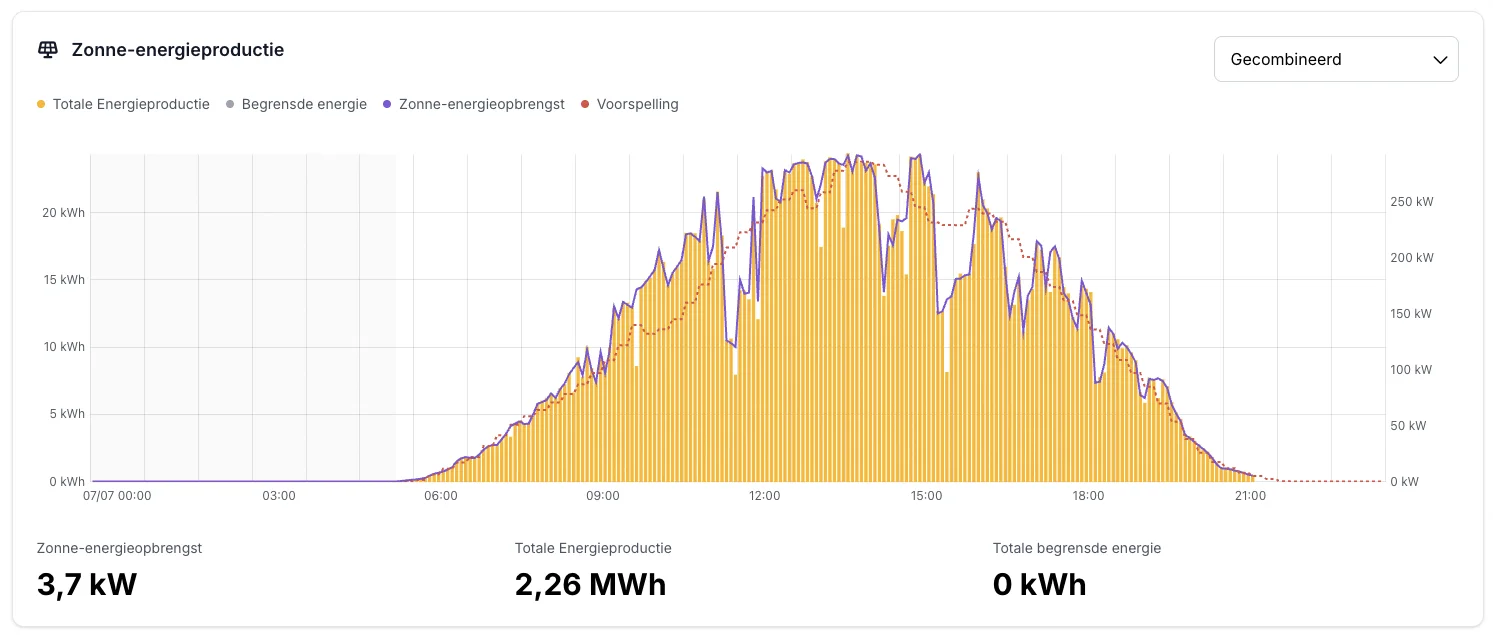
Better PV production forecasts: daily per-inverter scoring of forecast versus actual, with automatic bias correction and weather-aware improvements.
Energy Trading
New imbalance-trading partners
- Engie is now available as imbalance trading provider. Configure them in the project's energy trading module. Documentation

Improved
- Simpler trading configuration: trading eligibility is now determined automatically by device controllability, so the manual per-device enable/disable form has been removed. Documentation
- New EPEX regions: energy-price calculation now supports new EPEX bidding zones: DE, AT, CH, GB, PL. Documentation
DSO RTU (Telecontrol)
-
Sibelga is now supported as a telecontrol operator (over Modbus TCP), added through a new multi-operator telecontrol layer. Documentation
-
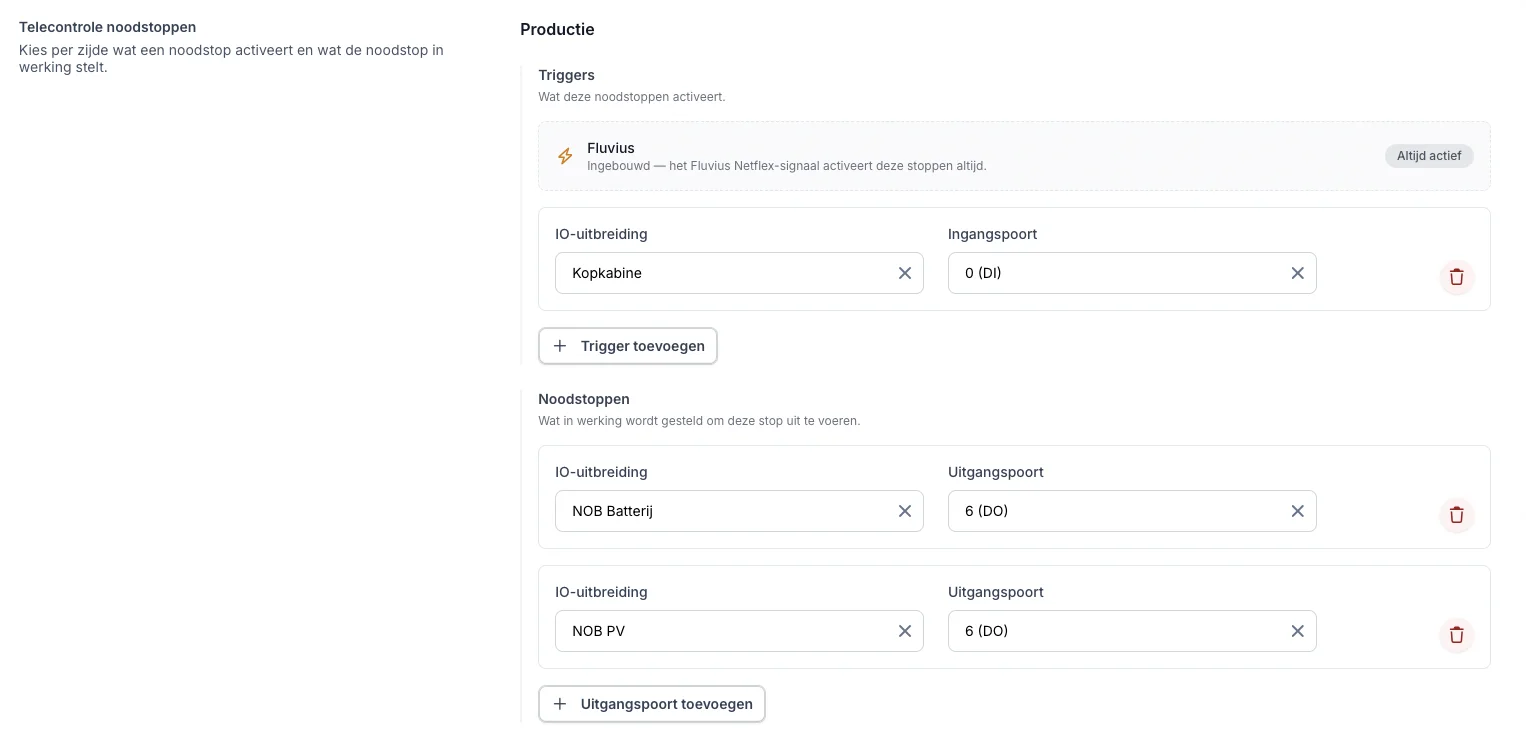
Local emergency-stop triggers: configured IO digital inputs can now assert production/consumption emergency stops locally, combined (OR-ed) with the grid operator's IEC-104 commands. Documentation
-
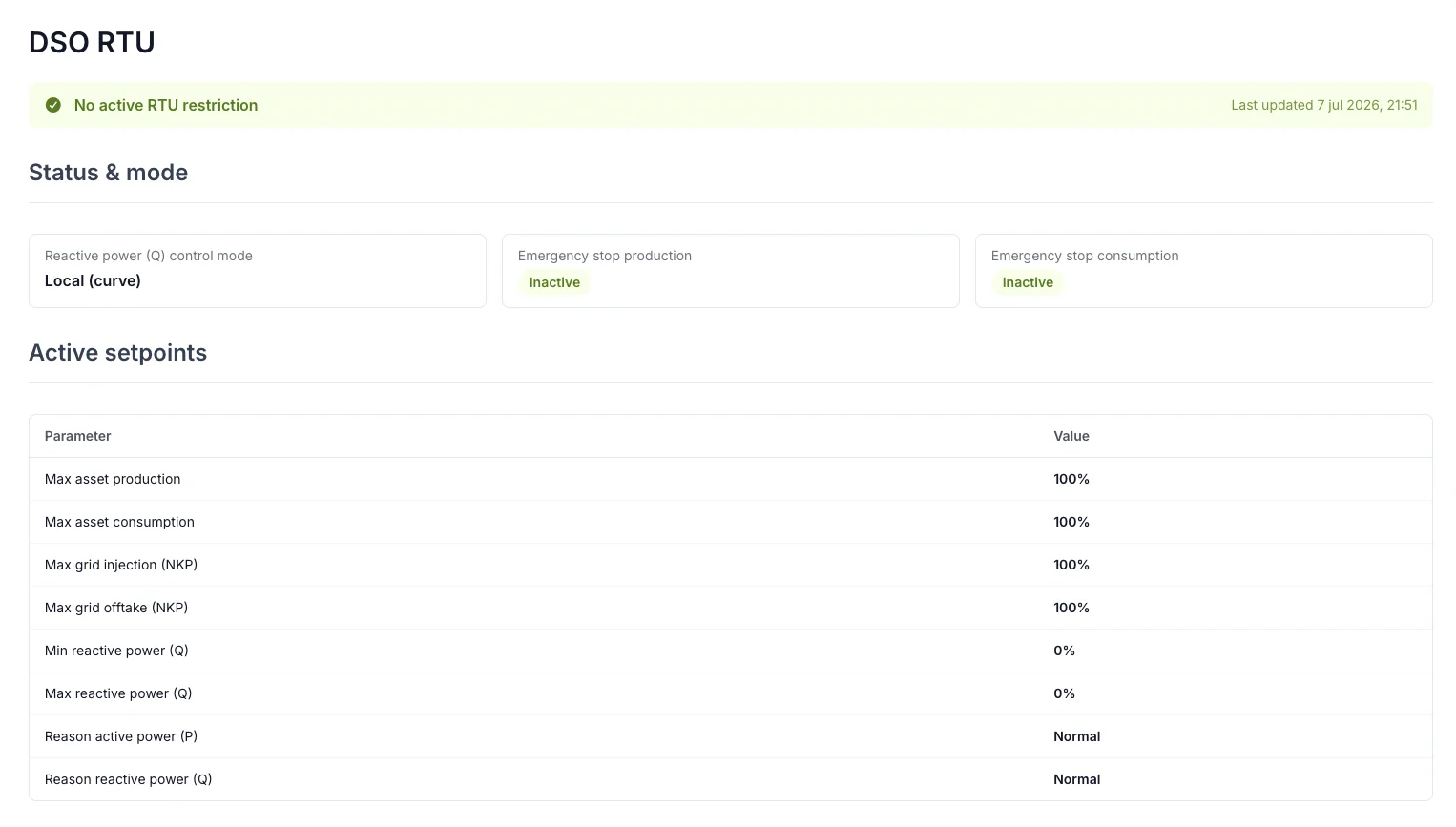
RTU status dashboard: a new telecontrol visualization shows live RTU status and raises incidents when the RTU triggers an emergency stop. Documentation
-
Fluvius energy-data mandate: support for the Fluvius (itsme) mandate flow to retrieve metering data. Documentation
EMS Validation
- Project delivery validation: New projects can be marked ready for validation, with a status bar on the EMS dashboard. This requests the Voltmasters project engineers to validate the configuration.
Planning & Overrides
-
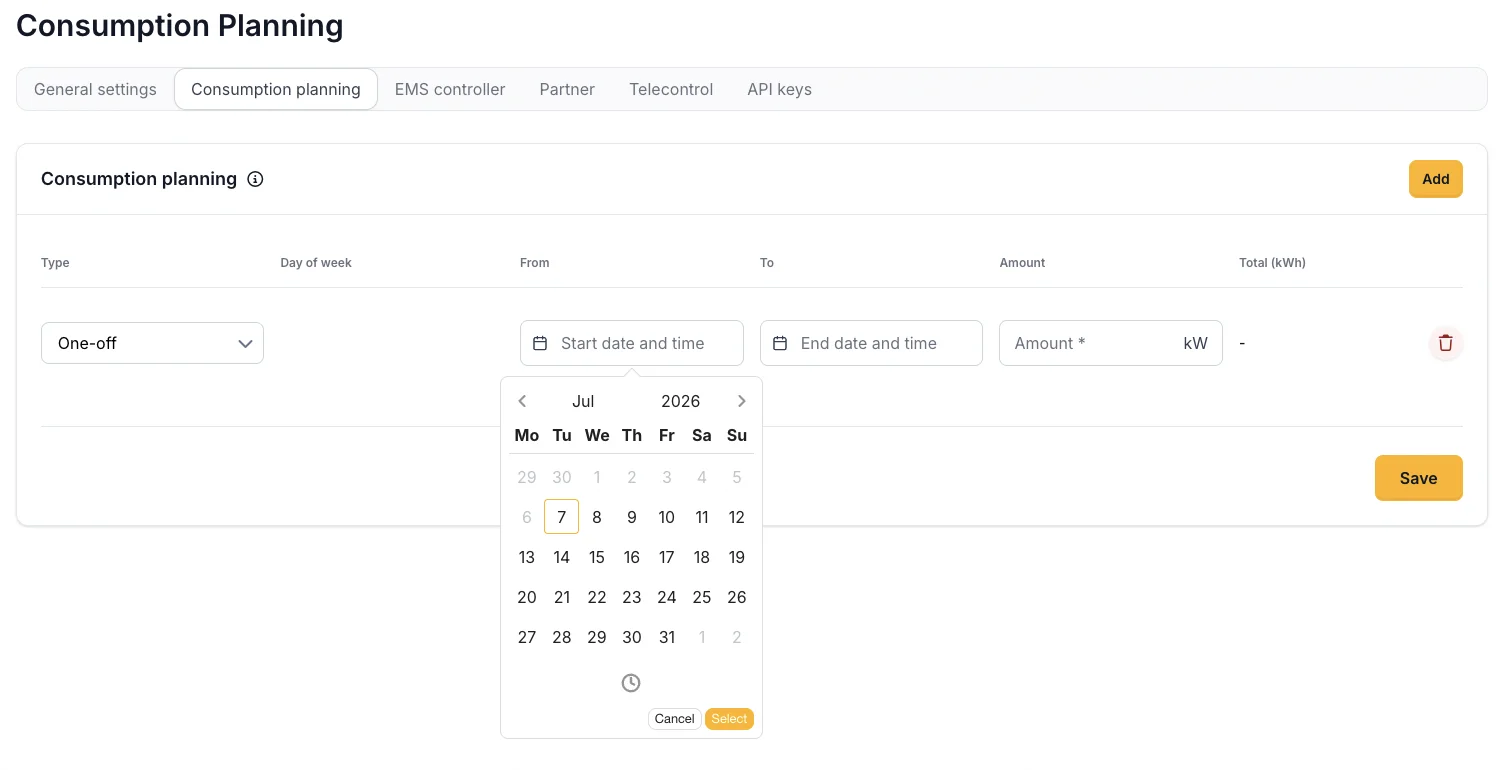
One-off consumption planning: schedule temporary load for a concrete date/time range, alongside the existing recurring weekly slots. Documentation
-
Scheduled manual overrides: device manual overrides can now be scheduled with from/till pickers. Documentation
Mobile app
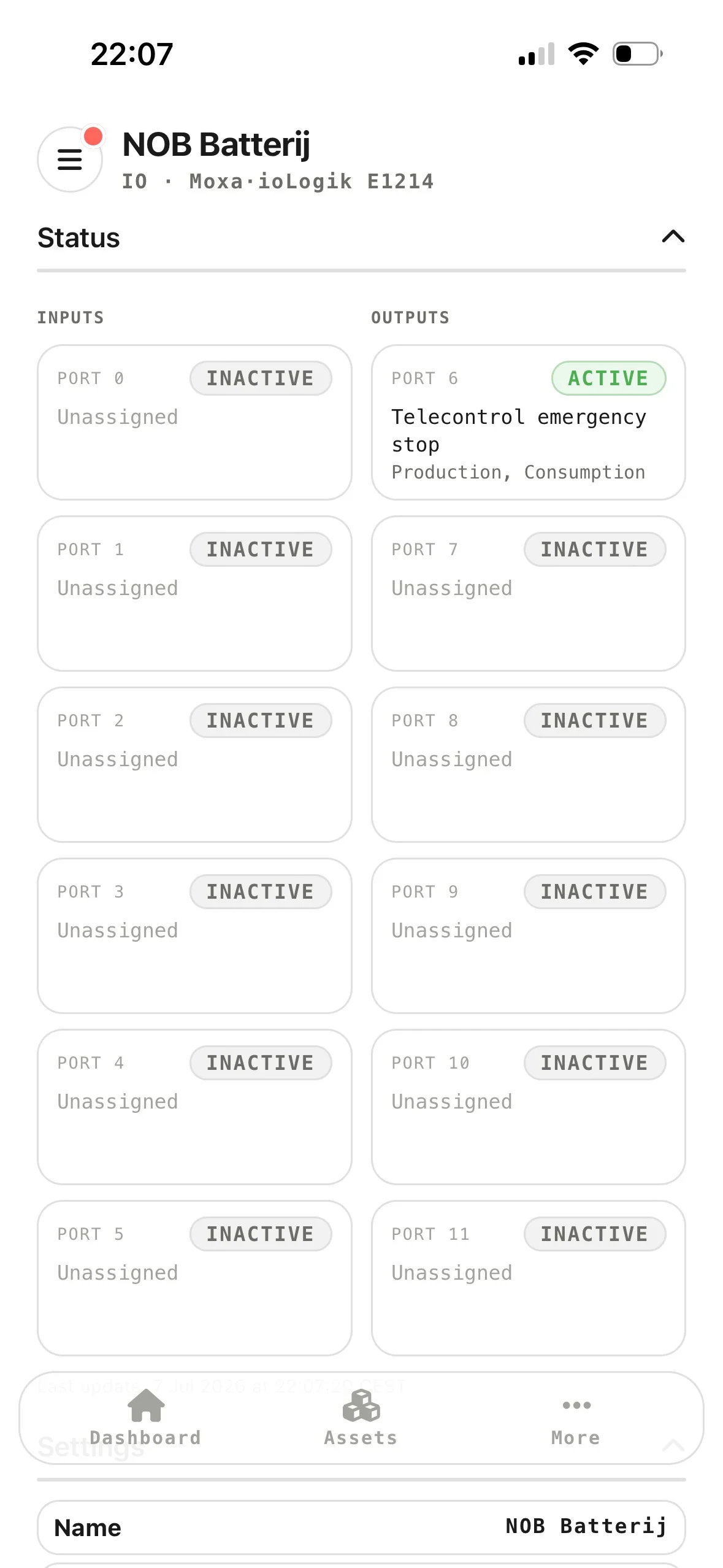
- IO extension ports are now available in the mobile app, showing each port's direction and assignment (controllable load, telecontrol trigger, emergency stop or switch position).
Release Notes - June (part 2)
This release introduces support for IO extensions and controllable loads, expands the list of supported hardware, adds a Flexible energy contract type, a network check for EMS controllers, and a partner webhook API, alongside numerous accuracy and reliability improvements.
Device Management
IO extensions & controllable loads
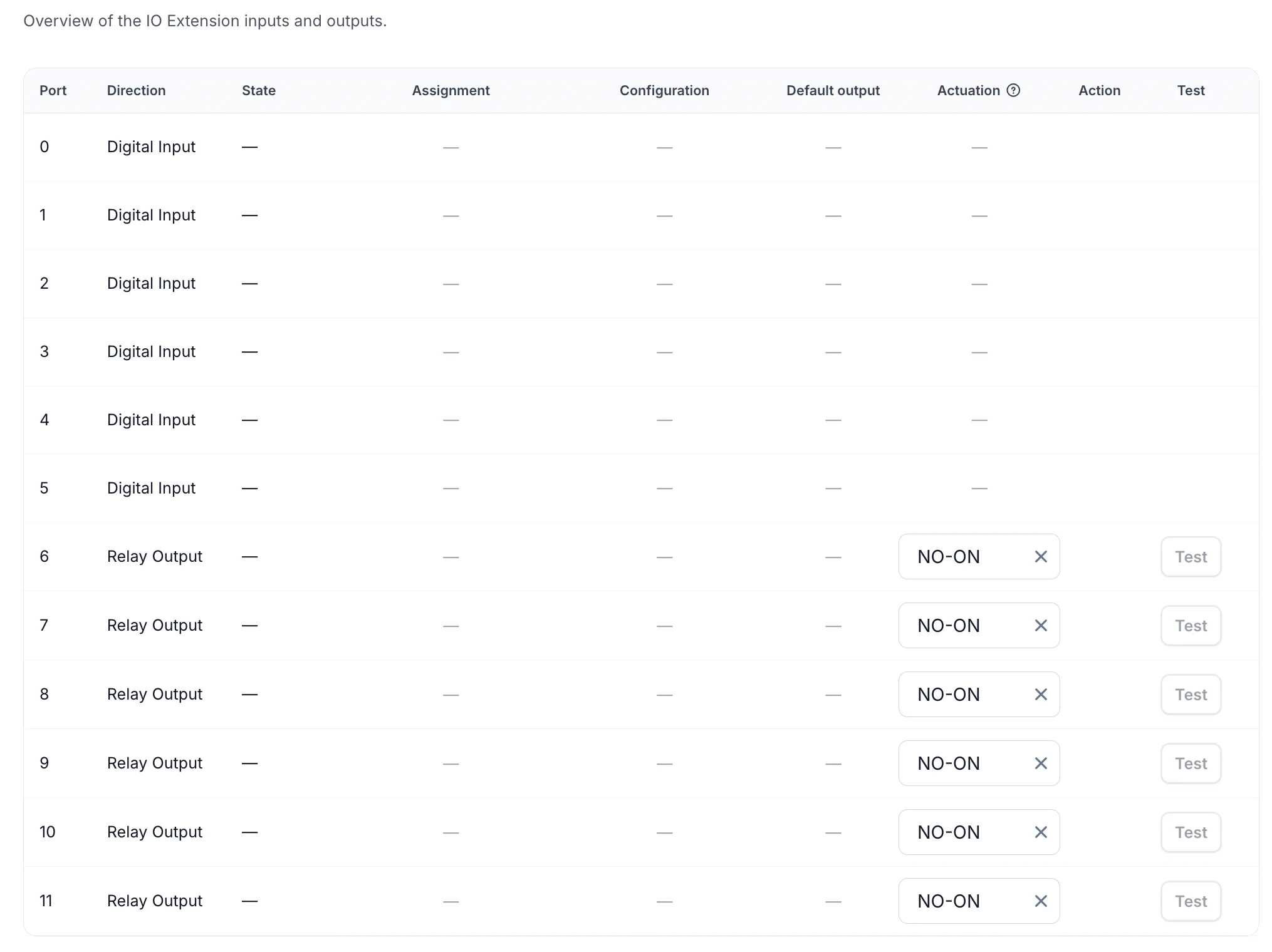
You can now connect an IO extension to the EMS controller and use its relay outputs to switch simple on/off loads (for example heating elements, pumps or auxiliary equipment) on and off directly from Voltmasters.
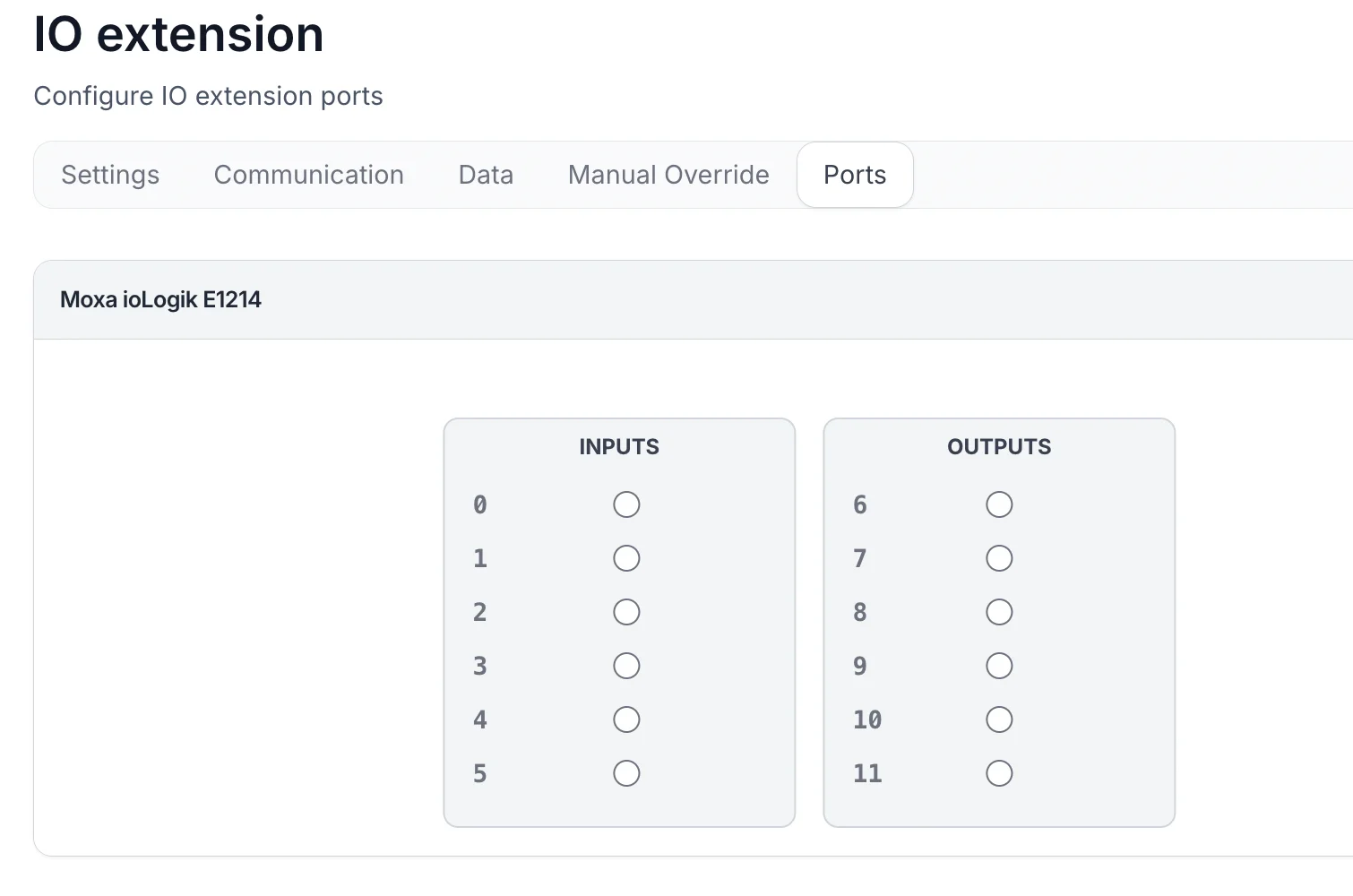
- IO extension as a new device category, with digital inputs and relay outputs. Moxa is the first supported brand.
- Controllable loads wired to a relay output of an IO extension, with:
- a configurable relay actuation mode (normally open / normally closed, and whether the device is ON or OFF when the contacts close)
- a default output state
- scheduling parameters to control when the load may switch
- A dedicated Ports tab on the IO extension to configure each port (direction and usage).
- Manual overrides to force a port or a controllable load on or off.
- Telecontrol emergency stops: map IO extension output ports to the production and consumption telecontrol stops in the project settings. Each port can be used by a single stop.

Newly supported devices
- Poweroad Flex261 AIO Liquid Cooled: liquid-cooled all-in-one battery system.
- Schneider iEM3355 & iEM3455: energy meters, added as beta.
- SAJ CHS2 self-consumption mode: the SAJ CHS2 hybrid inverter can now be configured to allow self-consumption mode, giving you more control over how the device prioritises using your own generated energy.
Energy Management
New
- Flexible energy contract type. Alongside dynamic and fixed contracts, you can now choose a Flexible contract: rates are adjusted periodically (for example monthly or quarterly) but remain fixed within that period. The contract-type tooltip now explains the difference between dynamic, flexible and fixed.
Partner Portal & Integrations
New
- Partner webhook API. Partners can now manage webhook subscriptions through the integration API (create, list, view, update, delete, ping, and rotate the signing secret) and receive notifications when a project's coupling configuration changes. A project site-config endpoint has been added as well.
See documentation: https://platform.voltmasters.be/docs/integration/api#/operations/v1.listIntegrationWebhook
Settings & Administration
New
- Network check for EMS controllers. Voltmasters can now test network connectivity from the controller to specific hosts and services (TCP, DNS, NTP, STUN and HTTP), including latency, resolved addresses and HTTP status, to quickly diagnose connectivity problems.
Release Notes - June
Device Management
Newly supported devices
A major expansion of supported hardware. You can now connect, monitor, and control the following devices directly from Voltmasters.
Batteries & battery inverters
- SAJ CHS2: hybrid inverter combining solar and battery in a single unit
- Teplore V2: battery inverter for residential and commercial storage
- Elecnova Eco: battery inverter for energy storage
- EcoPowerCell: battery system for storing solar energy
Solar (PV) inverters
- Solax X3: three-phase PV inverter, now supporting a 4th PV string
- Solax X3 Pro 15K G2: high-power three-phase PV inverter
- Solaxmega: PV inverter for larger installations
EV chargers
- Mennekes Amtron: smart charging station for electric vehicles
Energy meters
- Socomec DIRIS A-30: energy meter for accurate consumption measurement
Improved
- Several devices have graduated out of beta and are now fully supported.
Energy Management
Improved
- The Grid Limit Safety Controller now has an improved emergency-stop procedure and clearer warnings. It actively monitors your grid connection limit and intervenes before it is exceeded, helping you avoid peak penalties and outages.
- The consumption peak is now calculated per 15-minute interval, in line with grid operator settlement.
EMS Dashboard & Monitoring
New
- Calendar date picker on dashboard graphs. Jump straight to any day, or switch between day, week, and month views to review historical data.
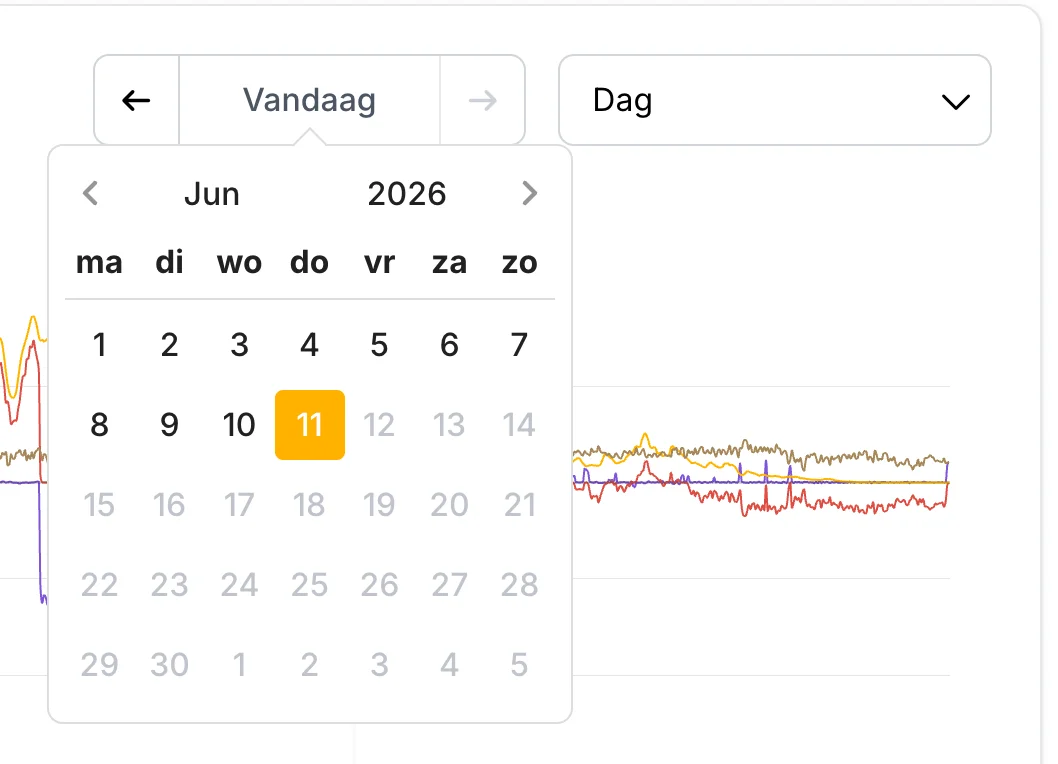
Pick any day, week, or month directly from the graph.
Improved
- Battery statistics no longer show unknown or unavailable values, for a cleaner overview.
- EV charging dashboard with corrected values, a revised connector interface, and a clearer charging-session tooltip.
- Improved energy price graph on the EMS dashboard, now showing live consumption and injection prices.
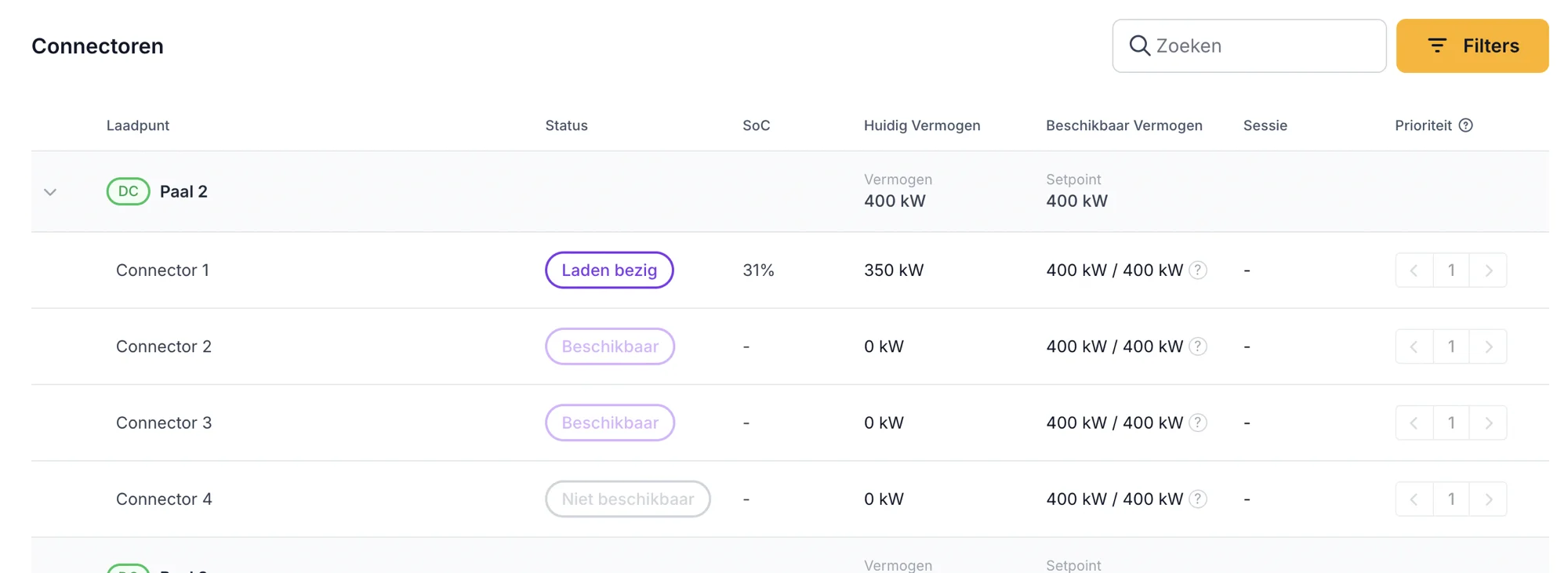
Per-connector status, state of charge, live power, available power, and charging priority.
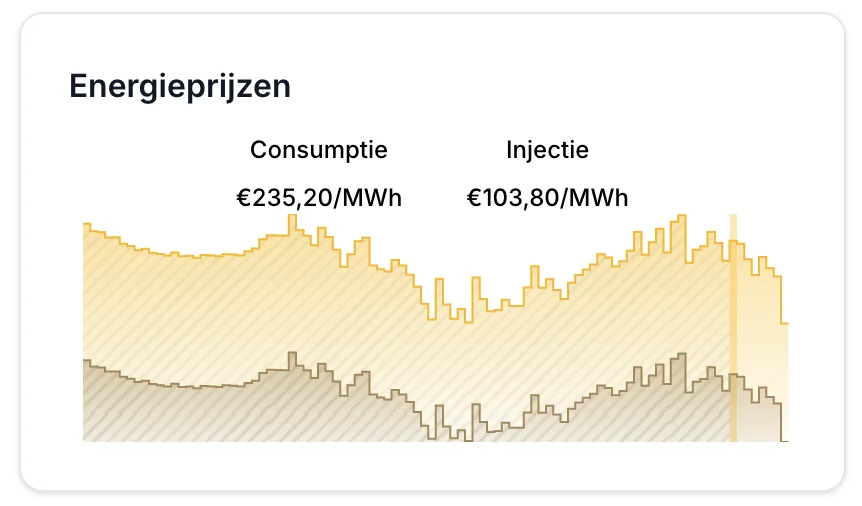
Consumption and injection prices at a glance.
Incident Management
New
- New incident types for battery (BMS) and inverter (PCS) faults, so hardware problems are detected and reported more precisely, including readable descriptions in your own language.
Partner Portal
The partner portal gets a major upgrade this release.
New Partner Dashboard
The partner portal now opens on a brand-new Partner Dashboard, your central cockpit as a Voltmasters partner. In one place you get:
- Key figures for your portfolio: active projects, active subscriptions, hardware integrations, and hardware-agnostic coverage
- A live feed of recent changes across all your projects
- Direct access to your account manager and technical support contacts
- Quick links to the technical documentation and shared documents you can use to introducte Voltmasters to your clients.
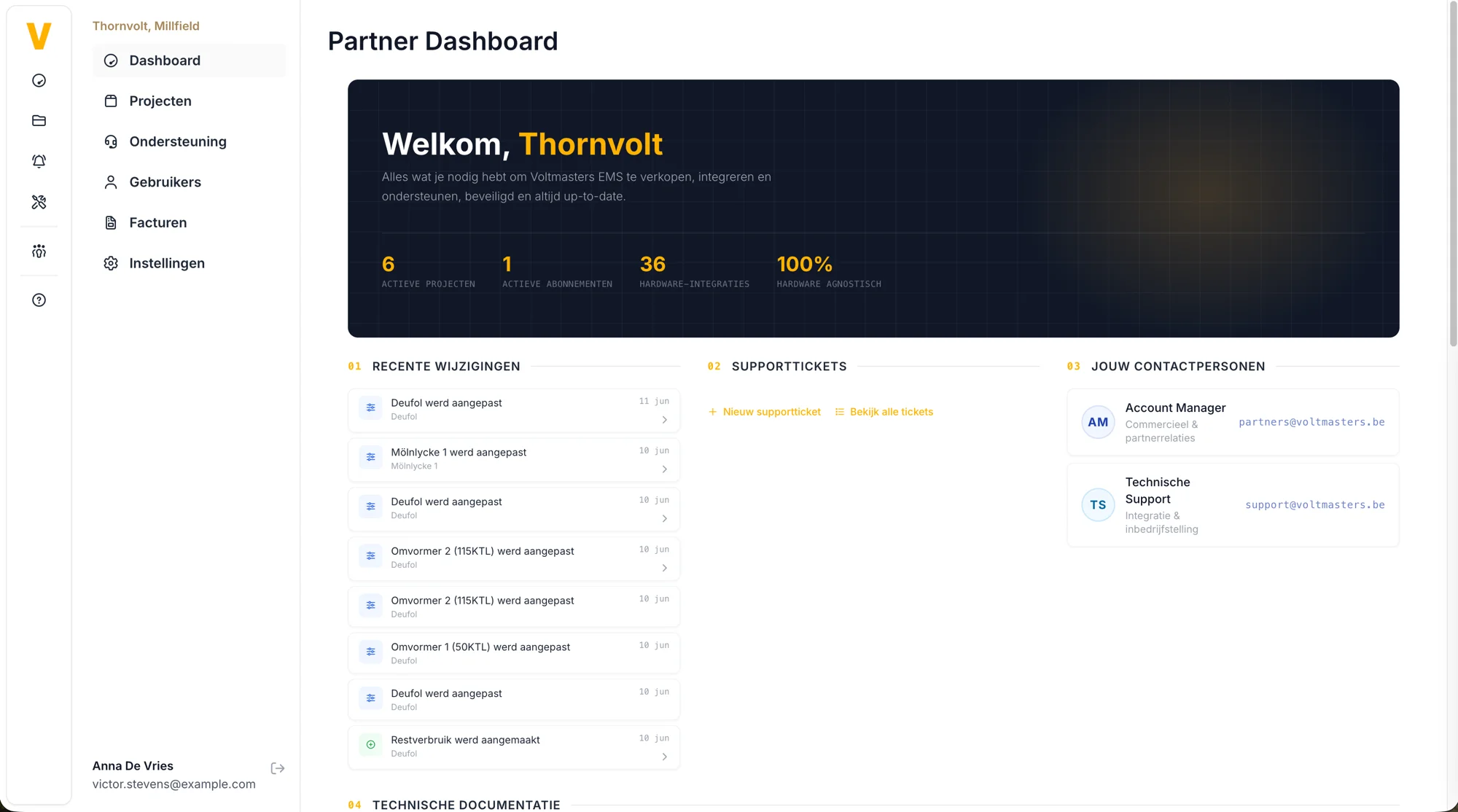
The new Partner Dashboard, your central overview as a Voltmasters partner.
Support & ticketing
Alongside the dashboard, the partner portal now includes built-in support, so you no longer need email to get help:
- Create support tickets directly from the portal
- Track all your tickets in a single overview, each linked to the relevant project and device
- Tickets are handled through our helpdesk for faster, traceable follow-up
Release Notes - April
Security
New
- Two-factor authentication (2FA) is now available for added account security.
- We strongly recommend enabling it for all users.
Reporting & insights
New consumption report
Available via the Energy Meters dashboard.
Includes:
- Totals and peak values per energy meter
- Totals per PV inverter
- Project-level totals
- Date range filtering
- Tariff scheme filtering (day/night)
- Export functionality
- Minute-level export for detailed internal settlement
EMS Dashboard
New
- Per-minute measurements in daily view for more accurate visibility of peaks and fluctuations.
- New graph for:
- energy prices
- grid power
- New KPI blocks:
- Self-supply rate
- Self-consumption rate
Improved
- Updated graph UI for better readability.
- Smoother chart rendering.
- Filters moved closer to graphs.
- Improved labels for:
- Consumption
- Grid import
- Grid export
- Each battery now shows SOC in the energy flow diagram.
Energy Management
New
- New battery load balancing strategies:
- Cascade
- Pro Rata
- Configurable in project settings.
- Grid capacity / contract power changes can now be:
- Applied immediately
- Scheduled for later execution
- Scheduled changes are automatically applied.
- Detection of deviations between battery setpoint and actual battery power.
- On each device, you can now configure whether the TCP connection must be exclusive or may be shared.
- Imbalance prices are now fully logged for all prices published by Elia in the context of market pricing.
- Purpose: market analysis to support development of proprietary control strategies.
Incident Management
New
- Incidents now include severity levels:
- Info
- Warning
- Critical
- Open incidents can now be manually marked as resolved.
Improved
- Status icons better reflect open, muted, and severe incidents.
Device Management
New support
- ABB EV chargers
- Fluvius P1 energy meters
- Sunny Tripower PV models
- Expanded support for SunSpec-compatible PV inverters
New
- Energy meter can be set as main meter directly during setup.
- Battery setup now requires minimum and maximum SOC values.
- Clear distinction between virtual and physical devices in the setup form.
Improved
- Additional tooltips added to input fields.
Project Management
Improved
- Projects without devices are now more clearly highlighted in the project list.
- Net connection references / meter point IDs can now be managed.
- Improved validation and country-specific guidance added.
PV & Energy Data
Improved
More consistent and accurate calculations for:
- battery state of charge
- PV production
- quarter-hour peaks
- consumption totals
- PV dashboard now correctly retains inverter selection between combined and individual views.
API & Integrations
New
New integration API for partners and energy providers:
- Retrieve projects
- Energy meter data per quarter-hour
- Peak and interval values for external reporting and integrations
Release Notes - March
Partner Portal & Management
New
- New Partner Portal for improved collaboration and management.
- Partner information visible in the sidebar.
- Partner logo shown in the menu.
- Users can be invited via email to access the partner environment.
- Partner settings available per project.
- Website link added to partner profile.
Billing
- Overview of invoices.
- Overview of subscriptions.
- Export/download of subscription data.
- Partner billing details are now automatically prefilled during subscription checkout.
- Mandatory user consent checkbox when activating subscriptions.
Project Management
New
- Direct navigation from project status icon to incidents.
- Firmware update prompt may appear when creating a new project.
- API key management moved to project settings.
Improved
- Grid settings in project configuration are now better structured.
Device Management
New
- New All Devices page.
- Direct link to device settings.
- Filters by type + model.
- Per-device telecontrol can now be enabled/disabled individually.
- Manual device overrides with full history tracking.
New supported devices / brands
- PowerVault
- Eastron SDM630
- Etrel
- Siemens
- Growatt
- Risen Storage
Improved
- Reduced number of required fields when adding devices.
- Better prevention of duplicate devices.
EMS Dashboard & Monitoring
New
- New control mode view.
- New EV Charging Pro dashboard for charging stations.
- Live data on dashboards:
- battery status
- real-time solar production
- charging status
- Daily PV forecast now visible in dashboards.
Improved
- Redesigned energy flow diagram.
- Improved layout.
- Better handling of long names.
- Battery State of Charge added.
- Higher refresh rate for the energy flow diagram.
Solar / PV
New
- Incident created when PV production is missing for 2 hours while production is expected.
- Smarter PV forecasting using weather data and historical data.
- Nominal power and production capacity added to configuration.
- PV curtailment visualization in graphs.
- Display of total curtailed energy.
Improved
- More accurate solar forecasting.
- Inverter power is now taken into account in predictions.
- Nominal power can be auto-filled when adding PV installations.
- Improved fallback when weather or prediction data is unavailable.
Energy Management
New
- Manual consumption planning input now available.
- Peak power split into:
- consumption
- injection
Improved
- Better handling of negative values in imbalance graphs.
- Clearer explanation for consumption planning inputs.
API & Integrations
New
- Introduction of a general API with API key authentication.
- API endpoints for:
- devices
- curtailment
- calibration
- overrides
- incidents
- manual overrides
- Full API documentation available.
Improved
- Trevi integration now uses a separate certificate per project.
- Fix for ENTSO-E day-ahead prices when quarters are missing.
General Improvements
- Faster user experience due to background controller updates.
- More reliable tooltips and graphs.
- Improved error messages for invalid email addresses.
- Grafana Pro dashboards are now refreshed daily to ensure the latest version is always available.
Release Notes - February
EV Charger Support
- New EV Charger module: full support for EV chargers in the platform.
- EV dashboard: new overview page with charging stations and connectors, real-time power, donut chart, and SoC column.
- Charging priority: priority can be set per connector; changes are processed in a queue.
- Integration: EV chargers included in the EMS dashboard (block) and in consumption planning.
- In project settings, a power boost reserve can be configured. This buffer is built up to smooth peak loads from DC fast chargers.
Subscriptions and Invoicing
- Subscription flow: new “activate-subscription” structure with subscription plans.
- Management page to handle subscriptions and invoices.
- Possibility to adjust billing details for upcoming invoices.
EMS Dashboard and BMS Dashboard
- Dashboard redesign: renewed EMS dashboard with line chart and improved battery visualization.
- Energy meters: “show unmeasured” option for energy meters; device type calculator now uses active power.
- EMS dashboard optimization
Consumption Planning
- Interface to manually enter consumption planning.
- Plan additional consumption as recurring. For example, for machines that switch on at fixed times where sufficient energy must be buffered to smooth this consumption peak.
Incidents and Monitoring
- Muted incidents: incidents can be muted; muted incidents no longer count toward status/badges in the project overview.
- New triggers: incident for negative consumption; command that verifies whether PV production is actually generating when it should.
Device Support and Management
- New brands/models: Hite (PCS/BMS), Solis, Growatt, Socomec (energy meter), Schneider IEM3555 energy meter. Sunspec generic PV device; SCU BRES reverse PCS adapter; proxy for Gres BMS; Hite combiner box.
- Adding devices: wizard redesigned:
- Device properties are read live from the device.
- Check if the device is reachable during setup.
- Child devices are detected and offered for automatic addition (e.g., hybrid inverters).
- Support for multiple BMS devices per inverter.
- Improved validation and device configuration.
MCP (Model Context Protocol)
- MCP server: new MCP server with device search and resources. Currently in beta.
Strategy and Trading
- Project strategy: deadband as a project strategy setting.
Minor Adjustments and Improvements
- UI/UX: small design and padding fixes; horizontal scrolling on battery components (no mouse wheel); fixed scrolling in charts; copy-to-clipboard for hardware ID (HTTPS); phone number no longer required/unique in profile.
- Forms: improvements to General Settings, add device form, and user profile (including precognition, password saving); tooltips and visibility logic in device settings.
- Charts: hidden series filtered from tooltip; tooltip rendering fixed when first series is disabled; minimum y-axis set to 0; adjusted line width; check added when chart element is not found (no mount).
Release Notes – Web Application
- Rework of the EMS dashboard
- Filter muted incidents from project overviews and the incidents item in the project menu
- Project filtering based on incidents now takes the muted status of incidents into account
- Project configuration: new fields added, power boost reserve (%) and deadband (kW)
- Fix for negative production values on the EMS dashboard
- Google Chat notification when creating new projects
- Data update:
total(Dis)ChargedWattHoursreplaced byconsumptionWhandproductionWh - Energy flow diagram now uses kW values read directly from the PCS, instead of V × A × cos φ
- Extended input validation for imbalance provider configuration
- Profile update: phone number is no longer required and no longer needs to be unique
- Fix for negative values on the EMS dashboard and energy meters
Firmware Version 0.0.192
PV Curtailment Optimization
- Grid export limit is now implemented directly in PV inverter setpoint calculations.
- Improved curtailment handling for edge cases:
- negative injection price, positive consumption price
- negative injection price and negative consumption price
Battery Scheduling
- Added a new “Charge at max power” action type to the battery schedule.
- Introduced an explicit action to charge the battery at maximum available power.
compensate_pv_surplusis now actively scheduled instead of defaulting to idle behavior.
Control Logic Improvements
- Added a dead zone to self-supply control to prevent unnecessary oscillations.
- Improved trading logic to prevent unintended battery charging from the grid when trading is enabled.
Controller Debugger UI – Enhancements
Activity Logs
- Important system events are now logged locally on the controller, improving diagnostics and troubleshooting.
Extended Controller Dashboard
The dashboard now includes additional system-level information:
- System information
- Memory usage
- Storage status
- Network details
- Complete list of incidents
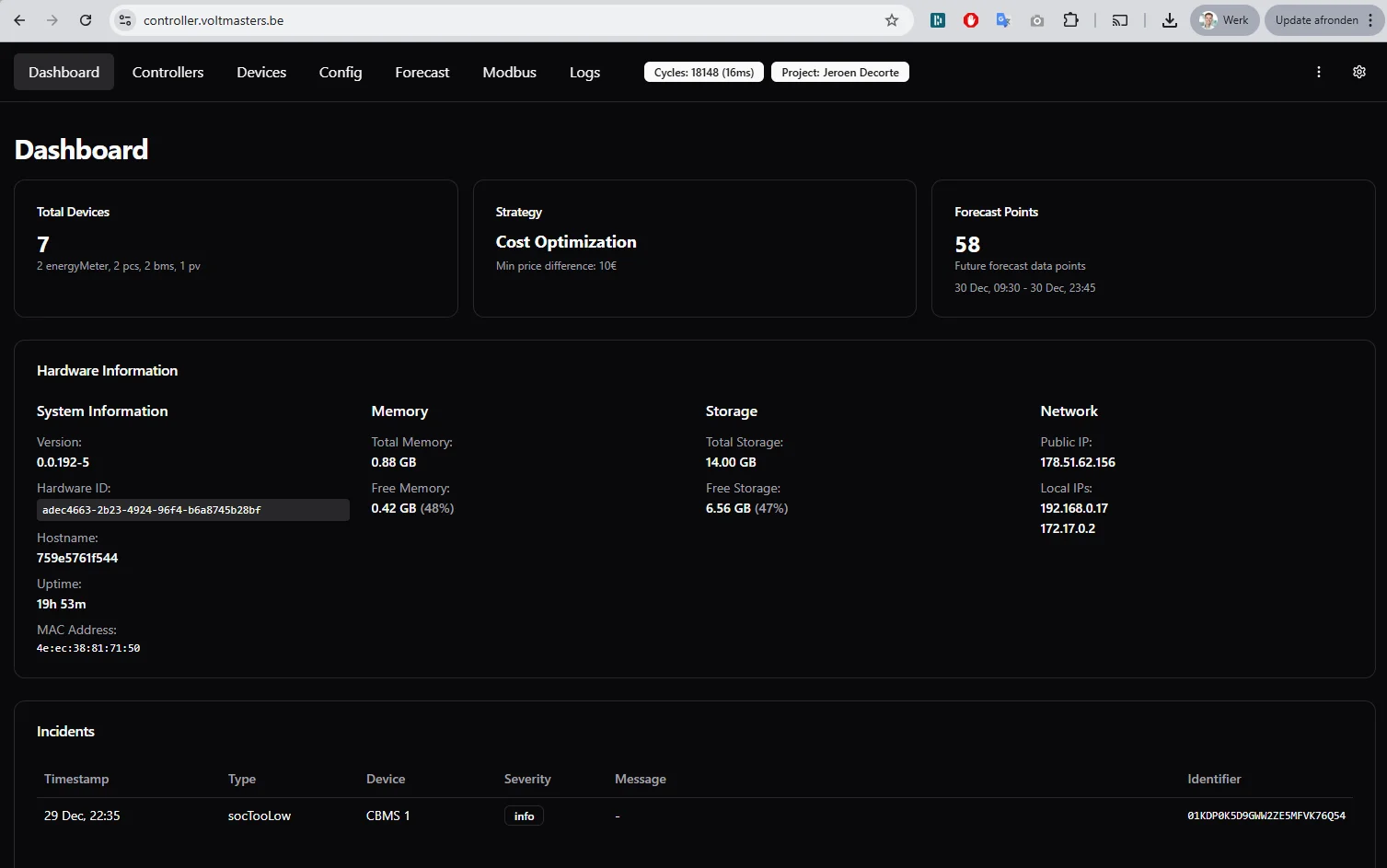
Configuration Tab
- API authentication token is now displayed in a readable format for secure server communication.
Forecast Page Improvements
- Added date filtering (from–until).
- Improved graph layout and readability.
- Updated styling of statistics summary blocks.
Controllers Overview
- Added a new controller type: BatteryScheduleController.
Forecast API & Data Processing
Forecast API Update
- Forecast API migrated from v1 to v2.
- Power values are now returned in Watts (W) instead of Watt-hours (Wh).
Internal Data Handling
- All forecast data is automatically converted from W to kW for processing and visualization, including:
- Consumption
- Total PV generation
- PV generation per inverter
Debug Enhancements
- Debug server now exposes historical forecast data up to 48 hours in the past.
- Forecast visualizations in the debugger have been improved for clarity and usability.
New Features
- Provisioning flow added for new EMS controllers.
- Sites dashboard extended with search and filter functionality.
- Support added for Schneider PAS600.
- Gateway device information added to the device communication overview.
- Option added to enable or disable advanced logging to reduce data usage.
- Project settings now display controller information and include an EMS controller update button.
- Project name, time zone, and project ID are now included in controller configuration.
Improvements & Fixes
ESS, PV & Data Accuracy
- Corrected consumption and production calculations in the ESS graph.
- PV dashboard data corrected.
- Battery performance email values corrected.
- Peak power information removed from battery performance emails.
UI & UX
- Device override interface improved.
- Tooltip corrected in the projects table when a controller is offline.
- Changelog table updated.
- Improved translations of algorithms.
Incidents & Monitoring
- Added new incident type: “unknown” for unidentified keys.
- Improved handling of unknown incident types.
- Removed duplicate incident detection.
- Chat notification added for fire alarm incidents.
- Additional checks added to hide battery temperature or DC breaker statistics when not available.
User Permissions & Visibility
- Both customers and installers now have access to the pro dashboards.
- Manual override is hidden for non-connectable inverters.
- Pro dashboard variables extended with
project_id.
Stability & Reliability
- Various internal optimizations and stability improvements across the system.
Firmware Version 0.0.191
This single update consolidates all functional, structural, and integration changes implemented across all intermediate versions.
Device, Adapter and Integration Support
A major expansion of supported hardware.
Newly Supported Devices
- Huawei Smartlogger
- SMA inverters (Sunny Tripower, Sunny Boy and related models)
- Fronius inverters
- ABB inverters
- Goodwe inverters
- Sungrow inverters
- Carlo Gavazzi EM24 energy meter
- Fluvius AMR digital meter
- Virtual PV adapter
PCS, Battery and BMS Improvements
- New adapters for:
- Liquid-cooled BMS
- EP Energy EPES233 PCS
- SCU BRES BMS and PCS
- EnjoyPower PCS
- Poweroad PMS PCS
- Corrected register mappings for all PCS types
- Added DC-side max charge and discharge current readouts
- Added battery production and consumption channels
- Added calibration command and calibration state handling
- Added derating coefficient support
- Added unmanaged device mode for read-only operation
- Improved device health evaluation using severity classification
Metering Enhancements
- Added auxiliary energy meters for PV and PCS
- Corrected inverted metering direction
- Improved active-power accuracy
- Added production capacity configuration
Trading, Forecasting and Imbalance Logic
Trevi
- Full implementation of Trevi battery trading provider
- Added Trevi imbalance signal support
- Added persistent trading state management
- Improved trading signal mapping and decision logic
- Added calibration lockout to prevent usage during automatic calibration
- Integrated Trevi metadata and measurements into process image logging
Yuso
- Full Yuso optimization integration
- Added Yuso imbalance signal support
- Fixed maxSiteOfftakeActivePower reporting
- Added logic to prevent charging from grid when operating in Yuso local mode
- Updated standby behaviour and local-mode optimizations
Forecasting
- Added complete forecast provider (API and static fallback mode)
- Added retry logic for forecast updates
- Fixed interval clearing issues
- Improved W→kW conversion accuracy
- Added fallback to self-supply when forecast data is insufficient
- Improved alignment of forecast data with 15-minute intervals
Algorithms, Control and Optimization
Cost Optimization
- Fully rewritten charging and discharging algorithm
- Proportional power distribution based on energy headroom
- Battery grouping logic based on pricing differences
- Improved PV buffering and oversupply handling
- Improved consumption reconstruction and calculation logic
- Enhanced load scheduling with minimum runtime rules
Oscillation Prevention
- Redesigned oscillation prevention controller
- Per-device measurement latency handling
- Controlled minTimeBetweenChanges
- Decision history tracking with persistent storage
- Integrated into main control cycle
- Removed legacy deadzone controller
Grid Logic
- Added grid limit exceeded incident
- Added grid power feedback correction logic
- Improved grid limit controller integration
- Corrected grid export calculations
Self-Supply Logic
- Migrated to algorithm-based architecture
- Updated fallback behaviour using forecast data
- Improved PV curtailment handling
Monitoring, Debugging and Process Image
Debugger Enhancements
- Added full control decision viewer
- Added forecast inspector
- Added device channel viewer
- Added project information (name, ID, URL)
- Added local and public IP display
- Added modbus REPL for device testing
- Added connectivity test command
- Added calibration status preview
- Added raw configuration view
- Improved stale data detection and tooltips
Logging and Process Image
- Added logging of:
- Battery power
- Grid power
- PV production
- Process image snapshots
- Trading provider states
- Control decisions
- Forecast data
- Enabled structured cloning of controller calls
- Added per-cycle logging of control cycles
Simulator and Development Tools
Simulator
- Full energy flow simulator added
- Timeline representation of consumption, PV and battery behaviour
- Integration with forecast data
- Simulation of cost with and without optimization
- Multiple bug fixes related to data models, paths and build process
- Major redesign of simulation data structures
Mockbus
- Added editable registers
- Simplified simulation behaviour
Developer Tooling
- Added build pipeline for both bytecode and bundled builds
- Added prerelease checking
- Added Docker mount improvements
- Added health monitor to terminate unhealthy processes
- Added extended developer documentation
Configuration and User Interface
Configuration Improvements
- Added import/export of JSON configuration
- Added override file support
- Improved parsing of optional arrays and nested config
- Added flags such as canBeUsedForEnergyTrading
- Updated battery settings (power limits, initial SoC)
- Improved SoC calculation and distribution logic
- Differentiated system configuration from process image
UI and Visualization
- Updated graphs to step-type with improved clarity
- Added horizontal reference lines
- Updated PV disabled state visibility
- Added scenario selection support
- Improved 24-hour views
Refactoring and Structural Improvements
- Reorganized algorithms and controllers into shared modules
- Removed unused controllers and dead code
- Simplified utility functions and naming
- Unified control logic for battery power distribution
- Cleaned formatting across major code sections
- Consolidated duplicated logic
- Improved fallback behaviour and error handling
Bug Fixes
Key issues resolved:
- Negative PV production values
- Incorrect unit conversions
- Unhealthy device handling bugs
- Forecast data mapping errors
- PMS and BMS register mapping issues
- Incorrect energy meter inversion
- Forecast and simulation alignment issues
- Influx logging inconsistencies
- Build failures and bundling issues
- Misreported power in Yuso integrations
- Oscillation prevention deadlocks
- Incorrect PV limit behaviour
- Missing trading state persistence
Full Consolidated Changelog (0.118 → 0.166)
This single update consolidates all functional, structural, and integration changes implemented across all intermediate versions.
Device, Adapter and Integration Support
A major expansion of supported hardware.
Newly Supported Devices
- Huawei Smartlogger
- SMA inverters (Sunny Tripower, Sunny Boy and related models)
- Fronius inverters
- ABB inverters
- Goodwe inverters
- Sungrow inverters
- Carlo Gavazzi EM24 energy meter
- Fluvius AMR digital meter
- Virtual PV adapter
PCS, Battery and BMS Improvements
- New adapters for:
- Liquid-cooled BMS
- EP Energy EPES233 PCS
- SCU BRES BMS and PCS
- EnjoyPower PCS
- Poweroad PMS PCS
- Corrected register mappings for all PCS types
- Added DC-side max charge and discharge current readouts
- Added battery production and consumption channels
- Added calibration command and calibration state handling
- Added derating coefficient support
- Added unmanaged device mode for read-only operation
- Improved device health evaluation using severity classification
Metering Enhancements
- Added auxiliary energy meters for PV and PCS
- Corrected inverted metering direction
- Improved active-power accuracy
- Added production capacity configuration
Trading, Forecasting and Imbalance Logic
Trevi
- Full implementation of Trevi battery trading provider
- Added Trevi imbalance signal support
- Added persistent trading state management
- Improved trading signal mapping and decision logic
- Added calibration lockout to prevent usage during automatic calibration
- Integrated Trevi metadata and measurements into process image logging
Yuso
- Full Yuso optimization integration
- Added Yuso imbalance signal support
- Fixed maxSiteOfftakeActivePower reporting
- Added logic to prevent charging from grid when operating in Yuso local mode
- Updated standby behaviour and local-mode optimizations
Forecasting
- Added complete forecast provider (API and static fallback mode)
- Added retry logic for forecast updates
- Fixed interval clearing issues
- Improved W→kW conversion accuracy
- Added fallback to self-supply when forecast data is insufficient
- Improved alignment of forecast data with 15-minute intervals
Algorithms, Control and Optimization
Cost Optimization
- Fully rewritten charging and discharging algorithm
- Proportional power distribution based on energy headroom
- Battery grouping logic based on pricing differences
- Improved PV buffering and oversupply handling
- Improved consumption reconstruction and calculation logic
- Enhanced load scheduling with minimum runtime rules
Oscillation Prevention
- Redesigned oscillation prevention controller
- Per-device measurement latency handling
- Controlled minTimeBetweenChanges
- Decision history tracking with persistent storage
- Integrated into main control cycle
- Removed legacy deadzone controller
Grid Logic
- Added grid limit exceeded incident
- Added grid power feedback correction logic
- Improved grid limit controller integration
- Corrected grid export calculations
Self-Supply Logic
- Migrated to algorithm-based architecture
- Updated fallback behaviour using forecast data
- Improved PV curtailment handling
Monitoring, Debugging and Process Image
Debugger Enhancements
- Added full control decision viewer
- Added forecast inspector
- Added device channel viewer
- Added project information (name, ID, URL)
- Added local and public IP display
- Added modbus REPL for device testing
- Added connectivity test command
- Added calibration status preview
- Added raw configuration view
- Improved stale data detection and tooltips
Logging and Process Image
- Added logging of:
- Battery power
- Grid power
- PV production
- Process image snapshots
- Trading provider states
- Control decisions
- Forecast data
- Enabled structured cloning of controller calls
- Added per-cycle logging of control cycles
Simulator and Development Tools
Simulator
- Full energy flow simulator added
- Timeline representation of consumption, PV and battery behaviour
- Integration with forecast data
- Simulation of cost with and without optimization
- Multiple bug fixes related to data models, paths and build process
- Major redesign of simulation data structures
Mockbus
- Added editable registers
- Simplified simulation behaviour
Developer Tooling
- Added build pipeline for both bytecode and bundled builds
- Added prerelease checking
- Added Docker mount improvements
- Added health monitor to terminate unhealthy processes
- Added extended developer documentation
Configuration and User Interface
Configuration Improvements
- Added import/export of JSON configuration
- Added override file support
- Improved parsing of optional arrays and nested config
- Added flags such as canBeUsedForEnergyTrading
- Updated battery settings (power limits, initial SoC)
- Improved SoC calculation and distribution logic
- Differentiated system configuration from process image
UI and Visualization
- Updated graphs to step-type with improved clarity
- Added horizontal reference lines
- Updated PV disabled state visibility
- Added scenario selection support
- Improved 24-hour views
Refactoring and Structural Improvements
- Reorganized algorithms and controllers into shared modules
- Removed unused controllers and dead code
- Simplified utility functions and naming
- Unified control logic for battery power distribution
- Cleaned formatting across major code sections
- Consolidated duplicated logic
- Improved fallback behaviour and error handling
Bug Fixes
Key issues resolved:
- Negative PV production values
- Incorrect unit conversions
- Unhealthy device handling bugs
- Forecast data mapping errors
- PMS and BMS register mapping issues
- Incorrect energy meter inversion
- Forecast and simulation alignment issues
- Influx logging inconsistencies
- Build failures and bundling issues
- Misreported power in Yuso integrations
- Oscillation prevention deadlocks
- Incorrect PV limit behaviour
- Missing trading state persistence