Voltmasters Platform
Imbalance trading dashboard
The external control dashboard puts the power the partner requests next to what the EMS executes and what the batteries do, with the modes, the SOC and the reported available power.
The dashboard only appears while external control is active. The partner then takes priority over the regular decisions of the EMS algorithm, see External signal.
How the control works
The dashboard
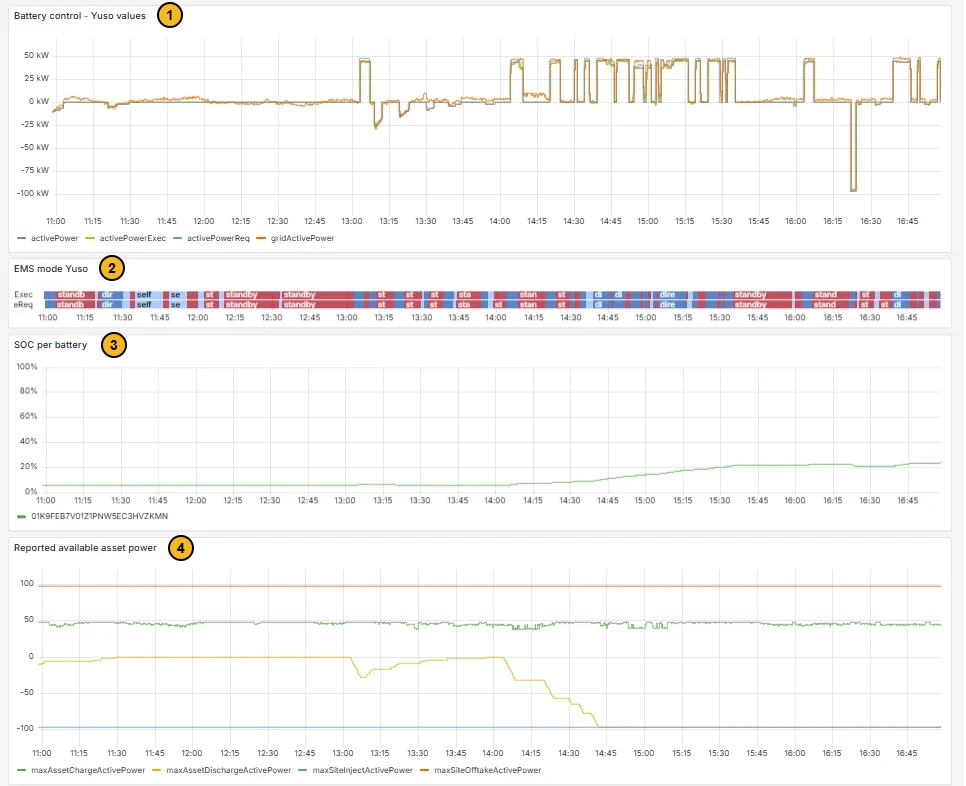
The panel titles carry the name of the partner, here Yuso.
- Battery control: the power the partner requests (activePowerReq), the power the EMS executes (activePowerExec), what the batteries actually do (activePower) and the grid power (gridActivePower). When the lines overlap, the installation follows the partner.
- EMS mode: the mode over time, in two rows. The bottom row (Req) shows what the partner requests, the top row (Exec) what the EMS executes. The labels are shortened, for example standby; hover over a block for the full name.
- SOC per battery: the state of charge per battery, named by device ID.
- Reported available asset power: the limits the EMS reports to the partner. How much the batteries can charge (maxAssetChargeActivePower) and discharge (maxAssetDischargeActivePower), and how much the site may export (maxSiteInjectActivePower) and import (maxSiteOfftakeActivePower).
Frequently asked questions
Why does the battery not follow the partner’s request?
- Does the EMS execute what the partner requests? In Battery control the request is shown as activePowerReq and the execution as activePowerExec. When those lines overlap, the battery did what the partner asked. EMS mode shows the same for the mode: the request at the bottom (Req), the execution at the top (Exec).
- Did the battery still have room? Check Reported available asset power. If maxAssetDischargeActivePower is 0, the battery could not discharge. If maxAssetChargeActivePower is 0, it could not charge.
- Why was there no room? Check SOC per battery. A nearly empty battery cannot discharge, a full battery cannot charge.
Where can I find the imbalance prices?
On the project dashboard, in the Energy prices block on the Imbalance tab.