Voltmasters Platform
Energy cost
Import cost, export revenue and net energy cost per meter, and why these amounts are an indication rather than a settlement.
Every meter panel on the Energy Meter dashboard shows three amounts for the period you selected:
| Amount | What it is |
|---|---|
| Import cost | What the energy this meter imported would have cost |
| Export revenue | What the energy this meter exported would have earned |
| Net energy cost | Import cost minus export revenue |
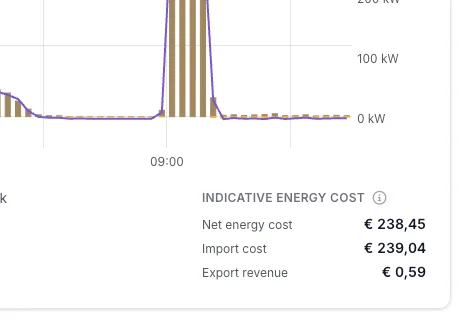
The three amounts below a meter, with the info icon next to Indicative energy cost.
These amounts are an indication, not a settlement: your measured energy, valued at the contract entered for this project. Only the invoice from your energy supplier is the actual settlement.
How the amounts are calculated
flowchart TD
    A["Day-ahead price per quarter hour (ENTSO-E)"] --> C
    B["Contract parameters of the project"] --> C
    C["Net prices per quarter hour, never recalculated"] --> D["Average of the four quarter-hour prices per hour"]
    D --> E["Energy times hourly price"]
    M["Measured import and export per hour"] --> E
    E --> F["Import cost"]
    E --> G["Export revenue"]
    F --> H["Net energy cost"]
    G --> H
The platform does not use a market price directly. For every quarter-hour it stores a net consumption price and a net injection price for your project, both in €/MWh. Those net prices are built from two things:
- The day-ahead market price for your project's bidding zone, sourced from the ENTSO-E Transparency Platform.
- The contract parameters entered for your project: the scaling factors and the per-MWh cost components, or the fixed prices if you are on a fixed, flexible or Spanish time-of-use contract.
The formulas that combine the two are documented in Energy price calculation, and the contract types that determine which formula applies are documented in Energy contracts.
This means the amounts are only as accurate as the contract you entered. If a parameter is wrong or missing, the cost on this dashboard is wrong in exactly the same way.
Prices are calculated and stored while a quarter-hour is still in the near future, using the contract in force at that moment, and they are never recalculated afterwards. So if you switched contracts halfway through the period you are viewing, the amounts already reflect the old contract before the switch and the new one after it.
Prices are stored per quarter-hour. The energy on this dashboard is valued on an hourly grid: each hour of measured import and export is multiplied by the average of that hour's four quarter-hour prices.
That keeps a year-long view fast to compute, at the cost of a small smoothing effect: within a single hour, the calculation cannot tell whether you consumed during the cheap quarter or the expensive one. Over a day or longer this evens out, but for a very short, very peaky period the figure is coarser than a true quarter-hourly settlement would be.
What is included, and what is not
The amounts cover the volumetric part of an energy bill only: the energy itself, plus every fee and levy per MWh that your contract carries and that you entered as a contract parameter.
Not included:
- Capacity tariff and any charge based on your peak power or access power.
- Fixed standing charges: meter rent, subscription fees, and anything billed per month or per year rather than per MWh.
- Anything that is not a contract parameter. If a cost component does not exist as a field on the energy contract, it is not in these figures.
Imbalance is not modelled
The platform does not know whether your supply contract exposes you to imbalance settlement, and it does not model imbalance in any way. No imbalance cost and no imbalance revenue is part of these amounts.
If your contract does pass imbalance through to you, your real invoice will differ from what this dashboard shows, and the difference can go in either direction. If you are unsure, ask your energy supplier how your contract handles imbalance.
This is separate from the Imbalance trading dashboard, which is about projects that actively trade on the imbalance market through an external party.
Grid meter versus submeter
Every meter on the dashboard is valued at the same prices, the ones that apply to your grid connection. What that amount means depends on which meter you are looking at:
flowchart TD
    N["Grid connection"] --> H["Main meter"]
    H --> S1["Submeter A"]
    H --> S2["Submeter B"]
- For the grid connection meter, it is the closest thing to a real cost: this is the energy that actually crosses your connection and that your supplier bills.
- For a submeter, it is an allocated cost: what that consumption would have cost at grid prices. It is useful for comparing departments, machines or buildings against each other, but it is not a separate bill. The levies behind those prices are charged once, at the grid connection.
Do not add up the amounts of several meters and expect the total to be your bill. A submeter usually sits behind the grid meter, so its energy is already counted in the grid meter's amount.
Reading the amounts
A negative net energy cost is money earned. It means the meter's export revenue outweighed what its import cost over the period. You will typically see this on a sunny period with a large PV installation and little consumption.
An empty amount is not €0. If a field shows no value, the platform could not value that period at all, because no prices are stored for it. A genuine €0 means something different: the meter measured no energy, or the energy it measured happened to be worth nothing. The dashboard also writes a short note under the amounts whenever something limits the calculation:
| Note | What it means |
|---|---|
| No prices are known for this period | Nothing could be valued. This is normal for periods before the project existed, or before energy prices were first calculated for it. |
| No prices are known for part of this period | The amounts only cover the part of the period that had prices. Energy outside that part is left out rather than counted as free. |
| No energy contract was in force during this period | Prices still exist, because the EMS needs prices to optimise against and falls back on default tariffs. The arithmetic is real, but the tariffs are invented. Enter your contract to get a meaningful figure. |
| An energy contract was in force for only part of this period | Part of the period uses your contract and the rest uses default tariffs. |
You enter your contract under Configuration → Grid & market → Energy contract. See Energy contracts.
Frequently asked questions
Can Voltmasters arrange an energy contract for me?
No. Voltmasters does not supply energy contracts. You arrange one with your own energy supplier and then enter its parameters in the platform, so the EMS can optimise against your real prices and so this dashboard can show a meaningful indication.
Does this include what my battery earned?
Only through the meters. These amounts value what each energy meter measured, not what a battery, inverter or charger did. A battery still shows up indirectly: by shifting when you import and export, it changes what the meter in front of it measures, and therefore what that meter costs.
Related pages
- Energy price calculation: the formulas that turn a market price and your contract parameters into net prices.
- Energy contracts: the contract types and how each one is priced.
- Energy Meter dashboard: the rest of what the dashboard shows.