Device integrations
Sungrow
Sungrow inverters and the Logger1000B in the Voltmasters EMS: supported series, setting up Modbus TCP, and keeping the inverter online at a 0 kW setpoint.
Our EMS monitors and curtails Sungrow inverters and the Logger1000B data logger over Modbus TCP.
Supported devices
| Series | Models |
|---|---|
| RT | SG3.0RT (beta), SG4.0RT (beta), SG5.0RT (beta), SG6.0RT (beta), SG7.0RT (beta), SG8.0RT (beta), SG10RT (beta), SG12RT (beta), SG15RT (beta), SG17RT (beta), SG20RT (beta) |
| KTL-M | SG5KTL-MT (beta), SG6KTL-MT (beta), SG8KTL-M (beta), SG10KTL-M (beta), SG10KTL-MT (beta), SG12KTL-M (beta), SG15KTL-M (beta), SG17KTL-M (beta), SG20KTL-M (beta), SG30KTL-M (beta), SG30KTL-M-V31 (beta), SG33KTL-M (beta), SG36KTL-M (beta), SG50KTL-M-20 (beta), SG80KTL-M (beta) |
| CX | SG25CX-SA (beta), SG30CX (beta), SG33CX, SG40CX-P2, SG50CX (beta), SG75CX (beta), SG100CX (beta), SG100CX-JP (beta), SG110CX (beta), SG125CX-P2 (beta), SG36CX-US (beta), SG60CX-US (beta) |
| KU / KTL | SG60KU (beta), SG60KU-M (beta), SG60KTL (beta), G80KTL (beta), SG80KTL-20 (beta) |
| HV / BF | SG80HV (beta), SG80BF (beta), SG85BF (beta), SG110HV-M (beta), SG111HV (beta), SG125HV (beta), SG125HV-20 (beta) |
| HX / TX | SG136TX (beta), SG225HX (beta), SG250HX (beta), SG250HX-IN (beta), SG250HX-US (beta) |
| Other | SG33K3J (beta), SG34KJ (beta), SG49K5J (beta), LP_P34KSG (beta) |
| Logger1000B | Data logger (beta) |
The SG33CX and the SG40CX-P2 are fully supported. The other models are beta.
Setup
Open the communication parameters
On the display of the inverter, go to Settings → Communication Parameters.
Set the protocol and the address
Set Protocol to MODBUS and give a unique Device Address between 1 and 247.
Enable Modbus TCP
Turn MODBUS-TCP on, leave the Port at
502, and choose DHCP or a fixed address for the IP Address, depending on your network.Keep the inverter on at a 0 % limit
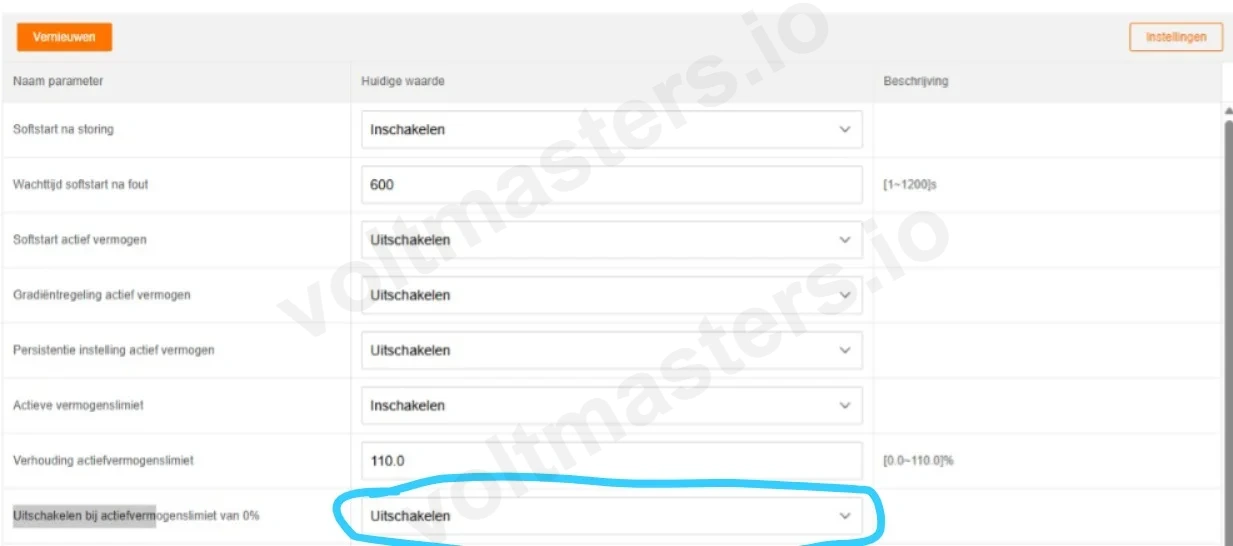
In the parameter list of the inverter, set Uitschakelen bij actiefvermogenslimiet van 0% (shut down at an active power limit of 0 %) to Uitschakelen (disabled). When that parameter is on, the inverter shuts itself down when the EMS asks for 0 kW, for example at negative prices, and stops responding to new setpoints for quite a while.
Add the inverter in Voltmasters
Add the inverter or the Logger1000B with its IP address, port
502and the Device Address from step 2.
Known issues
The inverter goes offline after a setpoint of 0
Some Sungrow models shut themselves down after the EMS sends a 0 kW setpoint, and then stop responding for quite a while. Set the parameter from step 4 to Uitschakelen. If it still happens after that, contact Voltmasters Support.