Voltmasters Platform
Consumption planning
Tell the Voltmasters EMS when consumption will differ from the forecast, so battery planning builds a larger buffer during the cheap periods.
Under Configuration → Consumption planning you tell the EMS when your expected consumption will differ from the automatic forecast. The EMS can then adjust the battery planning, for example by building a larger buffer during cheap periods.
kW vs kWh: Values in this screen are entered in kW, which is a measure of power, the rate at which energy is used at any given moment. This is different from kWh, which measures the total energy consumed over a period of time.
Example: A process that runs at 50 kW for 2 hours consumes 100 kWh of energy. In this screen, you enter 50 kW (the power demand during that period) and not the total energy figure.
The screen
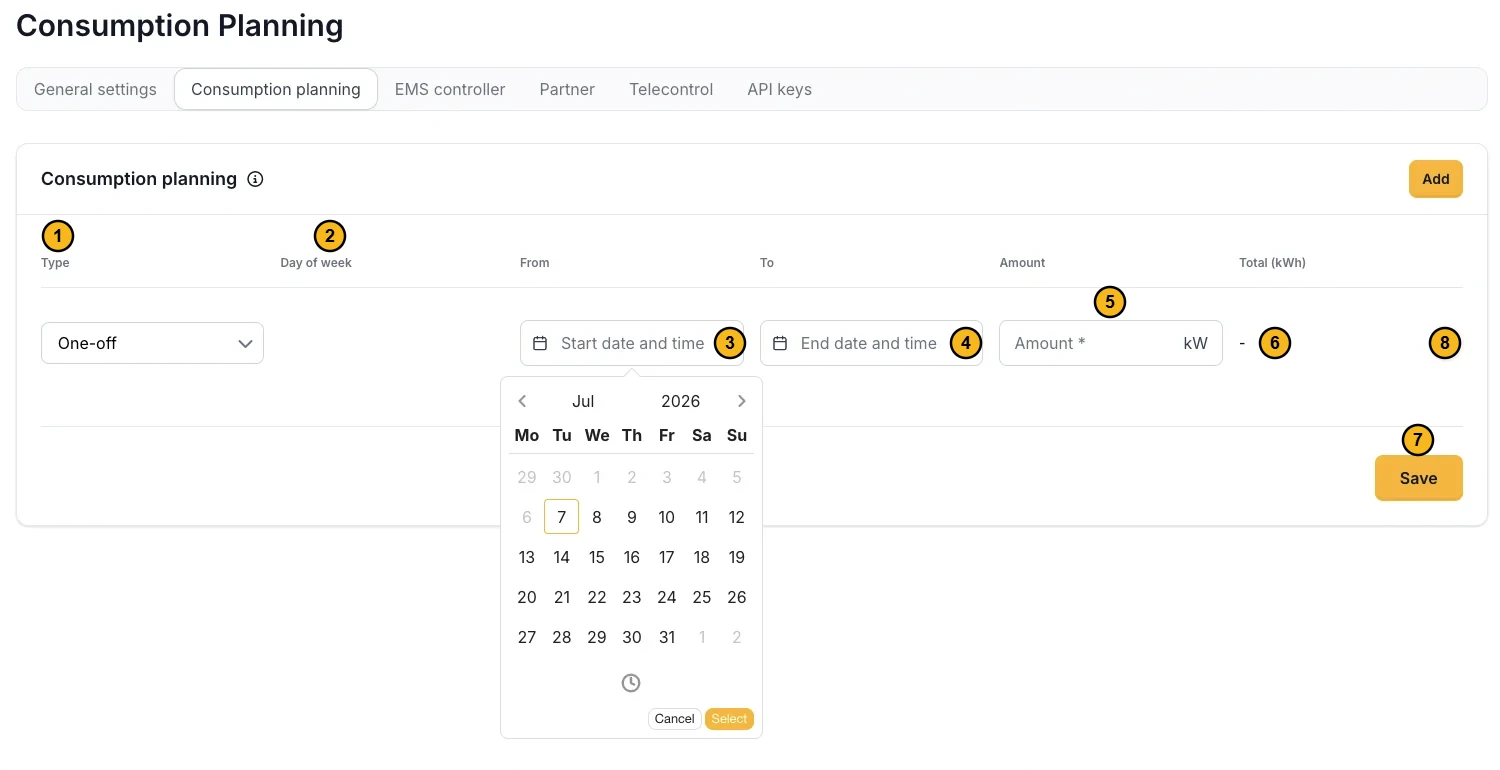
The numbers match the fields in the table below. The picture shows a one-off entry with the date picker open.
Entry types
Each entry is either one-off or recurring:
- One-off: applies once, over a fixed start and end date-and-time. Use this for a specific event, such as a production run on a particular afternoon.
- Recurring: repeats every week on a fixed day of the week, between a start and end time. Use this for a regular weekly pattern, such as a shift that runs every Tuesday.
When a one-off entry and a recurring entry overlap the same moment, the one-off entry takes priority.
How to fill in the consumption planning
Add one entry per planned period. The numbers on the picture are the fields in the table.
| Field | Description |
|---|---|
| Type | One-off or recurring |
| Day of the week | (Recurring) The weekday the entry repeats on |
| Start / end date | (One-off) The date-and-time the period starts and ends |
| Start / end time | The beginning and end of the period |
| Amount (kW) | The average power demand during this period |
| Total (kWh) | Calculated automatically from the amount and the duration, shown for reference, not entered |
| Save | Stores the entries you entered. Only then do they take effect. |
| Delete (bin) | Removes the row. Saving confirms it. |
Example: A production run that draws 50 kW on a specific afternoon. Add a one-off entry for that date, from 13:00 to 17:00, with an amount of 50 kW. The Total (kWh) column then shows 200 kWh (50 kW × 4 h).
How it works
During the planned period, the EMS replaces its standard consumption prediction with the value you entered. The battery and other controllable components are prepared in advance to meet the demand, reducing the risk of exceeding the import limit or drawing unnecessary power from the grid at an unfavourable price.
Changes to consumption planning entries are recorded in the project activity log.
To remove an entry, delete its row and save. For that period the EMS reverts to its standard consumption forecast.