Voltmasters Platform
EV charging dashboard
The EV charging dashboard of a project: live connector status, real-time power, the charge points and the history of charging sessions.
The EV chargers dashboard shows what the EV chargers of a project are doing right now, and what they have done before. On a project without chargers, the dashboard points you to the devices page instead.
This page is the project dashboard for EV charging. For the graph-based analysis over longer periods there is a separate EV charging dashboard under the Pro dashboards. For the logic that decides how much each connector may draw, see EV charging.
Connector status
A summary of how many connectors are in each state right now, with a total. Immediately after opening the page a connector can still be shown as waiting for its live status: the states arrive over the live connection, not with the page.
The states follow what the charge point itself reports:
| State | Meaning |
|---|---|
| Available | Free, nothing plugged in. |
| Waiting on vehicle | A card or tag was presented, the vehicle has not taken over yet. |
| Ready to charge | The vehicle is connected and ready, charging has not started. |
| Charging | Actively delivering energy. |
| Paused by vehicle | The car stopped taking energy, for example because its battery is full. |
| Paused by charge point | The charge point stopped delivering, typically because the EMS gave it no budget. |
| Finishing | The session is over, the cable is still connected. |
| Unavailable | Taken out of service by the charge point. |
| Faulted | The charge point reports a fault. |
During a session, the states follow each other like this:
stateDiagram-v2
    direction LR
    B: Available
    W: Waiting on vehicle
    K: Ready to charge
    O: Charging
    PV: Paused by vehicle
    PL: Paused by charge point
    A: Finishing
    [*] --> B
    B --> W
    W --> K
    K --> O
    O --> PV
    PV --> O
    O --> PL: no budget from the EMS
    PL --> O: budget back
    O --> A
    PV --> A
    A --> B
Real-time power
The power drawn by the EV chargers through the day, with the total energy for the period. You can switch between today and yesterday, and export the graph.
Charge points
A live table of every connector in the project:
| Column | Meaning |
|---|---|
| Chargepoint | The charge point and the connector on it. |
| Status | The state from the table above. |
| SoC | The state of charge of the vehicle, where the charge point reports it. DC chargers usually do, AC chargers usually do not. |
| Current power | What the connector is drawing right now. |
| Available power | What the EMS is currently allowing it. |
| Session | How long the running session has been going. |
| Priority | The order in which connectors get budget when there is not enough for everyone. |
The priority can be changed straight from the table. It only has an effect when the charger's load balancing is set to Connectors; the table says so in a tooltip when it does not apply.
A charging site that is steered as one whole, such as an Alpitronic HYC1000 or an ABB Terra Gateway Pro, has no per-connector configuration. Those chargers get one site budget from the EMS and divide it themselves.
Historical charging sessions
Under the live view sits the history: every charging session the chargers have reported, newest first.
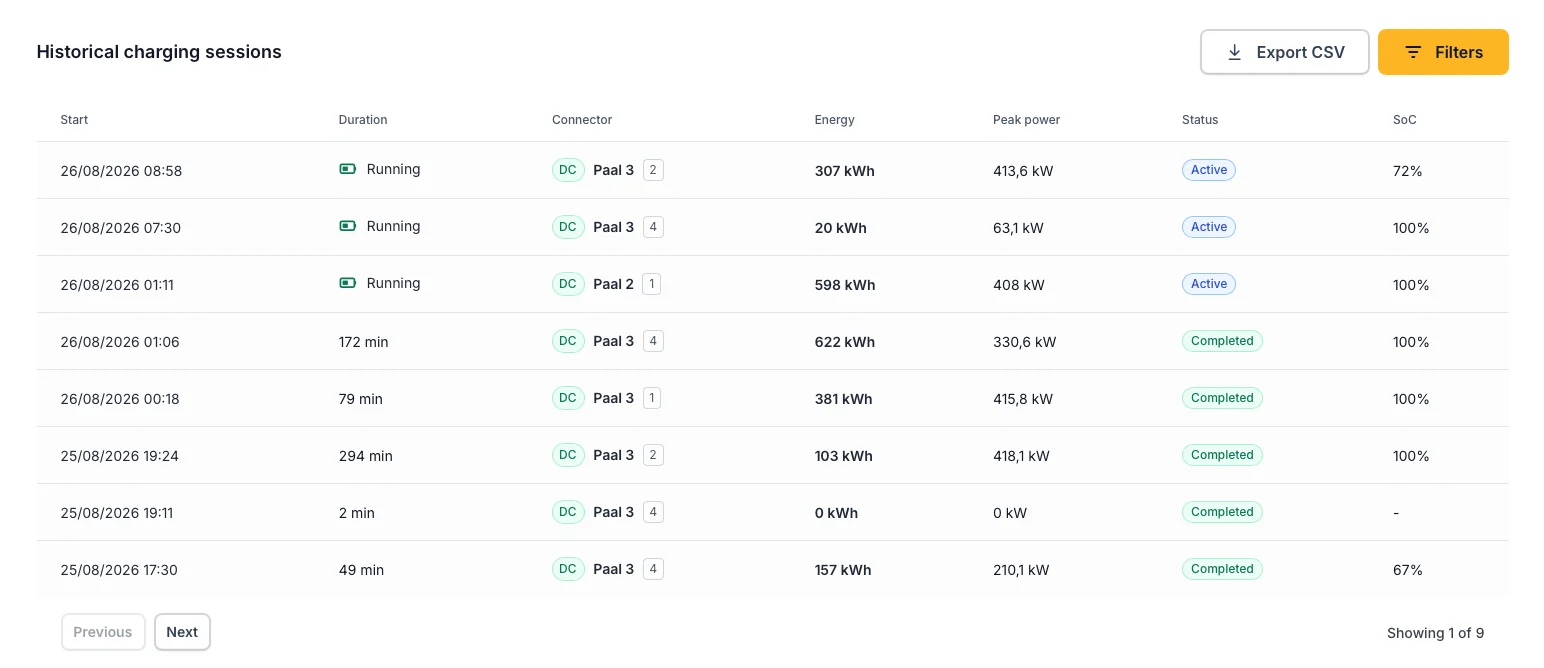
The charging sessions of a project, newest first.
| Column | Meaning |
|---|---|
| Start | When the session began, in the project's own timezone. |
| Duration | How long it lasted. A session still in progress shows as Running. |
| Connector | Which charge point and connector charged, with an AC or DC badge for the connector type. |
| Energy | The energy delivered in the session, in kWh. |
| Peak power | The highest power reached during the session, in kW. |
| Status | Active, Completed, Stopped or Fault. |
| SoC | The vehicle's state of charge. This column only appears when at least one session on the project carries a reading. |
With the Filters button you filter the list on a Period, from a start date to an end date, per connector and per status.
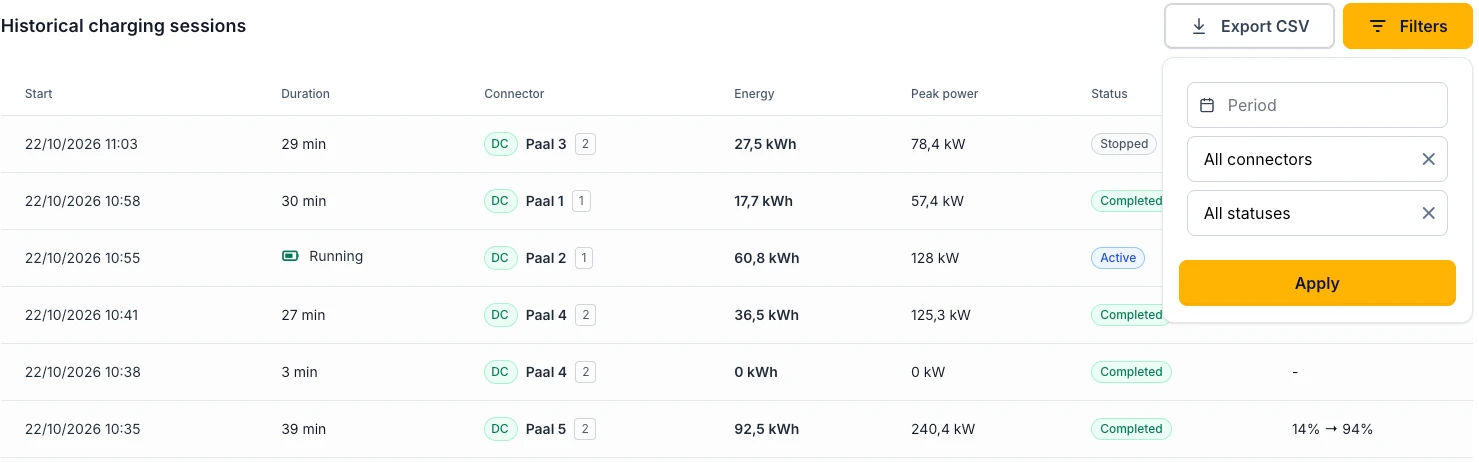
Export CSV downloads the current selection, with more detail than the table shows: the end time as well as the start, the charge point and the connector as separate columns, the duration in minutes, and the state of charge at both the start and the end of the session.
Session history starts on 20 August 2026, and only for EMS controllers that report sessions. For periods before that, only the quarter-hour aggregation of charged energy exists.
The platform stores no RFID or tag identifier and no vehicle identification, so sessions cannot be attributed to a driver or a car. If you need that, it comes from your charge point operator's own back office, not from the EMS.
Reading sessions over the API
Both the charging sessions and the energy charged per quarter-hour per charge point can be read over the Voltmasters API, so you can feed them into your own reporting or billing.