Skip to content

Overview

Navigate and operate the Voltmasters web platform: dashboards, device management, incident tracking and configuration for PV, batteries and grid.

The Voltmasters platform is the web application where installers and clients monitor and configure their projects: PV installations, batteries, consumption and the interaction with the grid.

The project dashboard in five parts
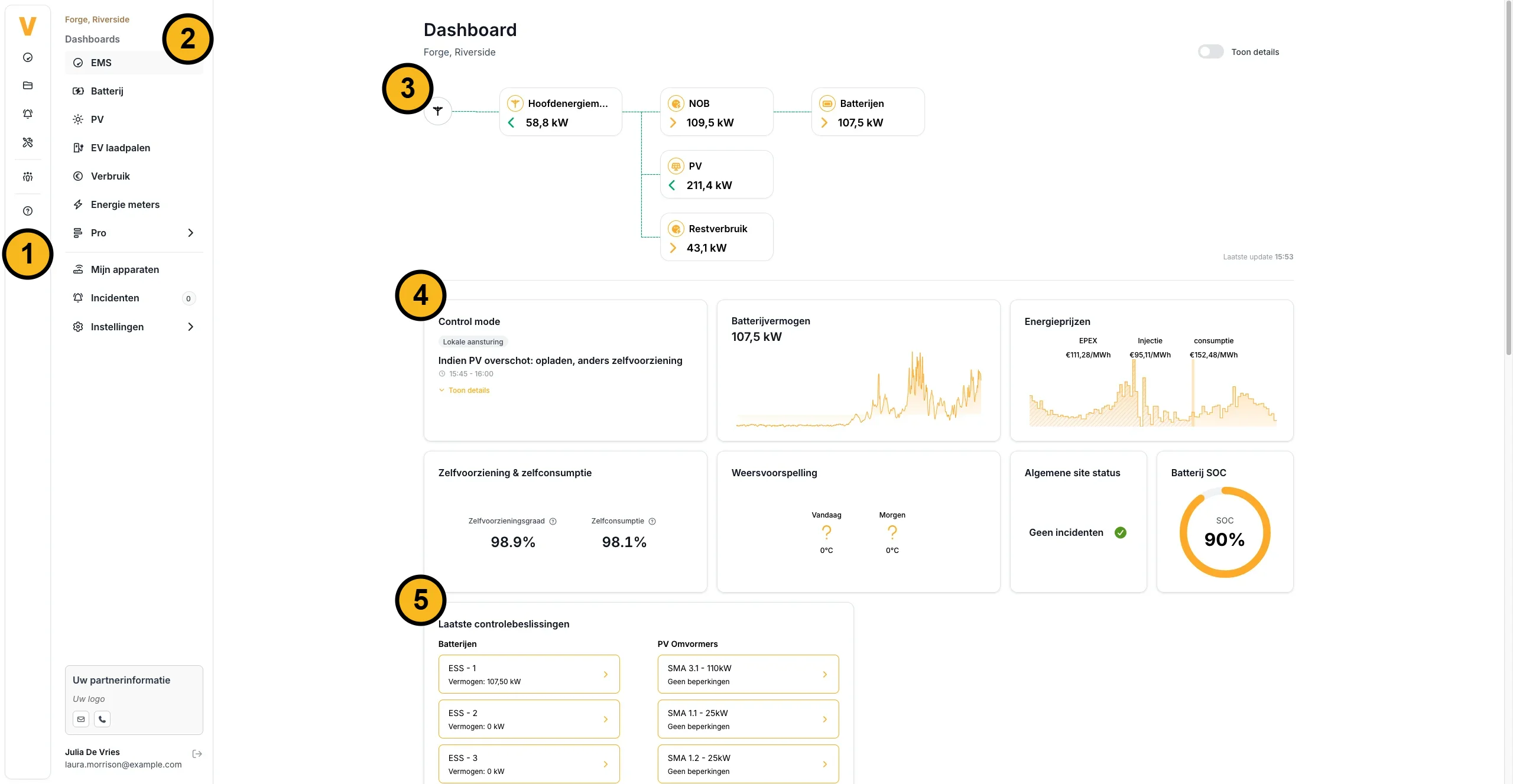
The EMS dashboard of a project in the Voltmasters platform, with five numbered parts. 1: the navigation bar on the far left. 2: the project menu with the EMS, Battery, PV, EV chargers, Consumption, Energy meters and Pro dashboards, and below them My devices, Incidents and Settings. 3: the live energy flow diagram, with the power of the main meter, the batteries, the PV and the remaining consumption. 4: the key metric cards, such as the control mode, the battery power, the energy prices, self-sufficiency and self-consumption, the weather forecast, the general site status and the battery state of charge. 5: the latest control decisions per battery and per PV inverter.
  1. Navigation bar: the projects, the overview of all projects, the incidents across all projects and support. See Main navigation.
  2. Project menu: the dashboards of the project, and below them My devices, Incidents and Settings. See Dashboards.
  3. Energy flow diagram: the live power between the grid, the PV, the batteries and the consumption. See Project dashboard (EMS).
  4. Key metrics: the live state of the site, from the active control strategy to the battery state of charge. See Key metric cards.
  5. Latest control decisions: what the EMS decided most recently, per battery and per PV inverter. See Latest control decisions.

In this section

Navigating the platformLogging in, two-factor authentication and the main navigation. DashboardsWhat each dashboard of a project shows and when it appears in the project menu. Vic AI assistantThe assistant that answers questions about the documentation and your own projects, devices and incidents. Device managementThe device list with the online status per device, and the settings behind each device. Incident managementThe incident list with tabs and filters, muting, and email or push notifications. Project settingsGrid protection, battery strategy, energy contracts, the EMS controller, the API, users and the audit trail. Subscription and billingThe subscription of a project, the billing history and ordering hardware in the shop.