Device integrations
Phoenix Contact
Supported devices: EEM-MA370 / EEM-MA371, EEM-MA600 and EEM-MA770 / EEM-MA771 series, and the EMpro CL meters EEM-XM157, XM355, XM357, XM375 and XM377
Our EMS reads Phoenix Contact energy meters over Modbus TCP. All models are configured the same way.
Supported devices
| Model | Description |
|---|---|
| EEM-MA370, EEM-MA371 | Including the -R variants |
| EEM-MA600 | |
| EEM-MA770, EEM-MA771 | Including the -EIP variants |
| EEM-XM375 | EMpro CL |
| EEM-XM157 (beta), EEM-XM355 (beta), EEM-XM357 (beta), EEM-XM377 (beta) | EMpro CL |
The EMpro CL meters run on the same integration as the EMpro MA meters. All models are supported from EMS controller version 0.0.192.
Setup
In the interface of the meter, set the Modbus settings as indicated in the screenshot.
- Modbus TCP should be enabled
- Compatibility mode should be disabled
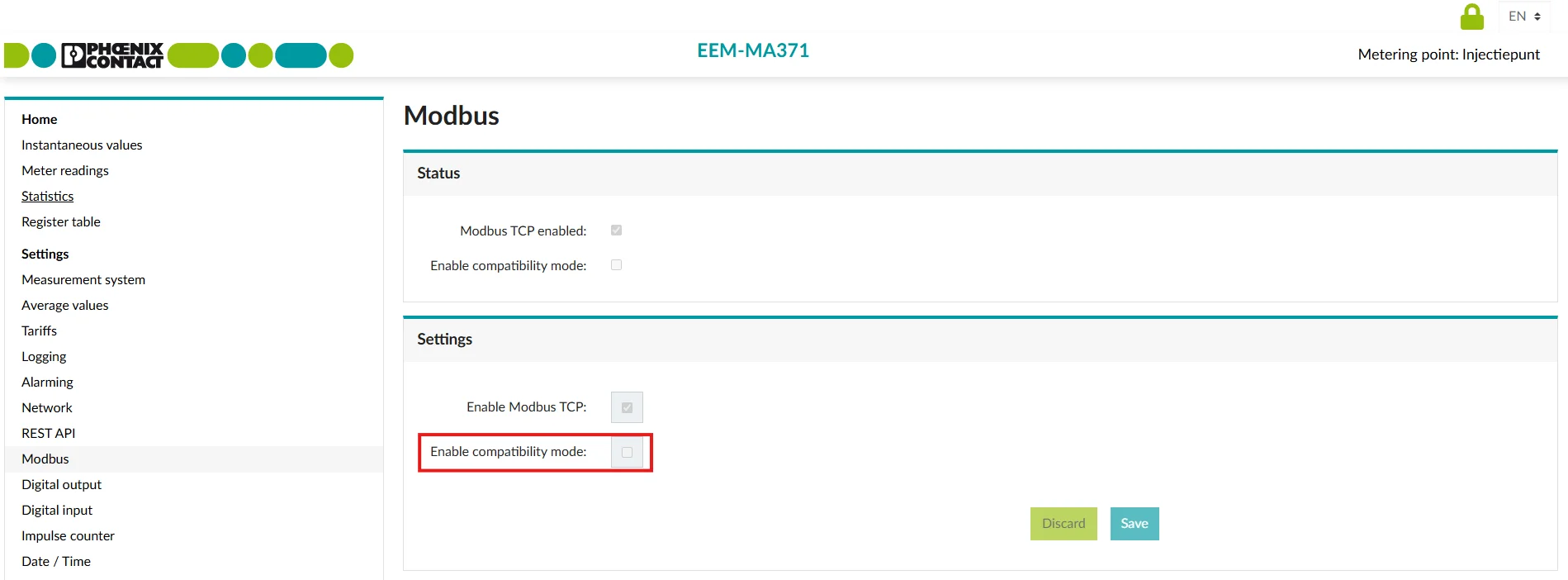
This parameter must be set as shown in the image. If it is not configured this way, you can change it by logging into the web interface using the password adm1n.