Device integrations
Volt DIO
The Volt DIO, the Voltmasters digital IO module: 6 digital inputs and 6 relay outputs, adding it on the platform and assigning its ports.
With a relay output the EMS switches an external circuit on or off. With a digital input it reads the position of an external contact. What you use the Volt DIO for is listed under Applications.
Adding the Volt DIO on the platform
- Add a device of the type IO Extension.
- Choose Modbus TCP as the connection and fill in the IP address, the port and the Modbus slave ID of the module, as you noted them during placement.
- Set the device to managed. A device set to unmanaged is only read: the EMS then never switches its relay outputs.
Assigning ports
You assign a function to a port where that function is configured. The device’s Ports page shows the function and the setting of each port.
| Function | Port | Where you assign it |
|---|---|---|
| Switching a controllable load | Relay output | When adding the load, see Controllable loads |
| Executing an emergency stop | Relay output | DSO RTU settings, see Emergency stop |
| Reading an emergency stop signal | Digital input | DSO RTU settings, see Emergency stop |
| Sending the position of a breaker to the grid operator | Digital input | DSO RTU settings, see Grid operators |
| A watchdog from or to the grid operator | Digital input or relay output | DSO RTU settings, see ORES |
| Microgrid signals, such as the position of the grid breaker or the start of the generator | Digital input or relay output | Microgrid settings, see IO roles |
A port carries one function: an output that carries an emergency stop or a watchdog cannot switch a controllable load. An input without a function is only read and logged. An output without a function stays free.
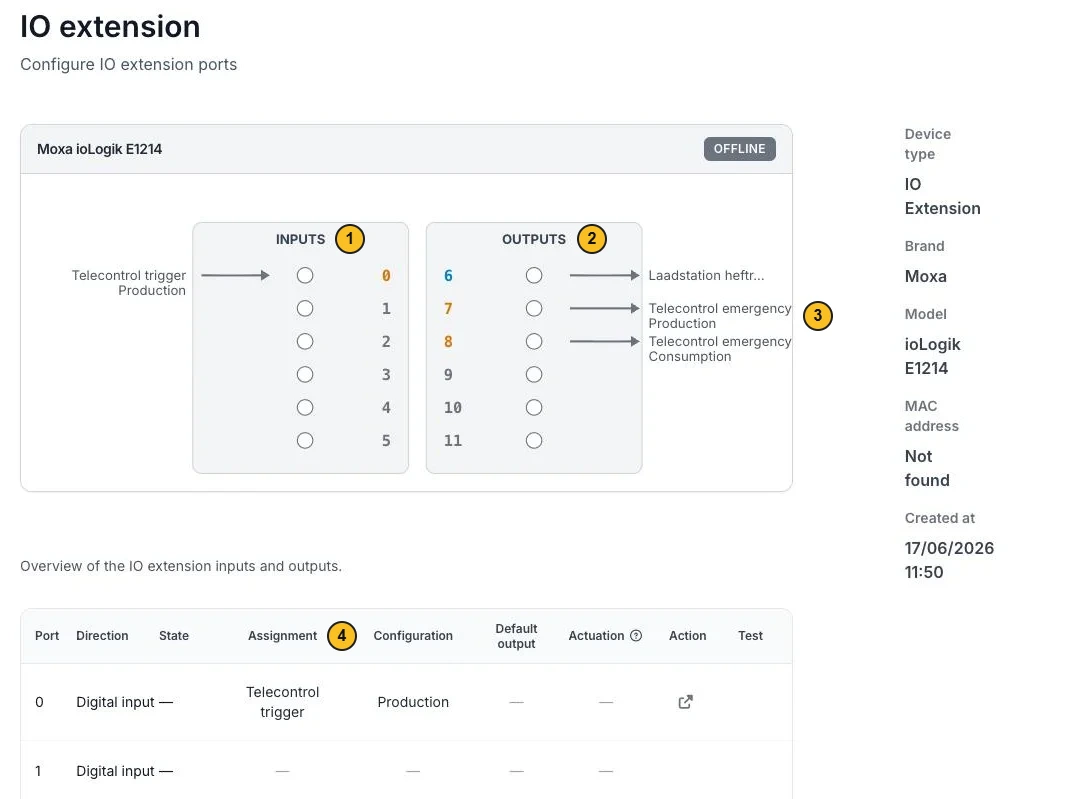
- The digital inputs (Inputs).
- The relay outputs (Outputs).
- The function a port carries, here Telecontrol emergency Production on output 7.
- The per-port overview, with the Assignment and the Configuration.
Manual override
You can set a relay output manually to On or Off, for example during commissioning or maintenance. The override takes precedence over the control. Clear it to let the port switch automatically again.
Deleting the Volt DIO
As long as a port carries a function, you cannot delete the Volt DIO. The platform shows which ports are in use and links to the Ports page so you can free them first.