Toestelintegraties
Mennekes AMTRON
Ondersteunde toestellen: AMTRON 4You, AMTRON 4Business en AMTRON Professional

Ons EMS ondersteunt de AC-laadpalen AMTRON 4You en AMTRON 4Business van Mennekes via Modbus TCP, zodat het laadvermogen mee met de rest van de site gestuurd wordt. Dat gaat voor een laadpaal die alleen staat en voor een laadpuntnetwerk van Mennekes, via de master van dat netwerk. De AMTRON Professional, met de ECU-laadcontroller van Mennekes, heeft een eigen integratie (zie AMTRON Professional hieronder).
Ondersteunde toestellen
| Model | Types | Stroomtype | Connectoren |
|---|---|---|---|
| AMTRON 4You | 400 en 500 | AC | 1 |
| AMTRON 4Business | 600 en 700 | AC | 1 |
| AMTRON Professional | ECU-laadcontroller, ook AMEDIO Professional en AMTRON Charge Control | AC | 1 |
De integratie volgt de Modbus TCP-registerlijst van Mennekes voor firmware 1.5.41. Het EMS leest de firmwareversie en het model van de laadpaal uit en logt ze.
De modellen AMTRON 4You en AMTRON 4Business zijn beschikbaar vanaf EMS-controllerversie 0.0.337, net als de ondersteuning voor een laadpuntnetwerk. Bestaande toestellen met het model Amtron draaien op dezelfde integratie en hoeven niet aangepast te worden.
Hoe de integratie werkt
- Sturing van het laadvermogen: het EMS schrijft een vermogensgrens naar de laadpaal. Een waarde onder het minimumvermogen dat de laadpaal meldt, bijvoorbeeld 4,14 kW voor 6 A op drie fasen, zet de laadpaal zelf om naar 0, en dan pauzeert het laden.
- Pauzeren en hervatten: een pauze zet de grens op 0 zonder de sessie te beëindigen, dus het laden gaat verder in dezelfde sessie.
- Lastverdeling: de laadpaal neemt deel aan het lastbeheer van de site, per connector.
- Fasen: het EMS rekent met het aantal fasen dat de laadpaal aan de sessie toewijst, zodat de grens van een driefasige sessie juist berekend wordt.
- Opvolging van de sessie: de laadstatus, het vermogen, de stroom per fase, de energie en de duur van de sessie worden teruggelezen en getoond op de toestelpagina en in het EV-laaddashboard.
- Incidenten: een verloren Modbus-verbinding, een defecte connector, foutcodes van de laadpaal, een laadpaal die de grenzen van het EMS niet toepast en satellieten van een laadpuntnetwerk die op hun terugvalstroom laden, worden als incident gemeld.
Instellen
Netwerk
Hang de laadpaal aan hetzelfde netwerk als de Voltmasters-controller en geef hem een vast IP-adres. Maakt de laadpaal deel uit van een laadpuntnetwerk, dan is dat het IP-adres van de master.
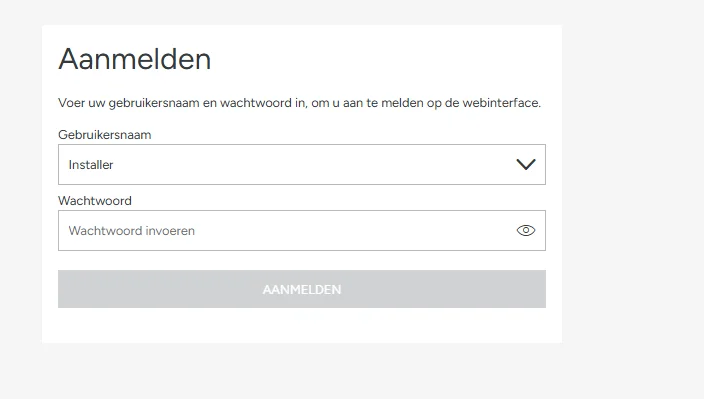
Meld je aan als installateur
Open de webinterface van de laadpaal en meld je aan met de installateursaccount.
Schakel Modbus TCP in
- Ga naar Settings → Networking → External energy management.
- Kies Modbus TCP als interface en activeer het energiebeheersysteem.
- Zorg dat Modbus TCP in de modus lezen en schrijven staat (in de registerlijst van Mennekes: HEMS Read and Write). In de modus alleen lezen meldt de laadpaal zijn waarden wel, maar past hij de grenzen van het EMS niet toe.
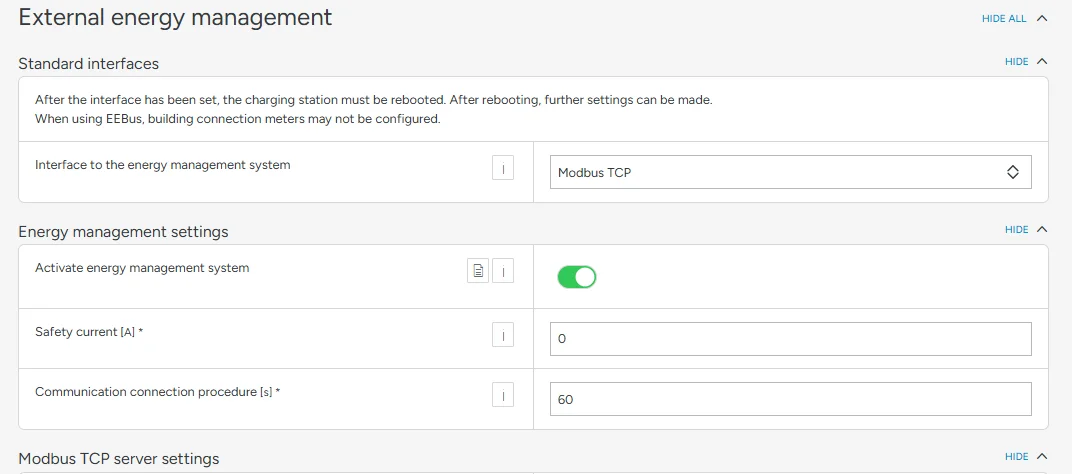
De veiligheidsstroom en de communicatietijd hoef je niet zelf in te stellen: het EMS schrijft ze naar de laadpaal (zie Terugval bij een verloren verbinding hieronder).
Voeg de laadpaal in het platform toe
Voeg een toestel van het type Laadpaal toe, met merk Mennekes en model AMTRON 4You of AMTRON 4Business. Vul het IP-adres in, poort
502, en kijk de vooraf ingevulde Slave-ID1na.Bij een laadpuntnetwerk voeg je alleen de master toe, niet de satellieten (zie Laadpuntnetwerk hieronder).
Controleer
Start een laadsessie en kijk op de toestelpagina na of de laadstatus en het vermogen binnenkomen, en of de laadpaal een verlaagde grens volgt. Verschijnt het incident dat de laadpaal het toegekende laadvermogen niet toepast, kijk dan de modus van Modbus TCP uit de vorige stap na.
Laadpuntnetwerk
AMTRON-laadpalen kunnen samen een laadpuntnetwerk vormen, met één master en een of meer satellieten. Het EMS kan zo'n netwerk alleen via de master sturen: een satelliet aanvaardt geen grenzen van een EMS.
- Voeg alleen de master toe. In het platform staat de master voor het hele netwerk: zijn connector toont het verbruik van het hele netwerk, berekend uit de stroom per fase van het netwerk.
- Eén grens voor het hele netwerk. Het EMS schrijft een stroomgrens per fase naar de master, dezelfde op de drie fasen, en blijft binnen de netwerkgrens die op de master ingesteld is. De master verdeelt die stroom zelf over de laadpalen van het netwerk.
- Geen sessiegegevens. De energie en de duur van de sessie gelden in de registers van Mennekes alleen voor de eigen uitgang van de master, dus voor een netwerk toont het EMS ze niet.
- Een satelliet als toestel. Voeg je toch een satelliet toe, dan stuurt het EMS hem niet en meldt het een incident. Verwijder hem en voeg de master toe.
- Satellieten op hun terugvalstroom. Verliest een satelliet de verbinding met de master, dan laadt hij op zijn terugvalstroom. Het EMS meldt dat als waarschuwing, met het aantal satellieten. Kijk dan de netwerkverbinding tussen de satellieten en de master na.
Terugval bij een verloren verbinding
Het EMS schrijft regelmatig een veiligheidsstroom van 0 A en een communicatietijd van 60 seconden naar de laadpaal, en dat werkt als hartslag. Hoort de laadpaal 60 seconden niets van het EMS, dan valt hij terug op 0 A en pauzeert het laden. Zodra het EMS weer verbinding heeft, neemt het de sturing opnieuw over.
AMTRON Professional
De AMTRON Professional heeft de ECU-laadcontroller van Mennekes, met een eigen Modbus-registerlijst. Kies er het model AMTRON Professional voor, en ook voor andere laadpalen van Mennekes met de ECU-laadcontroller, zoals de AMEDIO Professional en de AMTRON Charge Control. Op het model AMTRON 4You of 4Business schrijft het EMS zijn grenzen naar registers die de ECU niet heeft: een ladende wagen staat dan als beschikbaar en de laadpaal volgt het EMS niet.
Het model AMTRON Professional is beschikbaar vanaf EMS-controllerversie 0.0.339. Staat een AMTRON Professional al in het platform met het model AMTRON 4Business? Vraag Voltmasters dan om zijn model op AMTRON Professional te zetten zodra de controller 0.0.339 of later draait: alleen administrators kunnen het model van een bestaand toestel wijzigen.
- Sturing van de laadstroom: het EMS zet het vermogen dat het toekent om naar een stroom per fase, over de fasen waarop de wagen laadt, naar beneden afgerond en begrensd op 32 A. Onder 6 A pauzeert de laadpaal de sessie, en een pauze schrijft 0 A.
- Fasen: het EMS volgt het aantal fasen van elke sessie, zodat een eenfasige wagen niet aan het driefasige minimum vastzit.
- Opvolging van de sessie: de laadstatus, het vermogen, de stroom per fase, de energie en de duur van de sessie.
- Incidenten: een fout van de laadpaal geeft een kritiek incident, een verloren backendverbinding, een firmware-update of een USB-handeling een waarschuwing. Een laadpaal die de wagen 30 seconden lang meer stroom aanbiedt dan zijn grens, geeft het incident dat hij de grenzen van het EMS niet toepast.
- Terugval bij een verloren verbinding: net als bij de 4You en 4Business schrijft het EMS een veiligheidsstroom van 0 A en een communicatietijd van 60 seconden, zodat de laadpaal pauzeert als hij een minuut niets van het EMS hoort.
Instellen: hang de laadpaal aan hetzelfde netwerk als de Voltmasters-controller, geef hem een vast IP-adres en zorg dat de Modbus TCP-server van de laadcontroller ingeschakeld is. Voeg daarna een toestel van het type Laadpaal toe, met merk Mennekes en model AMTRON Professional. Vul het IP-adres in, poort 502, en kijk de vooraf ingevulde Slave-ID 1 na.